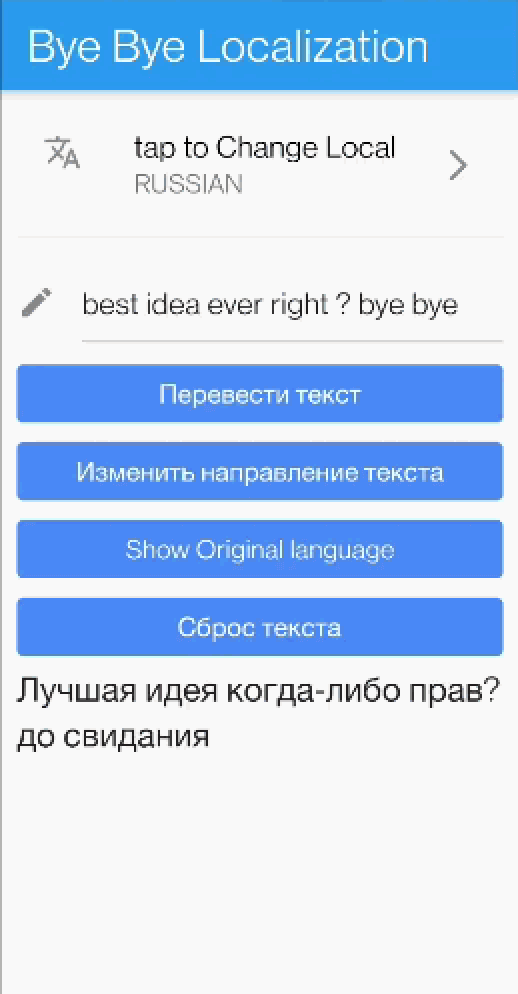
bye_bye_localization 套件透過在 Text 小工具內直接於裝置上進行翻譯,簡化了 Flutter 中的國際化。它使用內建的 AI 模型自動將文字翻譯成任何目標語言,無需手動建立本地化檔案或管理翻譯。開發者只需提供原始文字與所需的語言,小工具就會處理其餘部分。非常適合需要動態、即時翻譯且無需外部相依性的應用。
適用情境
應用中的即時文字翻譯
減少對翻譯檔案的依賴
快速原型設計,支援多語言
需要設備本地隱私的App
簡化小型專案的國際化
主要特色
設備端AI翻譯
不需要外部 API
自動語言檢測
簡單文字小工具整合
支援多種語言
適合對象
尋求多語言應用程式最小化設定的開發者
注重用戶隱私的項目
需要即時翻譯的原型
應用避免使用伺服器端翻譯服務
沒有專職翻譯的團隊
使用建議
由於嵌入了AI模型,應用體積更大
限於支援的語言
對舊裝置的潛在效能影響
翻譯品質取決於模型的準確性
不適合用於內容複雜的大規模生產
原始 README
以下為關聯原始碼儲存庫的 README 原文快照,最新內容請造訪原始碼儲存庫。
Bye Bye Localization 👋
Its just a simple Text widget that will provide automatic fast translation for any text. it supports 59 languages.
No more boring Localization configuration files, all you have to do is change your old Text() widget to TranslatedText() and enjoy the sweet sweet life without Localization
PS: the translation will be fast as it uses translation model deployed to the device under the hood.
Demo 📹
How to use ?
Step 1: All you have to do is call the widget
TranslatedText('your text')
Step2: don't forget to call init the widget using the Manager
WidgetbuildWidget(){
returnFutureBuilder(
future: initTranslation(),
builder: (context, snapshot) {
if (snapshot.hasError) {
returnText('${snapshot.error}');
}
if (snapshot.connectionState == ConnectionState.done) {
returnTranslatedText('I am a text that will be translated always');
}
returnCircularProgressIndicator();
},
);
}
Future<bool> initWidget() async {
returnawaitTranslationManager().init(
originLanguage: Languages.ENGLISH,
/// Change here the language to change the translation, and re run./// For example Languages.RUSSIAN.
translateToLanguage: Languages.ARABIC,
);
}
Live Demo 🔆
below you will find a link to APK contains live demo