搜尋套件、儲存庫與 APP 分類

calendar_viewer 封面
套件詳情v1.1.0

calendar_viewer

一個高度可自訂的日曆小部件,專為預訂、活動和多語言支援而設計。

AndroidiOSWebmacOSWindowsLinux
近 30 天下載
81
喜歡數
11
Pub 分數
160

安裝套件

flutter pub add calendar_viewer

套件介紹

根據套件公開資料產生的選型評估,僅供參考。

一個高度可自訂的Flutter日曆小工具,支援預約、事件與多語言顯示。提供靈活的樣式設定、事件整合,並在Android、iOS、Web、macOS、Windows及Linux之間實現無縫跨平台相容性。專為開發者設計,能輕鬆自訂日期、標題與UI元件,同時維持效能與回應速度。適合需要動態日期選擇與國際化功能的應用程式。

適用情境

  • 事件調度
  • 預訂系統
  • 多語言日曆
  • 日期選擇器整合
  • 時間管理應用
  • 旅行預訂介面

主要特色

  • 可自訂的 UI 主題
  • 多語言支援
  • 事件強調
  • 跨平台相容性
  • 響應式設計
  • 可設定的日期範圍

適合對象

  • 開發預約應用的開發者
  • 需要國際化日曆的團隊
  • 具有複雜日期互動的應用程式
  • 以使用者介面為重點的日曆實作
  • 需要輕量級日曆小部件的項目

使用建議

  • 需要手動處理事件資料
  • 有限的內建時區支援
  • 無原生重複事件邏輯
  • 樣式可能需要深度自定義
  • 依賴外部本地化套件以實現完整的 i18n

原始 README

以下為關聯原始碼儲存庫的 README 原文快照,最新內容請造訪原始碼儲存庫。

pub package github linkedin

Calendar Viewer

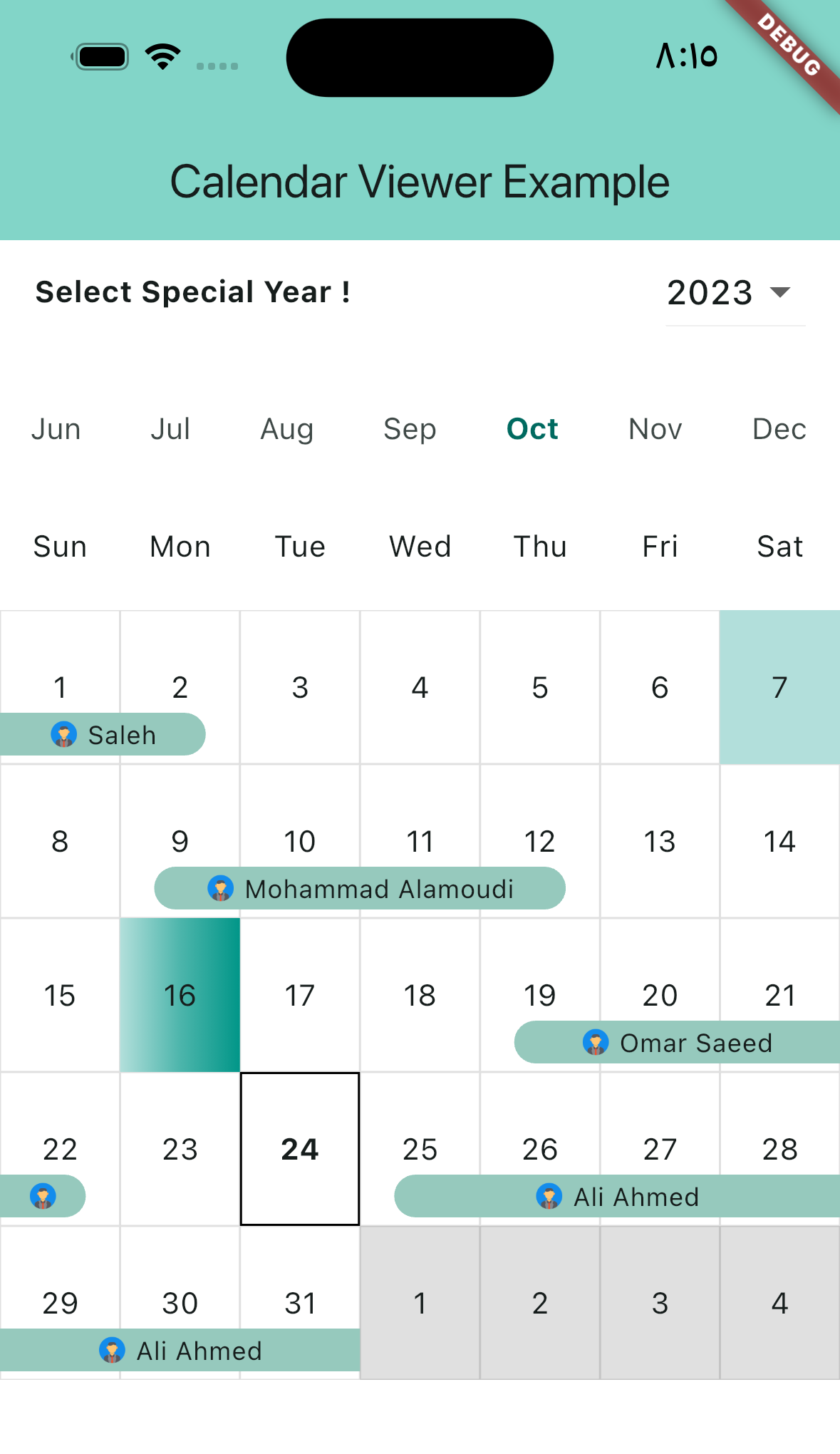
A highly customizable calendar widget designed for reservations, events, and multi-language support.

Calendar

Table of Contents

  1. Installing
  2. Features
  3. Usage
  4. Example Project
  5. Properties
  6. Events
  7. Contributors

🖥 Installing

Add Dependency
dependencies:
  calendar_viewer: ^1.1.0 # Use the latest version
Import Package
import 'package:calendar_viewer/calendar_viewer.dart';

✨ Features

  • Customizable month tabs and week bars.
  • Multi-language support for month and weekday names.
  • Add reservations spanning multiple dates.
  • Customizable styles for dates, weekdays, and reservations.
  • Support for event handling like taps and long presses on dates.

📖 Usage

Basic Example:
/// Use [CalendarPageViewer] if you want to show only one month at a time.
/// with no tab bar.
///
/// Use [CalendarListViewer] if you want to show all months at a time.
/// with a scrollable list.
CalendarTabBarViewer(
  initialDate: DateTime.now(),
  months: ['Jan', 'Feb', ...], // List of 12 months
  weekdays: ['Mon', 'Tue', ...], // List of 7 weekdays
  outsideDateConfig: CalendarDateConfig(
      decoration: BoxDecoration(
        color: Colors.black12,
        border: Border.all(color: Colors.black12, width: 0.5),
      ),
    ),
);
Advanced Configuration:
/// Use [CalendarPageViewer] if you want to show only one month at a time.
/// with no tab bar.
///
/// Use [CalendarListViewer] if you want to show all months at a time.
/// with a scrollable list.
CalendarTabBarViewer(
  key: Key(_selectedDate.toString()),
  initialDate: _selectedDate,
  months: ['January', 'February', ...],
  weekdays: ['Monday', 'Tuesday', ...],
  dateConfigBuilder: (date) {
    if (date.isAtSameMomentAs(DateTime(_now.year, _now.month, _now.day))) {
      return CalendarDateConfig(
        decoration: BoxDecoration(
          color: Colors.teal.withValues(alpha: .6),
          borderRadius: BorderRadius.circular(5),
        ),
      );
    } else if(date.isAtSameMomentAs(_selectedDate)) {
      return CalendarDateConfig(
        decoration: BoxDecoration(
          color: Colors.blue.withValues(alpha: .6),
          borderRadius: BorderRadius.circular(5),
        ),
      );
    }
    return null;
  },
  reservations: [
    CalendarViewerReservation(
      from: DateTime(2023, 10, 9),
      to: DateTime(2023, 10, 13),
      user: const CalendarReservationUser(
        name: 'Mohammad Alamoudi',
        netImage:
            'https://cdn-icons-png.flaticon.com/512/9203/9203764.png',
      ),
    ),
  ],
  reservation: CalenderReservationConfig(
    style: CalendarReservationStyle(
      color: Colors.teal.withValues(alpha: .6),
    ),
  ),
  outsideDateConfig: CalendarDateConfig(
      decoration: BoxDecoration(
        color: Colors.black12,
        border: Border.all(color: Colors.black12, width: 0.5),
      ),
    ),
);

📱 Example Project

  • Pub Example: Available on pub.dev.
  • GitHub Example Project: Available on GitHub.

📋 Properties

Property Description
initialDate The initial date used to calculate the selected month/year.
months List of 12 month names in your app's locale.
weekdays List of 7 weekday names in your app's locale.
reservation Configures reservations (e.g., style, data).
dateConfig Default configuration for calendar dates.
dateConfigBuilder Function to customize the style of specific dates.
onWeekdayTap Callback triggered on weekday tap with weekday and month as arguments.
customWeekdayStyle Map of styles for specific weekdays (e.g., weekends).
monthsTabBarConfig Configuration for the months tab bar.
outsideDateConfig Secondary default configuration for out-of-bounds dates.
outsideDateConfigBuilder Function to dynamically customize specific dates outside the active month.
startWeekday Target integer (1 = Monday, 7 = Sunday) to set fixed start alignment.
alwaysShowFullRows Locks view to perfectly output 6 rows or 5 rows maintaining aspect ratio.
showOutsideDays Whether to display padded days extending into previous/next calendar month.

🎯 Events

Event Description
onWeekdayTap Triggered when a weekday is tapped. Passes weekday and month.
onTap (in dates) Triggered when a specific date is tapped.
onLongPress (in dates) Triggered when a specific date is long-pressed.

👨🏻‍💻 Contributors

Feel free to contribute by submitting issues or feature requests on GitHub! 😊

所屬分類

原始碼儲存庫

使用此套件的專案

暫無相關資料。