搜尋套件、儲存庫與 APP 分類

card_scanner 封面
套件詳情v1.0.4

card_scanner

適用於 Flutter 的快速、精確且安全的信用卡與借記卡掃描庫。

AndroidiOS
近 30 天下載
975
喜歡數
124
Pub 分數
130

安裝套件

flutter pub add card_scanner

套件介紹

根據套件公開資料產生的選型評估,僅供參考。

Card Scanner 是一個快速、精確且安全的 Flutter 庫,專為掃描信用卡和借記卡而設計。它利用設備相機功能來檢測卡片邊界,以高精度提取卡號、到期日期和 CVV。此庫以隱私為設計核心,所有資料都在本地處理,不會將敏感資訊傳送至外部伺服器。適用於支付表單、結帳流程以及需要無縫卡片輸入的金融應用。該套件支援 Android 和 iOS 平台,並可透過簡單的 pub add 命令輕鬆整合。

適用情境

  • 支付表單自動化
  • 結帳流程優化
  • 金融應用整合
  • 卡資料提取
  • 使用卡牌輸入的用戶入門

主要特色

  • 即時卡牌偵測
  • 本地資料處理
  • 高精度掃描
  • 安全處理卡片細節
  • 跨平台支援(Android 與 iOS)

適合對象

  • 電子商務應用
  • 銀行與金融應用
  • 行動支付解決方案
  • 需要快速卡片輸入的應用程式
  • 重視安全與速度的開發者

使用建議

  • 需要相機權限
  • 可能需要校準以獲得最佳效能
  • 僅限信用卡/借記卡格式
  • 取決於設備攝像頭品質
  • 不支援非標準卡牌形狀

原始 README

以下為關聯原始碼儲存庫的 README 原文快照,最新內容請造訪原始碼儲存庫。

Fast, Accurate and Secure Credit & Debit card scanner for Flutter

card_scanner is a flutter plugin for accurately and quickly scanning debit and credit cards.

Features

  • 🔒Fully OFFLINE scan makes it a completely secure scanner !
  • 🎈 Can scan Expiry date , Card Holder name and Card Issuer (lacked by other scanners) along with the Card number✨
  • 🔋Powered by Google's Machine Learning models
  • ⚡ Great performance and accuracy
  • 🧹Auto checks the card number for errors using card checksum algorithms
  • 🎚Supports controlling parameters that determine the balance between speed and accuracy
  • ❤️ Simple, powerful, & intuitive API
Get Demo App Here :

Vision App

Install

Add this to your package's pubspec.yaml file:

dependencies:
  card_scanner: <latest-version>

get the latest version number here

Usage

Just import the package and call scanCard:

import 'package:card_scanner/card_scanner.dart';
var cardDetails = await CardScanner.scanCard();

print(cardDetails);

Example Output:

Card Number = 5173949117389006
Expiry Date = 11/26

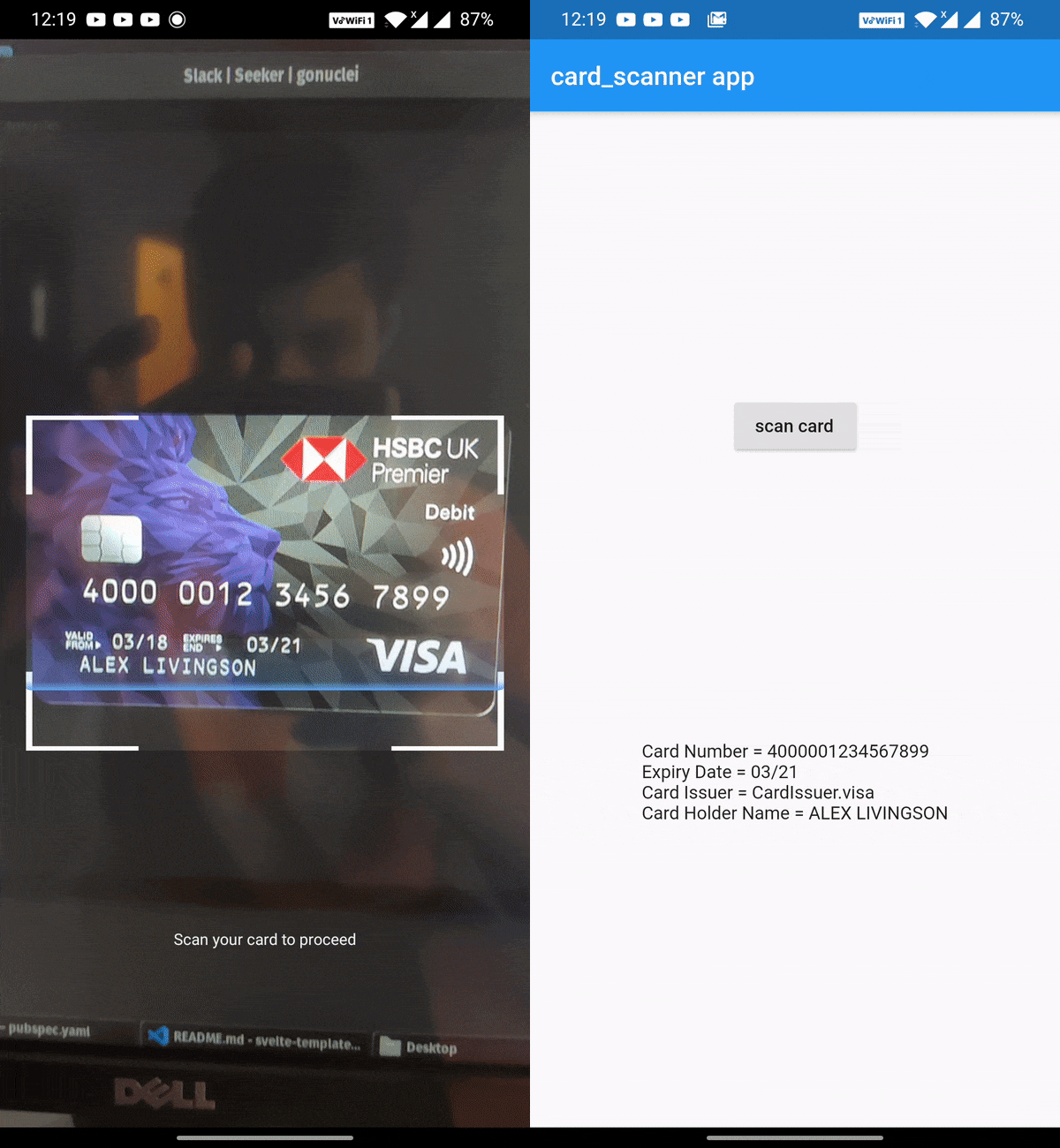
The above code opens the device camera, looks for a valid card and gets the required details and returns the CardDetails object.


Scan Options

If you wish to obtain the card holder name and card issuer, you can specify the options:

import 'package:card_scanner/card_scanner.dart';
var cardDetails = await CardScanner.scanCard(
    scanOptions: CardScanOptions(
        scanCardHolderName: true,
        scanCardIssuer: true,
    ),
);


print(cardDetails);

Example Output :

Card Number = 5173949117389006
Expiry Date = 11/26
Card Issuer = mastercard
Card Holder Name = PAUL SAMUELSON

iOS Requirements

  • The minimum target for iOS should be >= 12.0.0
  • Comment out the use_frameworks! line from under Podfile of your Flutter project. You can find this Podfile under your_flutter_project/ios/Podfile
Documentation & Samples 📖

所屬分類

原始碼儲存庫

使用此套件的專案

暫無相關資料。