搜尋套件、儲存庫與 APP 分類

christian_picker_image 封面
套件詳情v2.0.0

christian_picker_image

用於從 Android 和 iOS 圖像庫中選擇圖片,以及使用相機拍攝新照片的 Flutter 插件。

AndroidiOS
近 30 天下載
131
喜歡數
44
Pub 分數
140

安裝套件

flutter pub add christian_picker_image

套件介紹

根據套件公開資料產生的選型評估,僅供參考。

Christian Picker Image 是一個 Flutter 插件,可在 Android 和 iOS 上從裝置相簿中選擇圖片或使用相機拍攝新照片。它為 Flutter 應用程式中的影像輸入提供無縫的跨平台解決方案。該插件將原生影像擷取功能與簡單的 API 整合,讓需要上傳照片或收集媒體的應用程式輕鬆實作。支援單張與多張圖片選擇,並可自訂選擇介面。專為尋求可靠影像處理且無需複雜設定的開發者設計,簡化跨平台的媒體整合。

適用情境

  • 圖像上傳表單
  • 使用者個人檔案圖片選擇
  • 應用中的照片記錄
  • 社交媒體內容分享
  • 文件掃描工作流程

主要特色

  • 跨平台支援(Android 與 iOS)
  • 相機和相簿整合
  • 多圖選擇
  • 用於快速實作的簡單 API
  • 可自定義的選取器 UI

適合對象

  • 行動應用程式開發人員
  • 需要使用者照片上傳的應用程式
  • 需要媒體輸入的表單
  • 內容創作工具
  • 使用者驗證流程

使用建議

  • 需要平台特定權限
  • iOS 可能需要額外設定
  • 僅限影像選擇
  • 無內建影像編輯
  • 依賴於原生影像選擇器的行為

原始 README

以下為關聯原始碼儲存庫的 README 原文快照,最新內容請造訪原始碼儲存庫。

christian_picker_image

Flutter plugin that allows you to upload multi image picker on iOS & Android.

Getting Started

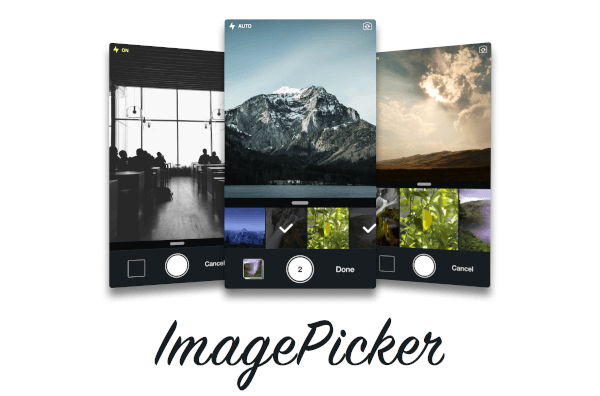
ChristianImagePicker is an all-in-one camera solution for your iOS app. It lets your users select images from the library and take pictures at the same time. As a developer you get notified of all the user interactions and get the beautiful UI for free, out of the box, it's just that simple.

ImagePicker has been optimized to give a great user experience, it passes around referenced images instead of the image itself which makes it less memory consuming. This is what makes it smooth as butter.

Demo

iOS

Add the following keys to your Info.plist file, located in <project root>/ios/Runner/Info.plist:

  • NSPhotoLibraryUsageDescription - describe why your app needs permission for the photo library. This is called Privacy - Photo Library Usage Description in the visual editor.
  • NSCameraUsageDescription - describe why your app needs access to the camera. This is called Privacy - Camera Usage Description in the visual editor. visual editor.
Example
import 'package:christian_picker_image/christian_picker_image.dart';

class MyHomePage extends StatefulWidget {
  @override
  _MyHomePageState createState() => _MyHomePageState();
}

class _MyHomePageState extends State<MyHomePage> {
  
  void takeImage(BuildContext context) async {
    List<File> images  = await ChristianPickerImage.pickImages(maxImages: 5);
    print(images);
    Navigator.of(context).pop();
  }

  Future _pickImage(BuildContext context) async {

    showDialog<Null>(
      context: context,
      barrierDismissible: false,
      builder: (BuildContext context) {
        takeImage(context);
        return Center();
    });

  }

  @override
  Widget build(BuildContext context) {
    return MaterialApp(
      home: Scaffold(
        appBar: AppBar(
          title: const Text('Plugin example app'),
        ),
        body: Text("Christian Picker Image Demo"),
        floatingActionButton: Column(
          mainAxisAlignment: MainAxisAlignment.end,
          children: <Widget>[
            Padding(
              padding: const EdgeInsets.only(top: 16.0),
              child: FloatingActionButton(
                onPressed: () {
                  _pickImage(context);
                },
                tooltip: 'Take a Photo',
                child: const Icon(Icons.photo_library),
              ),
            ),
          ],
        )
      ),
    );
  }

}

所屬分類

原始碼儲存庫

使用此套件的專案

暫無相關資料。