搜尋套件、儲存庫與 APP 分類

circular_bottom_navigation 封面
套件詳情v2.4.0

circular_bottom_navigation

圓形底部導航(或可能是標籤欄)

AndroidiOSWebmacOSWindowsLinux
近 30 天下載
592
喜歡數
223
Pub 分數
130

安裝套件

flutter pub add circular_bottom_navigation

套件介紹

根據套件公開資料產生的選型評估,僅供參考。

一個用於 Flutter 的圓形底部導航小部件,提供現代且視覺上吸引人的傳統標籤欄替代方案。它支援流暢的動畫以及可自訂的圖示、標籤和顏色。專為 Android、iOS、Web、macOS、Windows 和 Linux 等多個平台設計,確保一致的使用者體驗。該套件輕量且易於整合,非常適合希望採用獨特導航佈局而又不犧牲功能性的應用程式。

適用情境

  • 行動應用程式導航
  • Web 應用程式介面
  • 跨平台UI設計
  • 現代應用程式美學
  • 自定義標籤欄實現

主要特色

  • 圓形佈局設計
  • 平滑的動畫過渡
  • 可自定義圖示和標籤
  • 多平台支援
  • 與 Flutter 的輕鬆整合
  • 可設定的色彩方案

適合對象

  • 尋求獨特導航模式的開發者
  • 螢幕空間有限的應用程式
  • 注重設計的應用程式
  • 跨平台專案
  • UI/UX實驗

使用建議

  • 可能需要額外的樣式以確保可訪問性
  • 僅限圓形佈局(非線性)
  • 自定義的潛在學習曲線
  • 不適合複雜的導航層次結構
  • 依賴外部 GitHub 倉庫以取得更新

原始 README

以下為關聯原始碼儲存庫的 README 原文快照,最新內容請造訪原始碼儲存庫。

Circular Bottom Navigation (or maybe a tab bar).

Awesome Flutter

pub package APK

This is implementation of an artwork in Uplabs

Let's get started

1 - Install and import

In your Dart code, you can use:
import 'package:circular_bottom_navigation/circular_bottom_navigation.dart';
import 'package:circular_bottom_navigation/tab_item.dart';

2 - CheatSheet

3 - Use it like a charm

Make your TabItems
List<TabItem> tabItems = List.of([
    TabItem(Icons.home, "Home", Colors.blue, labelStyle: TextStyle(fontWeight: FontWeight.normal)),
    TabItem(Icons.search, "Search", Colors.orange, labelStyle: TextStyle(color: Colors.red, fontWeight: FontWeight.bold)),
    TabItem(Icons.layers, "Reports", Colors.red, circleStrokeColor: Colors.black),
    TabItem(Icons.notifications, "Notifications", Colors.cyan),
  ]);
Use this widget everywhere you want
CircularBottomNavigation(
      tabItems,
      selectedCallback: (int selectedPos) {
        print("clicked on $selectedPos");
      },
    )

CircularBottomNavigation supports RTL designs, If you wrap your widget in a Directionality widget and set the textDirection property you can customize the direction:

MaterialApp(
  title: 'Circular Bottom Navigation Demo',
  theme: ThemeData(
    primarySwatch: Colors.blue,
  ),
  home: Directionality(
    // use this property to change direction in whole app
    // CircularBottomNavigation will act accordingly
    textDirection: TextDirection.rtl,
    child: MyHomePage(title: 'circular_bottom_navigation'),
  ),
);
How to use CircularBottomNavigationController

With this controller you can read the current tab position, and set a tab position on widget (without needing to rebuild the tree) with the widget built in animation.

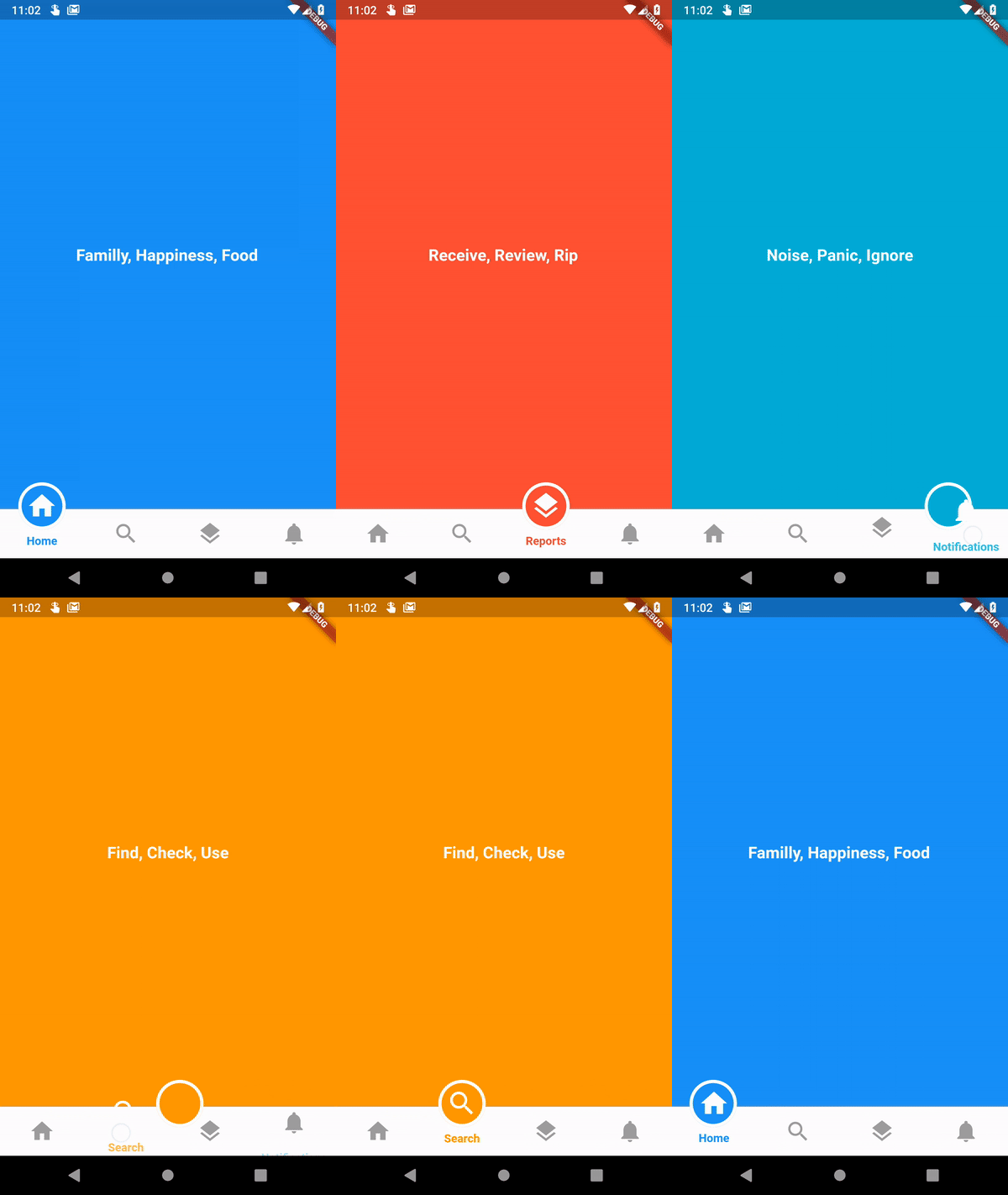
Just create a new instance of controller

CircularBottomNavigationController _navigationController =
new CircularBottomNavigationController(selectedPos);

Then pass it in your widget

CircularBottomNavigation(
      tabItems,
      controller: _navigationController,
    );

Now you can write (set new position with animation) and read value from it everywhere you want

// Write a new value
_navigationController.value = 0;

// Read the latest value
int latest = _navigationController.value;

所屬分類

原始碼儲存庫

使用此套件的專案

暫無相關資料。