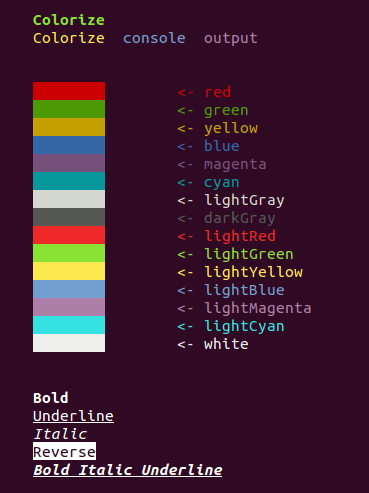
Colorize
Colorize console output in dart console apps!

Install
Add dependency to your pubspec.yaml:
colorize: any
Run
pub get
Usage
Import package:
import 'package:colorize/colorize.dart';
You have two way to colorize your string:
- use class
Colorize
- use top-level function
color()
Use Colorize
For colorize string with Colorize class you should create object of type Colorize:
Colorize string = new Colorize("This is my string!");
Then you can call methods of Colorize.
Text color
- default()
- black()
- red()
- green()
- yellow()
- blue()
- magenta()
- cyan()
- lightGray()
- darkGray()
- lightRed()
- lightGreen()
- lightYellow()
- lightBlue()
- lightMagenta()
- lightCyan()
- white()
Background color
- bgDefault()
- bgBlack()
- bgRed()
- bgGreen()
- bgYellow()
- bgBlue()
- bgMagenta()
- bgCyan()
- bgLightGray()
- bgDarkGray()
- bgLightRed()
- bgLightGreen()
- bgLightYellow()
- bgLightBlue()
- bgLightMagenta()
- bgLightCyan()
- bgWhite()
Formatting
- reset()
- bold()
- dark()
- italic()
- underline()
- blink()
- reverse()
- concealed()
After apply styles to string you can print it to console:
print(string);
Use top-level function color()
Top-level function color apply one required parameter - String text. It is text, that would be print
on console.
Also top-level function color has seven named parameters:
Styles front - name of front color (you can also use the constants of class Styles). Default value is ''.Styles back: name of background color (you can also use the constants of class Styles). Default value is ''.bool isUnderline - default value is false.bool isBold - default value is false.bool isDark - default value is false.bool isItalic - default value is false.bool isReverse - default value is false.
Example of usage
color("Bold Italic Underline", front: Styles.RED, isBold: true, isItalic: true, isUnderline: true);
Enum Styles
Enum Styles contains all styles which you can pass to Colorize.applyState method;