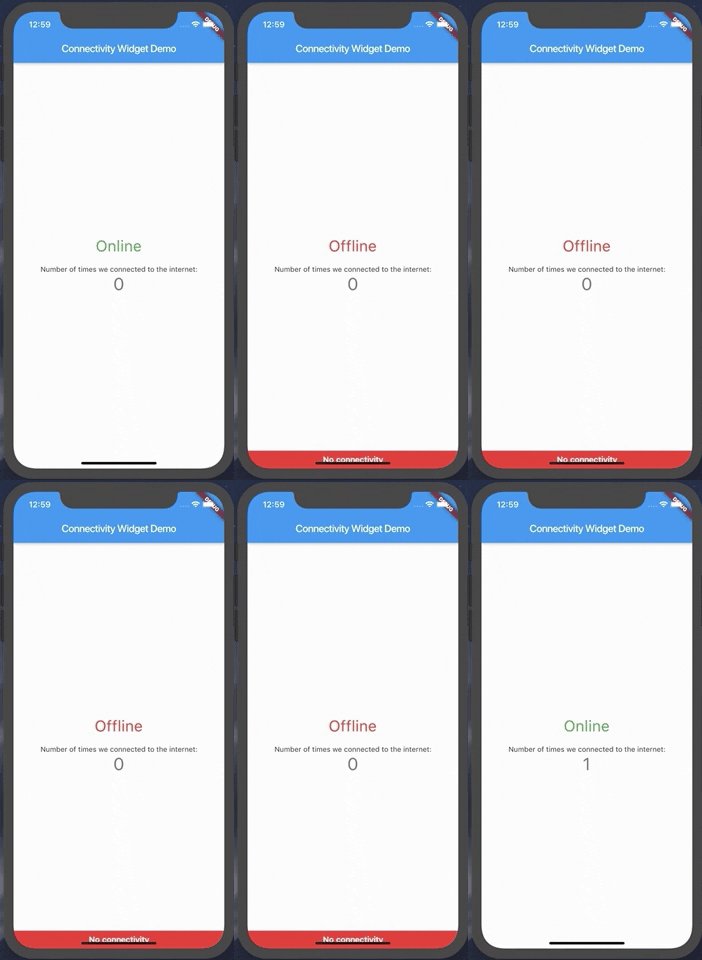
connectivity_widget 套件提供了一個簡單且反應式的元件,用於顯示裝置的當前網路連線狀態。它可監控 Android、iOS、Web、macOS、Windows 與 Linux 平台上的網路可用性,並在連線狀態變更時即時更新介面。設計上易於整合,讓開發者能透過圖示或文字等視覺指示,告知使用者目前是線上或離線。適用於需要立即回饋網路狀態的應用程式,例如即時通訊、媒體串流或資料同步服務。
適用情境
即時網路狀態顯示
離線模式指示器
連接變更期間的使用者體驗增強
根據網路狀態調整應用功能
在連接狀況不佳時載入狀態管理
主要特色
跨平台支援
反應式 UI 更新
簡單整合,設定最少
可自定外觀
自動檢測連接變化
適合對象
需要即時網路感知的應用程式
尋求輕量級連接監控的開發者
需要動態網絡反饋的UI組件
針對多個平台的專案
想要即時線上/離線狀態指示器的使用者
使用建議
在移動平台需要適當的權限
可能需要額外的邏輯來處理暫時性網路狀態
不處理特定網路類型(例如,Wi-Fi 與行動網路)
僅限連接狀態,不包含頻寬或品質
依賴底層平台 API 以確保準確性
原始 README
以下為關聯原始碼儲存庫的 README 原文快照,最新內容請造訪原始碼儲存庫。
connectivity_widget
A widget that shows the user if the phone is connected to the internet or not
This is accomplished not only by verifying the status of the mobile network and/or wifi, but also by pinging a remote server and verifying its response.
Using the ConnectivityWidget
The ConnectivityWidget uses a builder function that provides you a isOnline flag to build different screens for offline or online mode.
 ConnectivityWidget(
        builder: (context, isOnline) => Center(
          child: Column(
            mainAxisAlignment: MainAxisAlignment.center,
            children: <Widget>[
              Text("${isOnline ? 'Online' : 'Offline'}", style: TextStyle(fontSize: 30, color: isOnline ? Colors.green : Colors.red),),
              SizedBox(height: 20,),
              Text(
                'Number of times we connected to the internet:',
              ),
              Text(
                '$_counter',
                style: Theme.of(context).textTheme.display1,
              ),
            ],
          ),
        )
It also provides both a onlineCallback and a offlineCallback that are called when the phone changes the connection state to online and offline, respectively.
If there is a need to change the default offline banner, a Widget can be provided to the offlineBanner parameter. Additionally, its visibility can be enabled or disabled by using the showOfflineBanner parameter.
Configurable Parameters:
serverToPing;
timeoutDuration;
debounceDuration;
verifyResponseCallback;
Changing the server to ping and the response verification
By default, the Connectivity Widget checks if there is a connection to http://www.google.com. If you want to check the availability of a custom endpoint, you can set a new endpoint to ping and a callback to verify the response.
ConnectivityUtils.instance.setCallback((response) => response.contains("This is a test!"));
ConnectivityUtils.instance.setServerToPing("https://gist.githubusercontent.com/Vanethos/dccc4b4605fc5c5aa4b9153dacc7391c/raw/355ccc0e06d0f84fdbdc83f5b8106065539d9781/gistfile1.txt");
Using ConnectivityUtils to Listen to Network Changes
This library also provides access to the ConnectivityUtils class in which you can verify the status of the network.
Stream<bool> ConnectivityUtils.instance.isPhoneConnectedStream // gets the current status of the networkFuture<bool> ConnectivityUtils.instance.isPhoneConnected() // future that determines network status
Note on Web:
Although we can verify the status of the connection in web, what happens is that browsers will cache a request to a specific endpoint, so
we cannot verify for certain if the connection is down or if we are using cache, using the methods presented in this package.