搜尋套件、儲存庫與 APP 分類

contactus 封面
套件詳情v1.2.3

contactus

contactus 是一個幫助開發者輕鬆新增聯絡資訊的套件。開發者可以新增許多重要細節,例如網站、電子郵件、電話號碼等。

AndroidiOSWebmacOSWindowsLinux
近 30 天下載
556
喜歡數
66
Pub 分數
150

安裝套件

flutter pub add contactus

套件介紹

根據套件公開資料產生的選型評估,僅供參考。

contactus 套件簡化了在 Flutter 應用中新增聯絡資訊的過程。它讓開發者能輕鬆顯示電子郵件、電話號碼和網站等重要細節,並提供乾淨且可自訂的介面。此套件設計為無縫整合,支援 Android、iOS、Web、macOS、Windows 與 Linux 等多個平台。透過在應用內提供一種簡單的方式來分享聯絡資料,該套件提升了使用者的可存取性。僅需透過指令 'flutter pub add contactus' 進行最少設定,開發者即可快速實作專業的聯絡區塊。

適用情境

  • 在行動應用程式中新增聯絡資訊
  • 在應用設定中顯示開發者資訊
  • 整合網站和電子郵件連結
  • 在應用中建立支援區塊
  • 在應用內啟用使用者通訊
  • 快速存取社群媒體連結

主要特色

  • 與 Flutter 的輕鬆整合
  • 支援多種聯絡方式
  • 跨平台相容性
  • 可自訂的 UI 元素
  • 最小配置要求
  • 對所有主要作業系統內建平台支援

適合對象

  • 尋求快速聯繫解決方案的應用開發者
  • 初創公司正在構建帶有聯絡人功能的MVP
  • 教育類或作品集應用
  • 需要使用者支援管道的應用程式
  • 專注於使用者體驗和可存取性的開發人員
  • 需要響應式聯絡人顯示的項目

使用建議

  • 僅限聯絡資訊顯示
  • 未包含後端或表單提交
  • 設計自訂可能需要額外的樣式
  • 不適用於複雜的聯絡人管理
  • 依賴外部來源程式碼進行更新
  • 需要手動處理連結操作

原始 README

以下為關聯原始碼儲存庫的 README 原文快照,最新內容請造訪原始碼儲存庫。

Contact Us


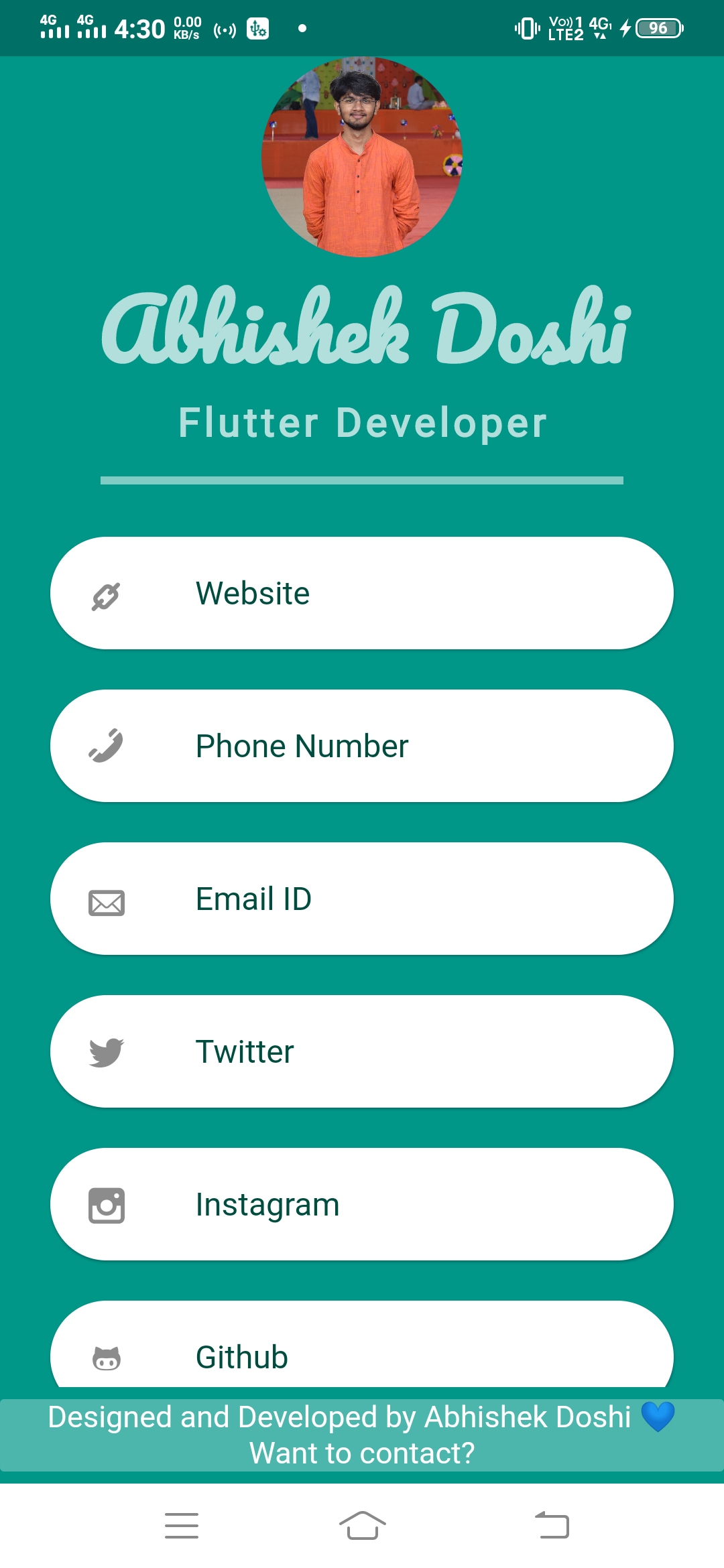
The most common functionality added in any commercial app is the Developer's contact details!!
So this package helps the developers to simply add their details.

Now you can also add the contact details as a part of your bottomNavigationBar


Now you can add customizedable fonts for company/individual name, tagline & text along with the custom color for divider and font weights.


Developers can add following details:
  • Company Name
  • Phone Number
  • Website
  • Email ID
  • Twitter Handle
  • Instagram ID
  • Facebook ID
  • Linkedin URL
  • Github UserName
  • Tiktok Username


Best feature is that, when the user clicks on any detail, respective app/web page will be opened.

Now you can also add the contact details as a part of your bottomNavigationBar


Example Code for creating an entire page


import 'package:contactus/contactus.dart';
import 'package:flutter/material.dart';

void main() {
  runApp(MyApp());
}

class MyApp extends StatelessWidget {
  @override
  Widget build(BuildContext context) {
    return MaterialApp(
      debugShowCheckedModeBanner: false,
      home: Scaffold(
        backgroundColor: Colors.teal,
        body: ContactUs(
          logo: AssetImage('images/crop.jpg'),
          email: 'adoshi26.ad@gmail.com',
          companyName: 'Abhishek Doshi',
          phoneNumber: '+91123456789',
          dividerThickness: 2,
          website: 'https://abhishekdoshi.godaddysites.com',
          githubUserName: 'AbhishekDoshi26',
          linkedinURL: 'https://www.linkedin.com/in/abhishek-doshi-520983199/',
          tagLine: 'Flutter Developer',
          twitterHandle: 'AbhishekDoshi26',
          instagramUserName: '_abhishek_doshi',
          customSocials: [
            CustomSocialField(
                icon: const Icon(Icons.abc),
                name: "Username",
                url: "Profile Url",
              ),
          ],
        ),
      ),
    );
  }
}


Example Code for adding details in bottomNavigationBar

bottomNavigationBar: ContactUsBottomAppBar(
          companyName: 'Abhishek Doshi',
          textColor: Colors.white,
          backgroundColor: Colors.teal.shade300,
          email: 'adoshi26.ad@gmail.com',
        ),


Output

Output

所屬分類

依賴

依賴清單 2 項

原始碼儲存庫

使用此套件的專案