cool_nav


A collection of really awesome, easy to use BottomNavigationBars
Getting Started
Add this to your package's pubspec.yaml file:
---
dependencies:
  cool_nav: ^0.1.1
Now in your Dart code, you can use:
import 'package:cool_nav/cool_nav.dart';
List of Bottom Navigation Bars:
Spotlight Bottom Navigation Bar

Based on design made by Sanchita Agarwal.
An easy to use and customizable Bottom Navigation Bar. You can customize the
colors as well provide a custom Gradient for the spotlight.
Usage
Scaffold(
bottomNavigationBar: SpotlightBottomNavigationBar(
items: [
SpotlightBottomNavigationBarItem(icon: Icons.smartphone),
SpotlightBottomNavigationBarItem(icon: Icons.laptop_mac),
SpotlightBottomNavigationBarItem(icon: Icons.desktop_mac),
],
currentIndex: currentIndex,
selectedItemColor: Colors.cyan,
onTap: _onTap,
),
)
Flip Box Bottom Navigation Bar
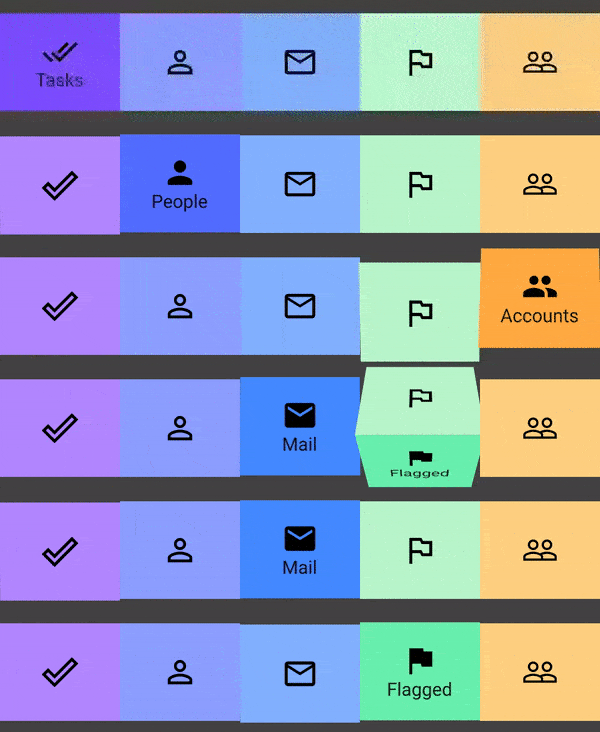
Based on design made by dannniel.
An easy to use and customizable Bottom Navigation Bar. You can customize the selected and unselected Icons and background Colors for the tiles.
Usage
Scaffold(
bottomNavigationBar: FlipBoxNavigationBar(
currentIndex: currentIndex,
verticalPadding: 20.0,
items: <FlipBoxNavigationBarItem>[
FlipBoxNavigationBarItem(
name: 'Tasks',
selectedIcon: Icons.done_all,
selectedBackgroundColor: Colors.deepPurpleAccent[200],
unselectedBackgroundColor: Colors.deepPurpleAccent[100],
),
FlipBoxNavigationBarItem(
name: 'People',
selectedIcon: Icons.person,
unselectedIcon: Icons.person_outline,
selectedBackgroundColor: Colors.indigoAccent[200],
unselectedBackgroundColor: Colors.indigoAccent[100],
),
FlipBoxNavigationBarItem(
name: 'Mail',
selectedIcon: Icons.mail,
unselectedIcon: Icons.mail_outline,
selectedBackgroundColor: Colors.blueAccent[200],
unselectedBackgroundColor: Colors.blueAccent[100],
),
]
),
)
Refer here for an example.
More Awesome Navigation Bars will be added in the future.
Examples
View the example folder to see more examples.

