搜尋套件、儲存庫與 APP 分類

cool_stepper 封面
套件詳情v1.2.1

cool_stepper

CoolStepper 是一個顯示逐步操作序列的組件。對於表單嚮導或入門引導非常有幫助。

AndroidiOSWebmacOSWindowsLinux
近 30 天下載
1270
喜歡數
147
Pub 分數
130

安裝套件

flutter pub add cool_stepper

套件介紹

根據套件公開資料產生的選型評估,僅供參考。

CoolStepper 是一個可自定義的 Flutter 小部件,專為引導使用者完成順序流程(如表單向導或入門流程)而設計。它以清晰、互動的方式視覺化呈現步驟,支援各階段之間的流暢過渡。支援所有主要平台——Android、iOS、Web、macOS、Windows 和 Linux,確保一致的使用者體驗。此小部件輕量且易於整合,非常適合需要逐步導航的應用程式。

適用情境

  • 引導教程
  • 多步驟表單
  • 結帳流程
  • 引導式設定精靈
  • 使用者註冊流程

主要特色

  • 可自訂的步驟指示器
  • 平滑過渡動畫
  • 跨平台相容性
  • 與現有 UI 的輕鬆整合
  • 支援水平與垂直佈局
  • 可設定的啟用/非啟用狀態

適合對象

  • 開發人員建構引導式工作流程
  • 需要直覺導航的應用
  • 尋求現代步進器組件的設計人員
  • 需要最少樣板程式碼的專案
  • 針對多個平台的團隊

使用建議

  • 有限的內建驗證邏輯
  • 需要手動管理狀態
  • 複雜設計可能需要自訂樣式
  • 未針對非常大的步數計數進行優化
  • 依賴外部相依性以實現進階功能

原始 README

以下為關聯原始碼儲存庫的 README 原文快照,最新內容請造訪原始碼儲存庫。

cool_stepper

CoolStepper is a widget that displays a step by step sequence of operations. it could be helpful for a form wizard or onboarding.

Usage

To use this package, add cool_stepper as a dependency in your pubspec.yaml file. And add this import to your file.

import 'package:cool_stepper/cool_stepper.dart';

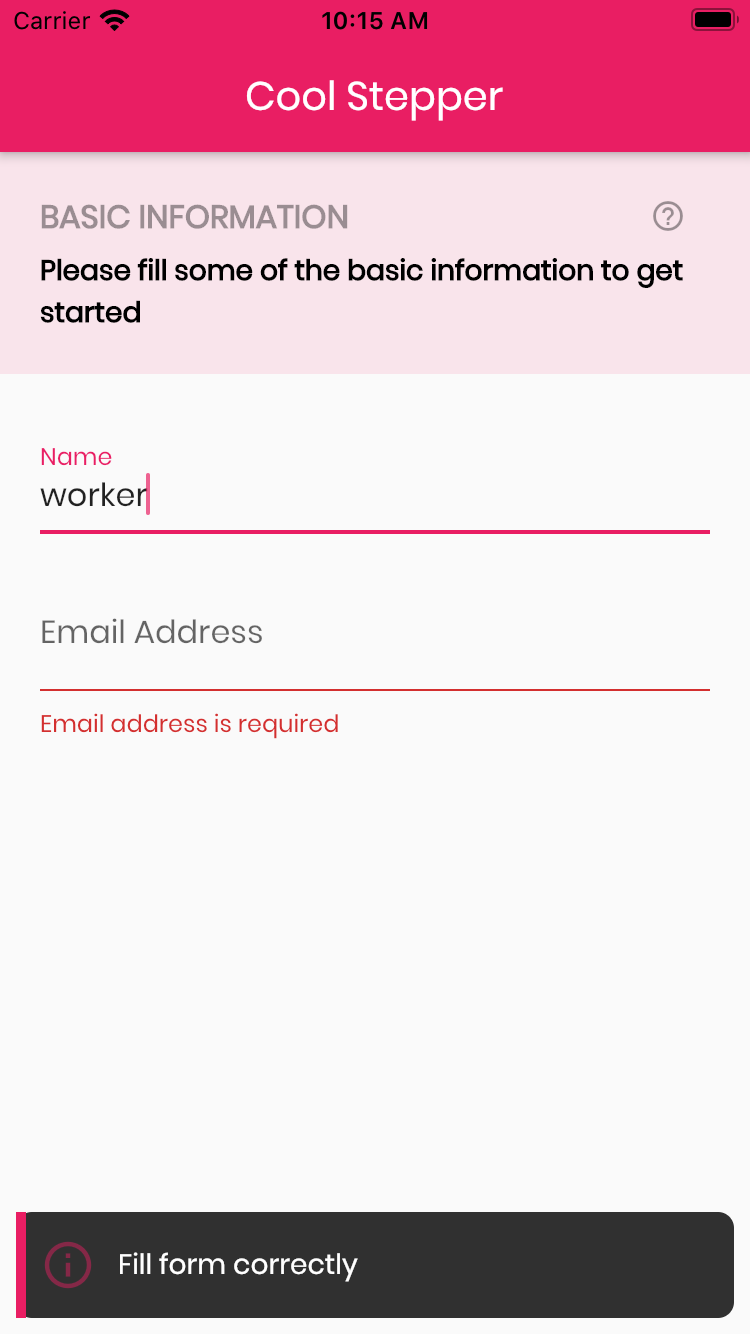
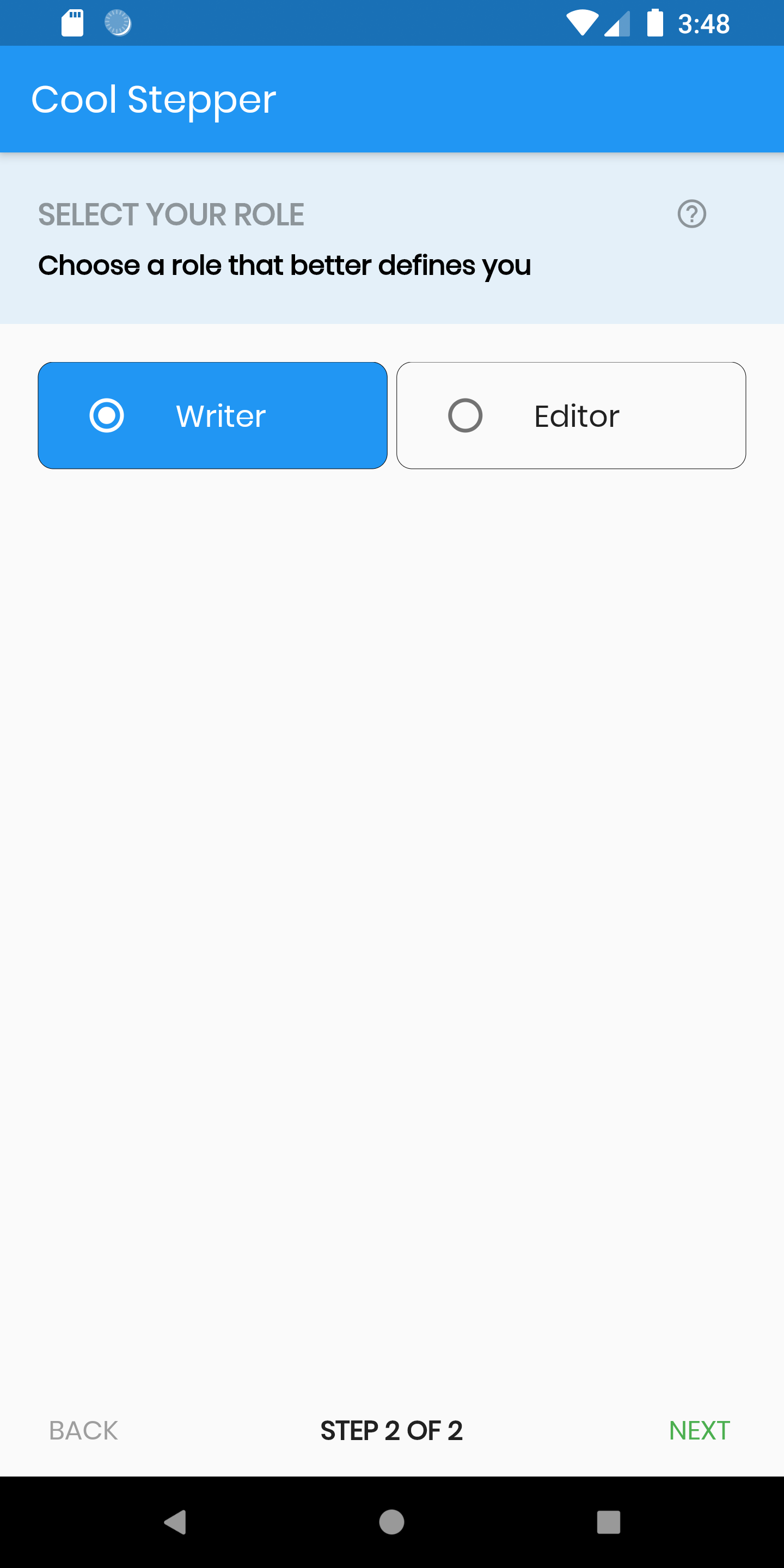
Screenshots

Example
CoolStepper(
   onCompleted: () {},
   steps: List<CoolStep>[
       CoolStep(
        title: "Basic Information",
        subtitle: "Please fill some of the basic information to get started",
        content: Container()
       ),
   ],
);

For each step, return a null, if you want the validation to pass or a String message which would be displayed if you set the showErrorSnackbar attribute to true.

validation: () {
          if (!_formKey.currentState!.validate()) {
            return 'Fill form correctly';
          }
          return null;
        },
CoolStepper Class
Attribute Data type Description Default Value
onCompleted Void Function() @required - A function that is triggers when all steps have been completed Null
steps List @required Null
config CoolStepperConfig Helps to customize your stepper CoolStepperConfig(backText: "BACK", nextText: "NEXT", stepText: "STEP", ofText: "OF")
showErrorSnackbar boolean Shows a snakbar at the bottom of the page when a step validation fails if set to true false
CoolStepperConfig Properties
Attribute Data type Description Default Value
backText String The text that should be displayed for the back button BACK
nextText String The text that should be displayed for the next button NEXT
finalText String The text that should be displayed for the next button on the final step FINISH
stepText String The text that describes the progress STEP
ofText String The text that describes the progress OF
headerColor Color This is the background color of the header Theme.of(context).primaryColor.withOpacity(0.1)
iconColor Color This is the color of the icon Color.black38
icon Icon This icon replaces the default icon Icon(Icons.help_outline,size: 18,Colors.black38)
titleTextStyle TextStyle This is the textStyle for the title text TextStyle(fontSize: 16.0,fontWeight: FontWeight.bold,color: Colors.black38)
subtitleTextStyle TextStyle This is the textStyle for the subtitle text TextStyle(fontSize: 14.0,fontWeight: FontWeight.w600,color: Colors.black)
backTextList List A List of string that when supplied will override 'backText'. Must be one less than the number of steps since for the first step, the backText won't be visible null
nextTextList List A List of string that when supplied will override 'nextText'Must be one less than the number of steps since the 'finalText' attribute is able to set the value for the final step's next button null

所屬分類

依賴

依賴清單 1 項

原始碼儲存庫

使用此套件的專案

暫無相關資料。