Cube Transition

A 3D Cube transition for your PageView and PageRoute.

Features
- Use the cube transition between the navigation of your pages.
- Add cube transitions to your PageView.
- Add custom transformation in your items of your PageView.
Getting started
You should ensure that you add the dependency in your flutter project.
dependencies:
  cube_transition: "^1.0.0"
You should then run flutter packages upgrade or update your packages in IntelliJ.
Import the package:
import 'package:cube_transition/cube_transition.dart';
Example Project
There is a example project in the example folder. Check it out. Otherwise, keep reading to get up and running.
Usage
Navigator Cube Transition
class Sample1 extends StatelessWidget {
  @override
  Widget build(BuildContext context) {
    return Scaffold(
      appBar: AppBar(
        title: Text('Navigator Cube Transition'),
      ),
      body: Center(
        child: RaisedButton(
          child: Text('Next Page'),
          onPressed: () {
            Navigator.of(context).push(
              CubePageRoute(
                enterPage: Sample1NextPage(),
                exitPage: this,
                duration: const Duration(milliseconds: 900),
              ),
            );
          },
        ),
      ),
    );
  }
}
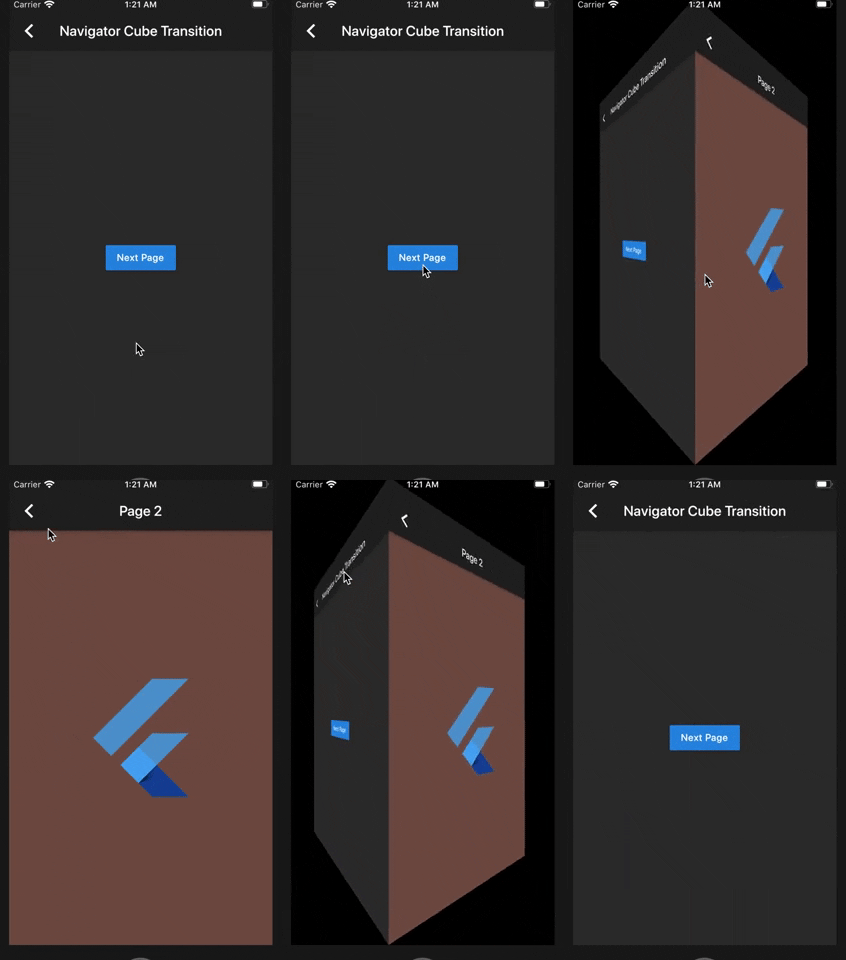
PageView Cube Transition (default)
class Sample2 extends StatelessWidget {
  @override
  Widget build(BuildContext context) {
    final height = MediaQuery.of(context).size.height / 2;
    return Scaffold(
      appBar: AppBar(
        title: Text('PageView Cube Transition'),
      ),
      body: Center(
        child: SizedBox(
          height: height,
          child: CubePageView(
            children: places
                .map(
                  (item) =>  Image.network(
                        item.url,
                        height: height,
                        fit: BoxFit.cover,
                      ),
                )
                .toList(),
          ),
        ),
      ),
    );
  }
}

PageView Cube Transition Custom (If you want more control over the items inside the CubePageView)
class Sample3 extends StatelessWidget {
  @override
  Widget build(BuildContext context) {
    final height = MediaQuery.of(context).size.height / 2;
    return Scaffold(
      appBar: AppBar(
        title: Text('Custom Cube Transition'),
      ),
      body: Center(
        child: SizedBox(
          height: height,
          child: CubePageView.builder(
            itemCount: places.length,
            itemBuilder: (context, index, notifier) {
              final item = places[index];
              final transform = Matrix4.identity();
              final t = (index - notifier).abs();
              final scale = lerpDouble(1.5, 0, t);
              transform.scale(scale, scale);
              return CubeWidget(
                index: index,
                pageNotifier: notifier,
                child: Stack(
                  children: [
                    Image.network(
                      item.url,
                      height: height,
                      fit: BoxFit.cover,
                    ),
                    Transform(
                      alignment: Alignment.center,
                      transform: transform,
                      child: Center(
                        child: Padding(
                          padding: const EdgeInsets.all(12.0),
                          child: Container(
                            decoration: BoxDecoration(boxShadow: [
                              BoxShadow(
                                color: Colors.black45,
                                spreadRadius: 5,
                                blurRadius: 5,
                              ),
                            ]),
                            child: Text(
                              item.name.split('-').join('\n'),
                              textAlign: TextAlign.center,
                              style: Theme.of(context).textTheme.title,
                            ),
                          ),
                        ),
                      ),
                    ),
                  ],
                ),
              );
            },
          ),
        ),
      ),
    );
  }
}

Copyright Aeyrium Inc
You can follow me on twitter @diegoveloper
