curved_nav_bar
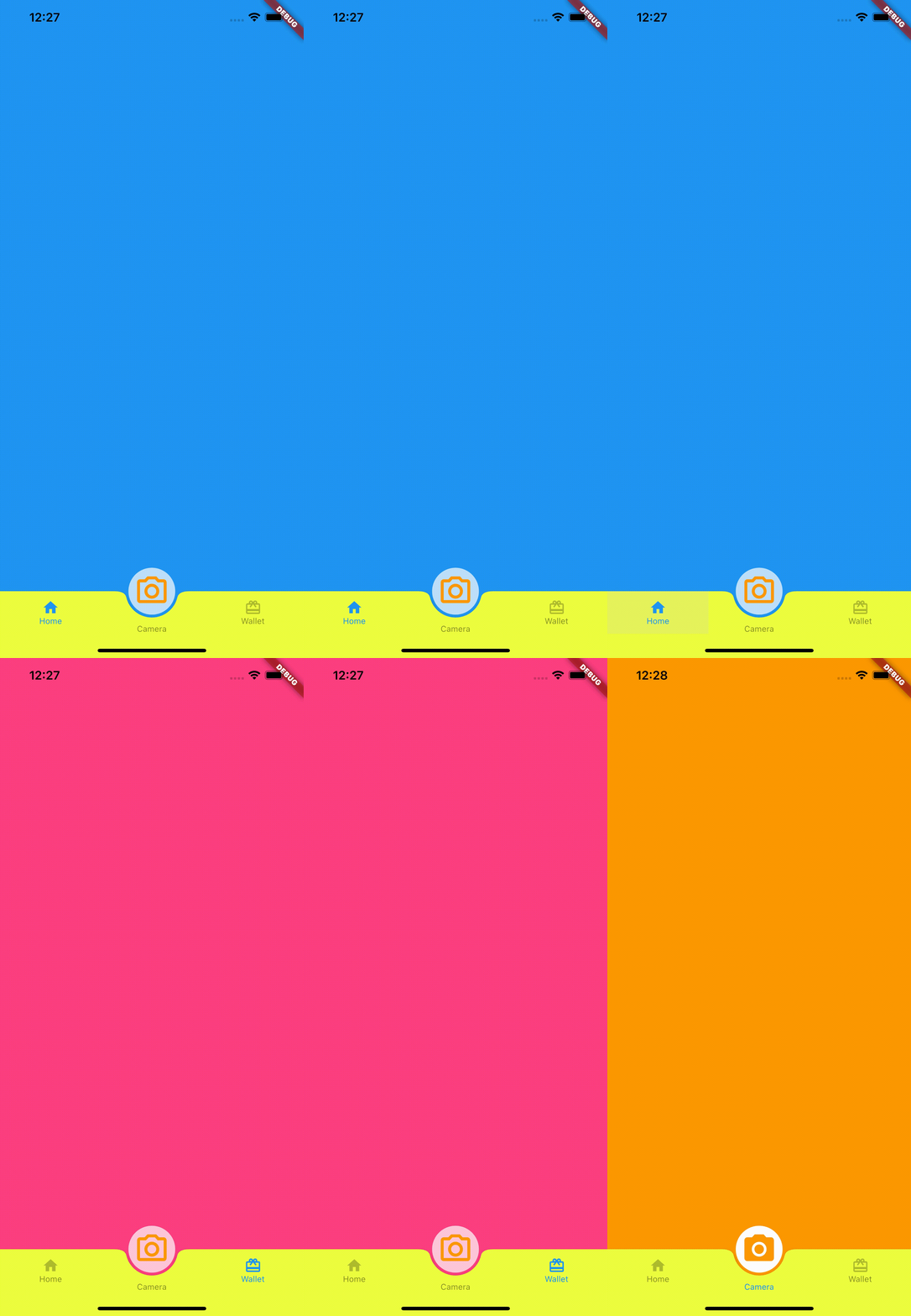
Bottom nav bar with FAB and center text, You can use FAB as a middle tab or perform other operations like, open popup or open camera (pub.dev ).
Screenshots
Usage
Example
To use this package :
dependencies:
   flutter:
     sdk: flutter
   curved_nav_bar:
Getting started
To start, import the dependency in your code:
import 'package:curved_nav_bar/curved_bar/curved_action_bar.dart' ;
import 'package:curved_nav_bar/fab_bar/fab_bottom_app_bar_item.dart' ;
import 'package:curved_nav_bar/flutter_curved_bottom_nav_bar.dart' ;
The following options are available for CurvedNavBar:
Property
Type
Description
appBarItemsListList of FABBottomAppBarItem,length of appBarItems should be equal to the length of bodyItems
bodyItemsListList of Widget,length of bodyItems should be equal to the length of appBarItems
extendBodyboolextendBody default value always true
actionButtonCurvedActionBarTypically a FloatingActionButton
activeColorColorColor of selected tab activeColor default value always Colors.black
inActiveColorColorColor of unselected tab inActiveColor default value always Colors.black26
navBarBackgroundColorColorbackground Color of navigation bar navBarBackgroundColor default value always Colors.white
actionBarViewWidgetSet as scaffold body when actionButton selected
Options for FABBottomAppBarItem are:
Property
Type
Description
activeIconWidgetselected icon of navigation bar item
inActiveIconWidgetunselected icon of navigation bar item
textStringlabel of navigation bar item
Options for CurvedActionBar are:
Property
Type
Description
activeIconWidgetselected icon for actionButton
inActiveIconWidgetunselected icon of actionButton
textStringtext label for actionButton
onTabValueChangedreturn bool value when tab on actionButton
How to use
import 'package:flutter/material.dart' ;
import 'package:curved_nav_bar/curved_bar/curved_action_bar.dart' ;
import 'package:curved_nav_bar/fab_bar/fab_bottom_app_bar_item.dart' ;
import 'package:curved_nav_bar/flutter_curved_bottom_nav_bar.dart' ;
void main () {
runApp (MyApp ());
}
class MyApp extends StatelessWidget @override
Widget build (BuildContext context) {
return MaterialApp (
title: 'Flutter Demo' ,
theme: ThemeData (
primarySwatch: Colors .blue,
),
home: MyHomePage (title: 'Flutter Demo Home Page' ),
);
}
}
class MyHomePage extends StatefulWidget MyHomePage ({Key ? key, required this .title}) : super (key: key);
final String title;
@override
_MyHomePageState createState () => _MyHomePageState ();
}
class _MyHomePageState extends State <MyHomePage > @override
Widget build (BuildContext context) {
return CurvedNavBar (
actionButton: CurvedActionBar (
onTab: (value) {
print (value);
},
activeIcon: Container (
padding: EdgeInsets .all (8 ),
decoration:
BoxDecoration (color: Colors .white, shape: BoxShape .circle),
child: Icon (
Icons .camera_alt,
size: 50 ,
color: Colors .orange,
),
),
inActiveIcon: Container (
padding: EdgeInsets .all (8 ),
decoration:
BoxDecoration (color: Colors .white70, shape: BoxShape .circle),
child: Icon (
Icons .camera_alt_outlined,
size: 50 ,
color: Colors .orange,
),
),
text: "Camera" ),
activeColor: Colors .blue,
navBarBackgroundColor: Colors .limeAccent,
inActiveColor: Colors .black45,
appBarItems: [
FABBottomAppBarItem (
activeIcon: Icon (
Icons .home,
color: Colors .blue,
),
inActiveIcon: Icon (
Icons .home,
color: Colors .black26,
),
text: 'Home' ),
FABBottomAppBarItem (
activeIcon: Icon (
Icons .wallet_giftcard,
color: Colors .blue,
),
inActiveIcon: Icon (
Icons .wallet_giftcard,
color: Colors .black26,
),
text: 'Wallet' ),
],
bodyItems: [
Container (
height: MediaQuery .of (context).size.height,
color: Colors .blue,
),
Container (
height: MediaQuery .of (context).size.height,
color: Colors .pinkAccent,
)
],
actionBarView: Container (
height: MediaQuery .of (context).size.height,
color: Colors .orange,
),
);
}
}
Pull Requests
Pull requests are most welcome. It usually will take me within 24-48 hours to respond to any issue or request.
Please keep PR titles easy to read and descriptive of changes, this will make them easier to merge :)
Pull requests must be made against develop branch. Any other branch (unless specified by the maintainers) will get rejected.
Created & Maintained By
Boffin Coders Pvt. Ltd.
If you found this project helpful or you learned something from the source code and want to thank me, consider buying me a cup of :coffee:
License
Copyright 2018 Boffin Coders Pvt. Ltd.

Licensed under the Apache License, Version 2.0 (the "License");
you may not use this file except in compliance with the License.
You may obtain a copy of the License at

   http://www.apache.org/licenses/LICENSE-2.0

Unless required by applicable law or agreed to in writing, software
distributed under the License is distributed on an "AS IS" BASIS,
WITHOUT WARRANTIES OR CONDITIONS OF ANY KIND, either express or implied.
See the License for the specific language governing permissions and
limitations under the License.