搜尋套件、儲存庫與 APP 分類

customizable_space_bar 封面
套件詳情v0.2.0

customizable_space_bar

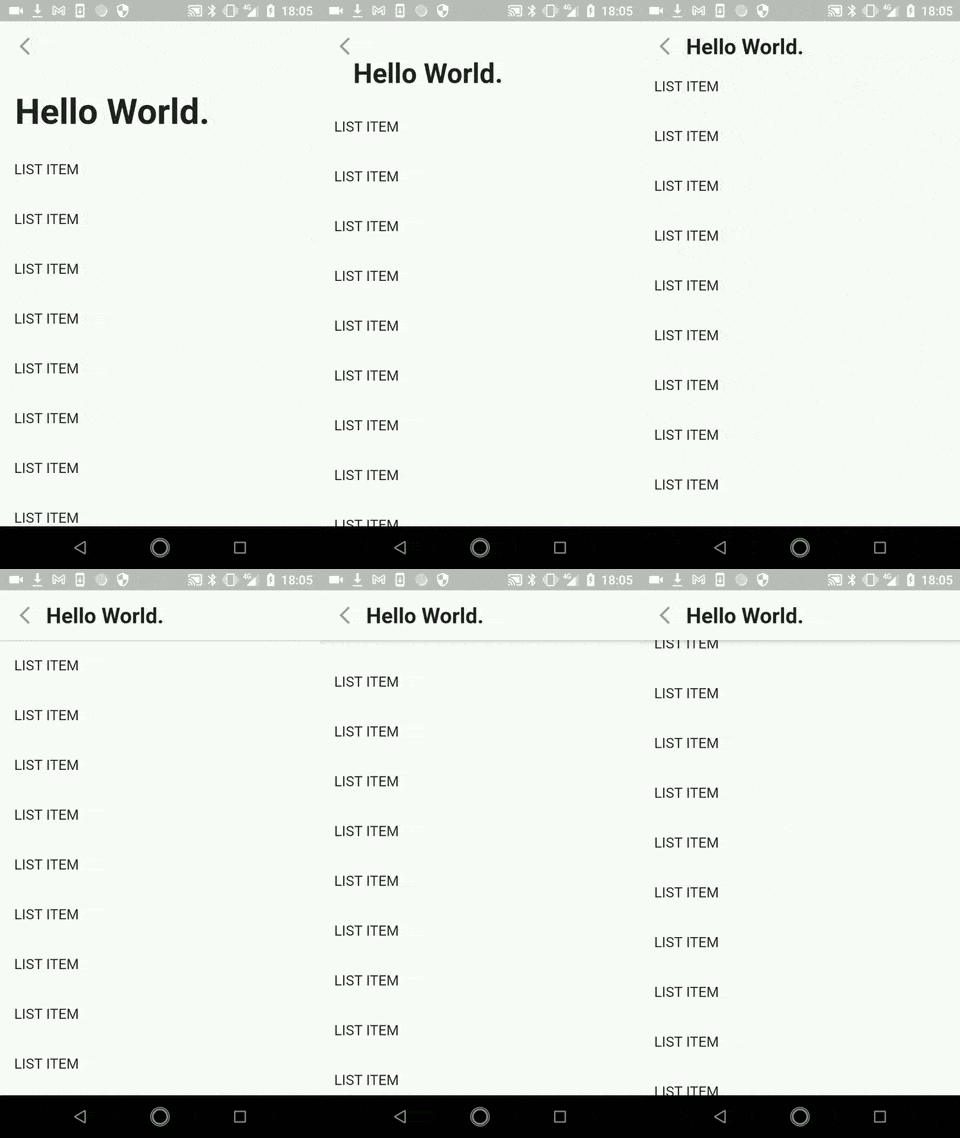
AppBar,隨著滾動速率變更內容。可實作「大型標題」。

AndroidiOSWebmacOSWindowsLinux
近 30 天下載
682
喜歡數
67
Pub 分數
140

安裝套件

flutter pub add customizable_space_bar

套件介紹

根據套件公開資料產生的選型評估,僅供參考。

一個可自訂的 AppBar,會根據滾動速度動態調整其內容,進而實現「大標題」效果。非常適合用來建立沉浸式、回應式的應用介面,讓使用者在瀏覽內容時,應用欄會隨著變化。此套件支援多個平台,包括 Android、iOS、Web、macOS、Windows 與 Linux,於各裝置上提供一致的行為。它在展開與收縮狀態之間提供順暢過渡,透過細微的視覺反饋提升使用者體驗。

適用情境

  • 在可滾動列表中實現大標題效果
  • 建立可隨著滾動位置動態調整的應用程式標籤列
  • 增強移動和桌面應用中的使用者介面沉浸感
  • 設計響應式導航標題
  • 構建自定義滾動驅動的過渡效果

主要特色

  • 基於滾動速度的內容變更
  • 支援大標題動畫
  • 跨平台相容性
  • 可自訂的外觀和行為
  • 平滑狀態轉換
  • 與標準 ScrollViews 的整合

適合對象

  • 開發 Material Design 應用的開發者
  • 尋求滾動驅動互動的UI設計師
  • 需要動態標題行為的應用程式
  • 跨平台 Flutter 項目
  • 使用高級滾動模式的資深Flutter開發人員

使用建議

  • 需要與 ScrollView 或 CustomScrollView 集成
  • 可能需要額外的樣式才能獲得最佳視覺效果
  • 最適合內容密集且垂直滾動的螢幕
  • 效能影響取決於動畫內容的複雜度
  • 僅限應用欄特定使用案例,不適用於一般版面元件

原始 README

以下為關聯原始碼儲存庫的 README 原文快照,最新內容請造訪原始碼儲存庫。

customizable_space_bar

pub package License: MIT

AppBar which changes the content with scrolling rate. Enables to implement "Large Title"

13063567123474

Usage

This package is expected to be used with flexibleSpace: in SliverAppBar, which means you also need to use CustomScrollView.

    CustomScrollView(
        slivers: [
          SliverAppBar(
            pinned: true,
            leading: IconButton(icon: Icon(Icons.arrow_back_ios_sharp)),
            backgroundColor: Theme.of(context).scaffoldBackgroundColor,

            /// This is the part you use this package
            flexibleSpace: CustomizableSpaceBar(
              builder: (context, scrollingRate) {
                /// Example content
                return Padding(
                  padding: EdgeInsets.only(
                      bottom: 13, left: 12 + 40 * scrollingRate),
                  child: Align(
                    alignment: Alignment.bottomLeft,
                    child: Text(
                      "Hello World.",
                      style: TextStyle(
                          fontSize: 42 - 18 * scrollingRate,
                          fontWeight: FontWeight.bold),
                    ),
                  ),
                );
              },
            ),
            /// End of the part

            expandedHeight: 150,
          ),
          SliverList(
            delegate: SliverChildBuilderDelegate(
              (context, index) {
                return ListTile(
                  title: Text("LIST ITEM"),
                );
              },
            ),
          )
        ],
      ),

You can control the layout in the AppBar with scrollingRate.

When the shape is fully expanded, scrollingRate is 0.0. When the shape is collapsed to AppBar, it reaches to the limit 1.0.

13063658045969

If you have any requests or questions, please feel free to ask on github.

所屬分類

原始碼儲存庫

使用此套件的專案

暫無相關資料。