搜尋套件、儲存庫與 APP 分類

dart_native 封面
套件詳情v0.7.11

dart_native

使用 Dart 編寫原生代碼。此套件可讓您擺脫原生代碼和低效能通訊的束縛。

AndroidiOSmacOS
近 30 天下載
138
喜歡數
23
Pub 分數
125

安裝套件

flutter pub add dart_native

套件介紹

根據套件公開資料產生的選型評估,僅供參考。

Dart_Native 讓開發者可以直接使用 Dart 編寫原生移動和桌面應用程式,無需撰寫平台特定程式碼或依賴效能開銷較大的互操作通道。透過利用 Dart 的強型別和現代語法,它可無縫存取 Android、iOS 和 macOS 上的原生 API。此套件彌補了高階 Dart 開發與底層系統功能之間的差距,為跨平台提供統一的工作流程。對於希望維護單一程式碼庫,同時實現原生效能與裝置功能存取的團隊而言,這是理想之選。

適用情境

  • 跨平台應用開發
  • 從 Dart 訪問原生 API
  • 消除平台特定程式碼
  • 高效能行動應用程式
  • 統一的程式碼庫,適用於多個平台

主要特色

  • 在 Dart 中直接編寫原生程式碼
  • 支援 Android、iOS 和 macOS
  • 不依賴低效能通道
  • 與原生 API 的無縫整合
  • 單一程式碼庫適用於多個平台

適合對象

  • 使用 Dart 開發移動/桌面應用的開發者
  • 團隊避免原生語言複雜性
  • 需要原生效能的專案
  • 跨平台應用程式開發
  • 希望減少樣板程式碼與互操作開銷的開發者

使用建議

  • 與成熟的原生工具相比,生態系統有限
  • 早期採用可能需要更深入的除錯
  • 需要理解原生平台概念
  • 可能尚未支援所有小眾原生功能
  • 開發人員不熟悉原生整合模式的學習曲線

原始 README

以下為關聯原始碼儲存庫的 README 原文快照,最新內容請造訪原始碼儲存庫。

DartNative

DartNative operates as a bridge to communicate between Dart and native APIs.

Replaces the low-performing Flutter channel with faster and more concise code.

pub package Build Status Dart CI

Features

Dynamic synchronous & asynchronous channeling

DartNative calls any native API dynamically. It supports both synchronous and asynchronous channeling.

Direct call between multi-language interfaces

Serialization of parameters and return values like Flutter Channel is no longer required. DartNative provides direct calls and automatic object marshalling between language interfaces.

Dart finalizer

Dart finalizer is only supported above Flutter 3(Dart 2.17), but with DartNative it is available in Dart Flutter 2.2.0(Dart 2.13.0) and up.

Autogenerate succinct bridging code

DartNative supports automatic type conversion so its bridging code is shorter & simpler than the Flutter channel.

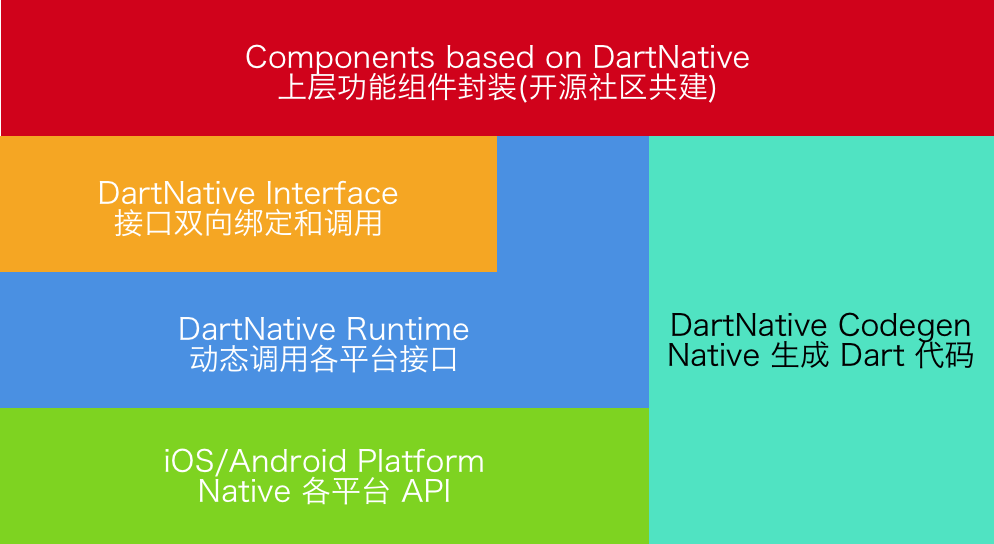
The design and vision of this package:

Requirements

DartNative Version Flutter Requirements Codegen Version
0.4.x - 0.7.x Flutter 2.2.0 (Dart 2.13.0) 2.x
0.3.x Flutter 1.20.0 (Dart 2.9.1) 1.2.x
0.2.x Flutter 1.12.13 (Dart 2.7) 1.x

Supported Platforms

iOS & macOS & Android

Usage

Basic usage: Interface binding

Add dart_native to dependencies and build_runner to dev_dependencies. Then you can write code. Here are some examples:

Dart calls Native

Dart code:

final interface = Interface("MyFirstInterface");
// Example for string type.
String helloWorld() {
    return interface.invokeMethodSync('hello', args: ['world']);
}
// Example for num type.
Future<int> sum(int a, int b) {
    return interface.invokeMethod('sum', args: [a, b]);
}

Corresponding Objective-C code:

@implementation DNInterfaceDemo

// Register interface name.
InterfaceEntry(MyFirstInterface)

// Register method "hello".
InterfaceMethod(hello, myHello:(NSString *)str) {
    return [NSString stringWithFormat:@"hello %@!", str];
}

// Register method "sum".
InterfaceMethod(sum, addA:(int32_t)a withB:(int32_t)b) {
    return @(a + b);
}

@end

Corresponding Java code:


// load libdart_native.so
DartNativePlugin.loadSo();

@InterfaceEntry(name = "MyFirstInterface")
public class InterfaceDemo extends DartNativeInterface {

    @InterfaceMethod(name = "hello")
    public String hello(String str) {
        return "hello " + str;
    }

    @InterfaceMethod(name = "sum")
    public int sum(int a, int b) {
        return a + b;
    }
}

NOTE: If your so path is custom, you need pass specific path.

DartNativePlugin.loadSoWithCustomPath("xxx/libdart_native.so");

And before using DartNative in dart, first invoke dartNativeInitCustomSoPath(). It will get path from channel.

Native calls Dart

Dart code:

interface.setMethodCallHandler('totalCost',
        (double unitCost, int count, List list) async {
    return {'totalCost: ${unitCost * count}': list};
});

Corresponding Objective-C code:

[self invokeMethod:@"totalCost"
         arguments:@[@0.123456789, @10, @[@"testArray"]]
            result:^(id _Nullable result, NSError * _Nullable error) {
    NSLog(@"%@", result);
}];

Corresponding Java code:

invokeMethod("totalCost", new Object[]{0.123456789, 10, Arrays.asList("hello", "world")},
             new DartNativeResult() {
                @Override
                public void onResult(@Nullable Object result) {
                    Map retMap = (Map) result;
                    // do something
                }

                @Override
                public void error(@Nullable String errorMessage) {
                    // do something
                }
              }
);
Dart finalizer
final foo = Bar(); // A custom instance.
unitTest.addFinalizer(() { // register a finalizer callback.
  print('The instance of \'foo\' has been destroyed!'); // When `foo` is destroyed by GC, this line of code will be executed.
});
Data types support
Dart Objective-C Swift Java
null nil nil null
bool BOOL Bool bool
int NSInteger Int int
double double Double double
String NSString String String
List NSArray Array List, ArrayList
Map NSDictionary Dictionary Map, HashMap
Set NSSet Set Set, HashSet
Function Block Closure Promise
Pointer void * UnsafeMutableRawPointer -
NativeByte NSData Data DirectByteBuffer
NativeObject NSObject NSObject Object
Advanced usage: Invoke methods dynamically
  • Step 1: Add dart_native to dependencies and build_runner to dev_dependencies.

  • Step 2: Generate Dart wrapper code with @dartnative/codegen or write Dart code manually.

  • Step 3: Generate code for automatic type conversion using dart_native_gen with the following steps (3.1-3.3):

    • 3.1 Annotate a Dart wrapper class with @native.

      @native
      class RuntimeSon extends RuntimeStub {
        RuntimeSon([Class isa]) : super(Class('RuntimeSon'));
        RuntimeSon.fromPointer(Pointer<Void> ptr) : super.fromPointer(ptr);
      }
      
    • 3.2 Annotate your own entry (such asmain()) with @nativeRoot.

      @nativeRoot
      void main() {
        runApp(App());
      }
      
    • 3.3 Run

      flutter packages pub run build_runner build --delete-conflicting-outputs 
      

      to generate files into your source directory.

      Note: we recommend running clean first:

      flutter packages pub run build_runner clean
      
  • Step 4: Call autogenerated function in <generated-name>.dn.dart in 3.3. The function name is determined by name in pubspec.yaml.

    @nativeRoot
    void main() {
      // Function name is generated by name in pubspec.yaml.
      runDartNativeExample(); 
      runApp(App());
    }
    
  • Step 5: Then you can write code. Here are some examples:

    • 5.1 iOS:

      Dart code (generated):

      // new Objective-C object.
      RuntimeStub stub = RuntimeStub();
      
      // Dart function will be converted to Objective-C block.
      stub.fooBlock((NSObject a) {
          print('hello block! ${a.toString()}');
          return 101;
      });
      
      // support built-in structs.
      CGRect rect = stub.fooCGRect(CGRect(4, 3, 2, 1));
      print(rect);


      Corresponding Objective-C code:

      typedef int(^BarBlock)(NSObject *a);
      
      @interface RuntimeStub
      
      - (CGRect)fooCGRect:(CGRect)rect;
      - (void)fooBlock:(BarBlock)block;
      
      @end
      

      More iOS examples see: ios_unit_test.dart

    • 5.2 Android:

      Dart code (generated):

      // new Java object.
      RuntimeStub stub = RuntimeStub();
      
      // get java list.
      List list = stub.getList([1, 2, 3, 4]);
      
      // support interface.
      stub.setDelegateListener(DelegateStub());


      Corresponding Java code:

      public class RuntimeStub {
      
          public List<Integer> getList(List<Integer> list) {
              List<Integer> returnList = new ArrayList<>();
              returnList.add(1);
              returnList.add(2);
              return returnList;
          }
      
          public void setDelegateListener(SampleDelegate delegate) {
              delegate.callbackInt(1);
          }
      }
      

      More android examples see: android_unit_test.dart

NOTE: If you use dart_native on macOS, you must use use_frameworks! in your Podfile.

Documentation

Further reading

FAQs

Q: Failed to lookup symbol (dlsym(RTLD_DEFAULT, InitDartApiDL): symbol not found) on macOS archive.

A: Select one solution:

  1. Use dynamic library: Add use_frameworks! in Podfile.
  2. Select Target Runner -> Build Settings -> Strip Style -> change from "All Symbols" to "Non-Global Symbols"

Contribution

  • If you need help or you'd like to ask a general question, open an issue.
  • If you found a bug, open an issue.
  • If you have a feature request, open an issue.
  • If you want to contribute, submit a pull request.

License

DartNative is available under the BSD 3-Clause License. See the LICENSE file for more info.

所屬分類

依賴

依賴清單 2 項

  • dart_native_gen^0.3.3
  • ffi>=1.1.2 <3.0.0

原始碼儲存庫

使用此套件的專案

暫無相關資料。