搜尋套件、儲存庫與 APP 分類

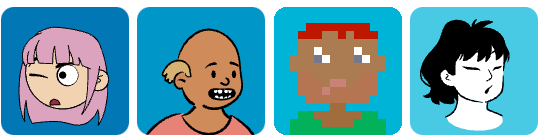
dice_bear 封面
套件詳情v1.0.4

dice_bear

DiceBear API 包裝器。DiceBear 是設計師和開發人員的頭像庫。產生隨機頭像個人圖片!

AndroidiOSWebmacOSWindowsLinux
近 30 天下載
2690
喜歡數
47
Pub 分數
130

安裝套件

flutter pub add dice_bear

套件介紹

根據套件公開資料產生的選型評估,僅供參考。

DiceBear 是一個 Flutter/Dart 套件,封裝了 DiceBear API,讓開發者能夠產生獨特且隨機的頭像圖片。它支援多種風格與自訂選項,非常適合用於使用者資料、即時通訊介面與社交應用。此套件可在 Android、iOS、Web、macOS、Windows 與 Linux 等主要平台運作。透過 pub add 簡單整合,即可輕鬆為 UI 增加個人化頭像。

適用情境

  • 使用者個人檔案圖片
  • 聊天頭像
  • 社交媒體應用UI
  • 儀表板用戶指標
  • 遊戲玩家角色

主要特色

  • 隨機頭像產生
  • 多種頭像樣式
  • 可自定外觀
  • 跨平台支援
  • 透過 pub 实現輕鬆整合
  • 基於API的設計

適合對象

  • 尋求快速頭像的應用開發者
  • 需要一致頭像的設計師
  • 聊天或社交應用
  • 使用真實的使用者視覺進行原型設計
  • 專案需要最少的設定

使用建議

  • 需要互聯網連接以生成頭像
  • 限於預定義的 DiceBear 風格
  • 依賴外部API的可用性
  • 無離線頭像生成
  • 樣式自訂受到 API 限制

原始 README

以下為關聯原始碼儲存庫的 README 原文快照,最新內容請造訪原始碼儲存庫。


dice_bear
Flutter Package

A fully-typed Dart/Flutter wrapper for the DiceBear API (v9.x) that generates unique avatar profile pictures with extensive customization options.

DiceBear is an avatar library for designers and developers. Generate random, deterministic avatar profile pictures from seeds, supporting 30+ unique art styles with fine-grained style-specific customization.

GitHub stars pub package

Features

✨ Full Type Safety — Every style option is a dedicated Dart class with compile-time validation

🎯 30+ Avatar Styles — Support for all DiceBear styles including Adventurer, Avataaars, PixelArt, and more

🔧 Style-Specific Customization — Each style has its own set of customization options (eyes, mouth, accessories, etc.)

📦 Flexible Output — Get SVG URLs, rendered Flutter widgets, or raw SVG bytes

🎲 Deterministic & Random — Generate consistent avatars from a seed or random ones each time

Installation

Add to your pubspec.yaml:

dependencies:
  dice_bear: ^1.0.0

Then run flutter pub get.

Quick Start

Basic Usage
import 'package:dice_bear/dice_bear.dart';

// Create a simple avatar request
final request = DiceBearRequest(
  style: DiceBearStyle.adventurer,
  coreOptions: DiceBearCoreOptions(
    seed: 'john_doe', // Deterministic: same seed = same avatar
  ),
);

// Render as Flutter widget
Widget widget = request.toImage(width: 200, height: 200);

// Get the SVG URL
Uri svgUrl = request.uri;

// Get raw SVG bytes
Uint8List? svgBytes = await request.fetchBytes();
Random Avatar
// Generate a new random avatar each time
final request = DiceBearRequest(
  style: DiceBearStyle.random,
  coreOptions: DiceBearCoreOptions(
    seed: DateTime.now().millisecondsSinceEpoch.toString(),
  ),
);

Advanced Usage

Style-Specific Customization

Each DiceBear style has its own options class for fine-grained control:

// Adventurer style with custom eye and mouth options
final request = DiceBearRequest<DiceBearAdventurerOptions>(
  style: DiceBearStyle.adventurer,
  coreOptions: DiceBearCoreOptions(
    seed: 'user123',
  ),
  styleOptions: DiceBearAdventurerOptions(
    eyes: ['variant01', 'variant05'],
    mouth: ['variant10'],
    glasses: ['variant02'],
    glassesProbability: 50,  // 50% chance of glasses
  ),
);
PixelArt with Customization
final request = DiceBearRequest<DiceBearPixelArtOptions>(
  style: DiceBearStyle.pixelArt,
  coreOptions: DiceBearCoreOptions(
    seed: 'pixel_user',
  ),
  styleOptions: DiceBearPixelArtOptions(
    accessories: ['variant01', 'variant02'],
    beard: ['variant03'],
    clothingColor: ['ff5733', 'fbf5e6'],
    eyesColor: ['647b90'],
  ),
);
Common Customization Parameters
Parameter Type Example Notes
backgroundColor Color? Color(0xFF3ECAF5) Applied to SVG background
radius int 10 Border radius (0-20)
scale int 100 Scale factor (0-200)
rotate int 45 Rotation in degrees (0-360)
flip bool true Flip horizontally
translateX, translateY int 10, -5 Translation offsets (-100 to 100)
size int 256 SVG size in pixels

Available Styles

Character-Based Styles (with eyes & mouth customization)
  • Adventurer / Adventurer Neutral — D&D-inspired characters
  • Avataaars / Avataaars Neutral — Cartoonish avatars
  • Big Ears / Big Ears Neutral — Quirky big-eared characters
  • Big Smile — Always happy expressions
  • Bottts / Bottts Neutral — Robot-like avatars
  • Croodles / Croodles Neutral — Minimalist faces
  • Fun Emoji — Expressive emoji style
  • Lorelei / Lorelei Neutral — Artistic character design
  • Micah — Stylized character portraits
  • Miniavs — Tiny avatar style
  • Personas — Professional-looking character avatars
  • Pixel Art / Pixel Art Neutral — 8-bit style avatars
  • Thumbs — Thumbs-up styled avatars
  • Toon Head — Cartoon character avatars
Geometric & Abstract Styles
  • Dylan — Gradient-based geometric design
  • Glass — Glassy geometric patterns
  • Icons — Icon-based avatars
  • Identicon — Hash-based geometric avatars
  • Initials — Two-letter initials display
  • Notionists / Notionists Neutral — Notion-inspired design
  • Open Peeps — Open-source character art
  • Rings — Concentric ring patterns
  • Shapes — Geometric shape arrangements

Widget Parameters

When calling .toImage(), you can pass additional Flutter parameters:

widget = request.toImage(
  width: 200,
  height: 200,
  fit: BoxFit.contain,
  alignment: Alignment.center,
  placeholderBuilder: (context) => CircularProgressIndicator(),
  semanticsLabel: 'User avatar for John Doe',
);
Parameter Type Default
width double? —
height double? —
fit BoxFit BoxFit.contain
alignment Alignment Alignment.center
placeholderBuilder WidgetBuilder? —
color Color? —
semanticsLabel String? —
clipBehavior Clip Clip.hardEdge
theme SvgTheme? —

Architecture

The library maintains a clean, semantically organized structure:

lib/
├── dice_bear.dart (main entry point)
└── src/
    └── style_options/
        ├── character_style_options.dart (abstract base)
        ├── adventurer_options.dart
        ├── avataaars_options.dart
        ├── big_ears_options.dart
        ├── big_smile_options.dart
        ├── bottts_options.dart
        ├── pixel_art_options.dart
        ├── persons_options.dart
        ├── rings_options.dart
        ├── shapes_options.dart
        └── ... (30 style option classes total)
Design Pattern
  • Abstract Base Class: DiceBearCharacterStyleOptions for humanoid styles with eyes and mouth fields
  • Standalone Implementations: Geometric and abstract styles directly implement DiceBearStyleOptions
  • Validation: Each style class validates its options before sending to the API
  • Composability: Mix and match styles with global and style-specific options

Minimum SDK

Requires Dart SDK >= 2.17.0 (supports super parameters syntax for cleaner inheritance)

Examples

Profile Picture Builder
class UserAvatar extends StatelessWidget {
  final String userId;
  final double size;
  
  const UserAvatar({
    required this.userId,
    this.size = 100,
  });
  
  @override
  Widget build(BuildContext context) {
    final request = DiceBearRequest(
      style: DiceBearStyle.avataaars,
      coreOptions: DiceBearCoreOptions(
        seed: userId,
        backgroundColor: DiceBearCoreOptions.fromColor(Colors.blue.shade100!),
      ),
    );
    
    return request.toImage(width: size, height: size);
  }
}
Random Avatar Gallery
ListView.builder(
  itemCount: 10,
  itemBuilder: (context, index) {
    final request = DiceBearRequest(
      style: DiceBearStyle.random,
      coreOptions: DiceBearCoreOptions(
        seed: index.toString(),
      ),
    );
    return request.toImage(width: 100, height: 100);
  },
)

Testing

The package includes comprehensive unit tests covering all style options and API interactions.

flutter test

License

This package is licensed under the MIT License. See LICENSE for details.

Contributing

Contributions are welcome! Please feel free to submit a pull request to the repository.

Support

Found an issue? Have a feature request? Open an issue on GitHub.

所屬分類

依賴

依賴清單 2 項

原始碼儲存庫

使用此套件的專案

暫無相關資料。