搜尋套件、儲存庫與 APP 分類

dotted_line 封面
套件詳情v3.3.0

dotted_line

此套件讓您可以在 Flutter 中繪製虛線。您可以繪製出美麗的虛線。

AndroidiOSWebmacOSWindowsLinux
近 30 天下載
19.4萬
喜歡數
328
Pub 分數
160

安裝套件

flutter pub add dotted_line

套件介紹

根據套件公開資料產生的選型評估,僅供參考。

dotted_line 套件讓開發者能夠輕鬆在 Flutter 應用中建立視覺上吸引人的虛線。它提供了一種簡單且可自訂的方式,在各種 UI 元素上繪製虛線或點線,以最少的程式碼增強介面設計。此套件支援多個平台,包括 Android、iOS、Web、macOS、Windows 和 Linux,使其適用於跨平台開發。透過直覺的設定選項,非常適合在現代應用設計中加入分隔線、分隔符或裝飾性元素。

適用情境

  • 在列表中創建視覺分隔符
  • 在表單中設計自定義分隔符
  • 透過裝飾性線條元素增強使用者介面
  • 使用虛線邊框構建響應式佈局
  • 在卡片組件中添加風格化點綴

主要特色

  • 與 Flutter 小部件的輕鬆整合
  • 可自訂的點大小與間距
  • 支援水平與垂直線條
  • 跨平台相容性
  • 輕量且高效
  • 可設定的輪廓顏色與寬度

適合對象

  • 尋求裝飾性元素的UI設計師
  • 開發乾淨、現代介面的開發者
  • 需要一致視覺樣式的專案
  • 需要細膩圖形點綴的應用程式
  • 跨平台 Flutter 應用程式

使用建議

  • 僅限基於行的裝飾
  • 不支援動畫點
  • 在複雜佈局中需要手動處理對齊
  • 不適合高性能量繪圖場景
  • 依賴Flutter的渲染管道以實現流暢顯示

原始 README

以下為關聯原始碼儲存庫的 README 原文快照,最新內容請造訪原始碼儲存庫。

logo.png


About

This package allows you to draw dotted lines with Flutter.

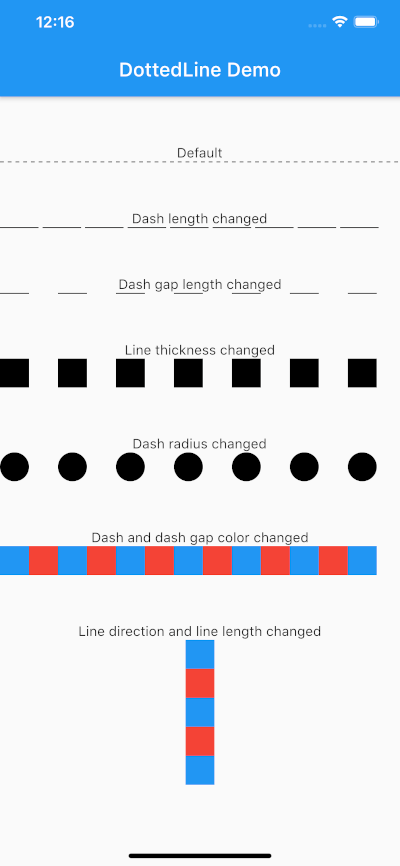
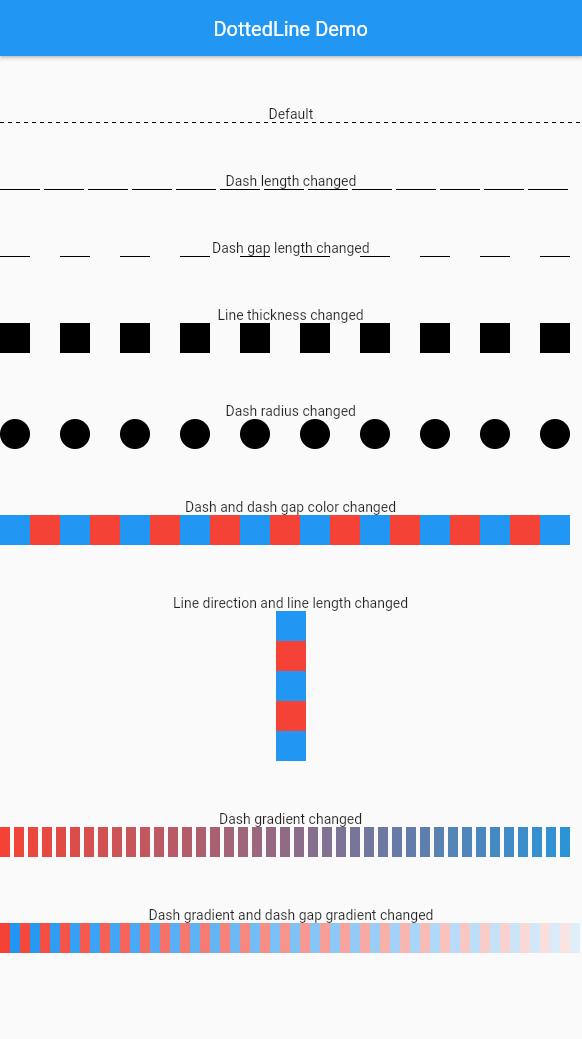
screenshot.png

Usage

Parameter Default Description
direction Axis.horizontal The direction of the entire dotted line.
alignment WrapAlignment.center The alignment of the entire dotted line.
lineLength double.infinity The length of the entire dotted line.
lineThickness 1.0 The thickness of the entire dotted line.
dashLength 4.0 The length of the dash.
dashColor Colors.black The color of the dash.
dashGradient null The gradient colors of the dash.
dashRadius 0.0 The radius of the dash.
dashGapLength 4.0 The length of the dash gap.
dashGapColor Colors.transparent The color of the dash gap.
dashGapGradient null The gradient colors of the dash gap.
dashGapRadius 0.0 The radius of the dash gap.
addRepaintBoundary false Whether to wrap the dotted line with a RepaintBoundary.

This can be used without parameters.

import 'package:dotted_line/dotted_line.dart';

DottedLine()

You can also customize by specifying parameters.

import 'package:dotted_line/dotted_line.dart';

DottedLine(
  direction: Axis.horizontal,
  alignment: WrapAlignment.center,
  lineLength: double.infinity,
  lineThickness: 1.0,
  dashLength: 4.0,
  dashColor: Colors.black,
  dashGradient: [Colors.red, Colors.blue],
  dashRadius: 0.0,
  dashGapLength: 4.0,
  dashGapColor: Colors.transparent,
  dashGapGradient: [Colors.red, Colors.blue],
  dashGapRadius: 0.0,
  addRepaintBoundary: true,
)

Performance Optimization

If your DottedLine is placed inside a widget that rebuilds frequently, you might experience performance issues (dropped frames) because the dashes and gaps are constantly repainted.

In such cases, setting addRepaintBoundary: true can improve performance by wrapping the DottedLine in a RepaintBoundary, isolating its paint step.

Note: The default is false to prevent unexpected memory overhead. Keep it false if you are displaying hundreds of dotted lines (e.g., in a large list) to avoid excessive memory usage.

Example

The sample code can be found under the example package. You can try changing all parameters.

所屬分類

原始碼儲存庫

使用此套件的專案