搜尋套件、儲存庫與 APP 分類

dragsheet 封面
套件詳情v0.0.4

dragsheet

具有物理效果、彈跳感且可拖曳的 Flutter 頁面和模態框。專為填補我自己的應用中遇到的空白而建構。

AndroidiOSWebmacOSWindowsLinux
近 30 天下載
71
喜歡數
4
Pub 分數
160

安裝套件

flutter pub add dragsheet

套件介紹

根據套件公開資料產生的選型評估,僅供參考。

Dragsheet 是一個 Flutter 套件,提供基於物理、彈跳式且可拖曳的底部抽屜與模態框。設計用以提供更動態且回應迅速的使用者體驗,彌補標準 Flutter 底部抽屜實作中的缺口,透過類似彈簧的動畫加入真實的拖曳互動。非常適合需要互動式、手勢驅動面板的應用程式,讓介面感覺自然且引人入勝。

適用情境

  • 可互動的底部面板
  • 由手勢驅動的模態框
  • 動態UI元件
  • 以行動裝置為首的設計模式
  • 可自定義的頁面轉換
  • 增強使用者參與度

主要特色

  • 基於物理的拖曳互動
  • 彈跳動畫效果
  • 流暢的手勢回應
  • 跨平台支援
  • 可自定義的拖曳閾值
  • 輕鬆整合至現有的 Flutter 應用程式

適合對象

  • 尋求高級底部表單行為的開發者
  • 需要觸覺、動畫使用者介面的應用程式
  • 設計師專注於流暢的運動
  • 帶有互動式底部面板的 Flutter 項目
  • 想要一個可直接取代標準 BottomSheet 的使用者

使用建議

  • 可能需要調整以獲得最佳物理行為
  • 動畫帶來的額外效能開銷
  • 不適合用於簡單的靜態表格
  • 最佳搭配清晰的視覺反饋使用
  • 除了拖曳機制外,自訂功能有限
  • 需要理解物理模擬原理

原始 README

以下為關聯原始碼儲存庫的 README 原文快照,最新內容請造訪原始碼儲存庫。

Dragsheet: Bouncy, Fun, & Draggable ✨

Simple Flutter package for creating bouncy, fun, and most importantly draggable sheets.

Developed because I wanted this for my own app, was familiar with the React Native versions of this, but couldn't find a matching one in the Flutter ecosystem.

Examples

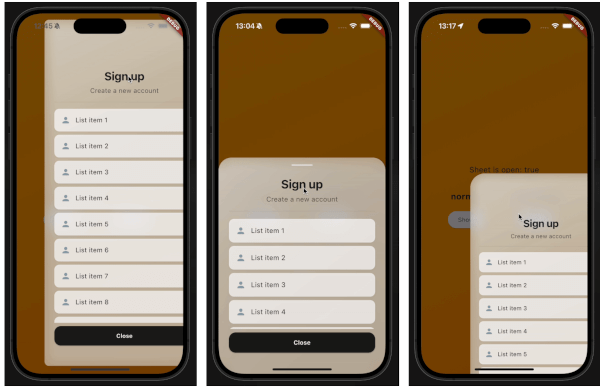
demo gif 1 demo gif 2 demo gif 3

This demo "sign up" blurry sheet is not included with the package. I created it to demonstrate what you are capable of doing with the dragsheet package.

Usage

  1. Initialize the controller.

    final controller = DragSheetController();
    
  2. Open YourWidget via the controller.

    controller.show(
        context,
        (ctx) => YourWidget(),
    ),
    
  3. If you want to close the sheet, use the controller.

    controller.close();
    
  4. If you want to listen to the state of the sheet, use the controller.

    controller.addListener(() {
        print(controller.isOpen);
    });
    
  5. Remember to dispose of the controller when you're done with it.

    @override
    void dispose() {
        super.dispose();
        controller.dispose();
    }
    
  6. If you care about customization, you won't be disapointed. However, the defaults should be solid enough. The main properties to know about are shrinkWrap, which will make the dragsheet shrink to the size of the child you provide it, and if shrinkWrap is true, closeOnShrinkWrapTap, which will close the sheet when you tap outside of the sheet.

    void show(
        BuildContext context,
        WidgetBuilder builder, {
        bool shrinkWrap = false,
        bool closeOnShrinkWrapTap = true, 
        double minScale = 0.85,
        double maxScale = 1.0,
        double minRadius = 0.0,
        double maxRadius = 30.0,
        double minOpacity = 0.0,
        double maxOpacity = 0.5,
        Duration entranceDuration = const Duration(milliseconds: 200),
        Duration exitDuration = const Duration(milliseconds: 200),
        Duration gestureFadeDuration = const Duration(milliseconds: 200),
        Duration programmaticFadeDuration = const Duration(milliseconds: 200),
        double effectDistance = 220.0,
        BgOpacity? bgOpacity,
        double swipeVelocityMultiplier = 2.5,
        double swipeAccelerationThreshold = 50.0,
        double swipeAccelerationMultiplier = 12.0,
        double swipeMinVelocity = 1000.0,
        double swipeMaxVelocity = 10000.0,
        double swipeFriction = 0.09,
        VoidCallback? onShow,
        VoidCallback? onDismiss,
        Duration opacityDuration = const Duration(milliseconds: 200),
        ApplyBorderRadius applyBorderRadius = ApplyBorderRadius.toTop,
    })
    

所屬分類

原始碼儲存庫

使用此套件的專案

暫無相關資料。