搜尋套件、儲存庫與 APP 分類

easy_folder_picker 封面
套件詳情v1.3.4

easy_folder_picker

適用於 Flutter 的簡單目錄選擇器,您可以選擇目錄或建立目錄以進行後續操作

AndroidiOSWindows
近 30 天下載
359
喜歡數
34
Pub 分數
140

安裝套件

flutter pub add easy_folder_picker

套件介紹

根據套件公開資料產生的選型評估,僅供參考。

Easy Folder Picker 是一個 Flutter 套件,可簡化行動裝置與桌面應用程式中的目錄選擇與建立。它讓使用者能夠瀏覽並挑選現有的目錄或建立新的目錄,非常適合檔案管理的工作流程。此套件支援 Android、iOS 與 Windows 平台,於各裝置間提供一致的介面。僅需透過 `flutter pub add easy_folder_picker` 進行最少量設定,開發者即可快速將資料夾選擇功能整合至應用程式中。對於需要使用者控制檔案儲存或組織的應用程式尤為實用。

適用情境

  • 檔案管理應用
  • 文件儲存工具
  • 備份和匯出功能
  • 使用者定義的專案資料夾
  • 資料匯入/匯出工作流程

主要特色

  • 簡單目錄選擇
  • 建立新目錄
  • 跨平台支援(Android、iOS、Windows)
  • 最小設定
  • 原生般的使用者介面體驗

適合對象

  • 開發面向檔案的應用程式開發者
  • 需要使用者控制資料夾路徑的應用程式
  • 跨平台文件選擇器整合
  • 快速文件導航原型設計
  • 教育或生產力軟體

使用建議

  • 需要 Android/iOS 的平台特定權限
  • 選擇器 UI 的自訂有限
  • 無內建檔案預覽功能
  • 依賴原生作業系統檔案系統存取
  • 可能需要手動處理權限請求

原始 README

以下為關聯原始碼儲存庫的 README 原文快照,最新內容請造訪原始碼儲存庫。

Easy Folder Picker

Easy directory picker for Flutter

pub

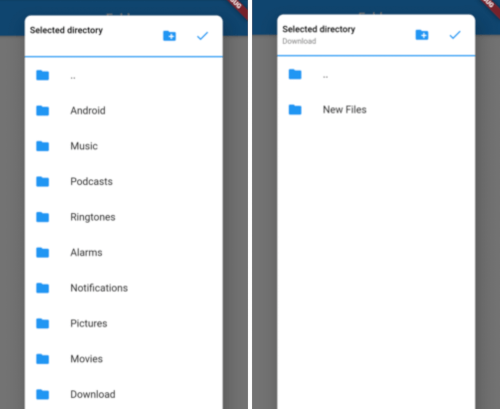
A flutter package to pick directories and handles requesting required permissions as well. This package only supports ANDROID.

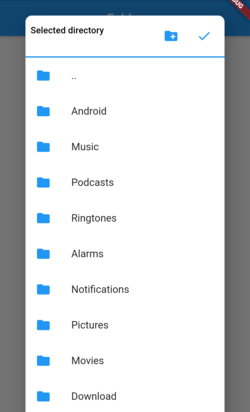
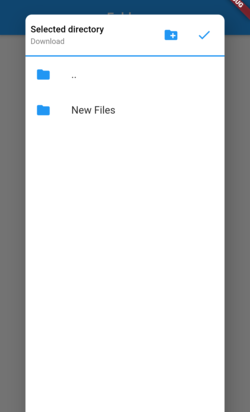
Picker Screenshot1 Picker Screenshot2

Installation

Add below line to your pubspec.yaml and run flutter packages get

  easy_folder_picker: ^latest version

Permissions

Add below line to your android/app/src/main/AndroidManifest.xml

<uses-permission android:name="android.permission.READ_EXTERNAL_STORAGE" />

If you want to allow creating new folders directly from picker then add the below permission also

<uses-permission android:name="android.permission.WRITE_EXTERNAL_STORAGE" />
Android 10 (Q)

In Android 10, you need to add the Following Lines in AndroidManifest file:

<application
      android:requestLegacyExternalStorage="true"
Android 11

From Android 11, you need to manage permission within your app, if you want to write in different folders of external storage.

Steps
  1. Add the following Lines in AndroidManifest file
  <uses-permission android:name="android.permission.MANAGE_EXTERNAL_STORAGE"/>
  1. Add device_info package to check android version
  2. Check permission if app can manage external storage if its android 11 or greater Note: This is a runtime permission (might not show it in app info's permission section )
  var status = await Permission.manageExternalStorage.status;
      if (status!.isRestricted) {
        status = await Permission.manageExternalStorage.request();
      }

      if (status!.isDenied) {
        status = await Permission.manageExternalStorage.request();
      }
      if (status!.isPermanentlyDenied) {
        ScaffoldMessenger.of(context).showSnackBar(SnackBar(
          backgroundColor: Colors.green,
          content: Text('Please add permission for app to manage external storage'),
        ));
      }

Flutter Usage

import 'package:easy_folder_picker/FolderPicker.dart';

// In any callback call the below method
  Future<void> _pickDirectory(BuildContext context) async {
    Directory directory = selectedDirectory;
    if (directory == null) {
      directory = Directory(FolderPicker.ROOTPATH);
    }

    Directory newDirectory = await FolderPicker.pick(
        allowFolderCreation: true,
        context: context,
        rootDirectory: directory,
        shape: RoundedRectangleBorder(
            borderRadius: BorderRadius.all(Radius.circular(10))));
    setState(() {
      selectedDirectory = newDirectory;
      print(selectedDirectory);
    });
  }

所屬分類

依賴

依賴清單 2 項

原始碼儲存庫

使用此套件的專案

暫無相關資料。