搜尋套件、儲存庫與 APP 分類

套件詳情v2.0.0

enhanced_future_builder

提高可讀性並解決 FutureBuilder 常見的重複觸發問題的包裝器

AndroidiOSWebmacOSWindowsLinux
近 30 天下載
1050
喜歡數
29
Pub 分數
140

安裝套件

flutter pub add enhanced_future_builder

套件介紹

根據套件公開資料產生的選型評估,僅供參考。

EnhancedFutureBuilder 是一個 Flutter 套件,透過提升程式碼可讀性並消除未來完成時不必要的重繪問題,增強了標準的 FutureBuilder。它提供了一種更乾淨、更直覺的非同步資料處理 API,減少樣板程式碼並防止意外的元件重繪。作為 Future 的延伸建構,它可無縫整合至現有的 Flutter 專案中。該套件支援所有主要平台,包括 Android、iOS、Web、macOS、Windows 和 Linux。

適用情境

  • 使用非同步資料處理以減少重構
  • 改進狀態管理中的程式碼清晰度
  • 簡化未來基礎的UI更新
  • 取代冗長的 FutureBuilder 模式
  • 簡化載入/錯誤/載入狀態

主要特色

  • 防止未來完成後的意外重構
  • 更乾淨、更易讀的語法
  • 內建的載入、錯誤與資料狀態支援
  • 擴展 Future 以實現直覺的使用
  • 跨平台相容性

適合對象

  • 尋求更簡單異步 UI 處理的開發者
  • 旨在減少 widget 重構的專案
  • 重視程式碼可維護性的團隊
  • Flutter 初學者學習非同步模式
  • 頻繁異步資料取得的應用程式

使用建議

  • 需要 Dart 2.12 或更高版本
  • 可能需要重構現有的 FutureBuilder 程式碼
  • 僅限用於基於 Future 的作業
  • 不適用於複雜的串流情境
  • 依賴於正確的未來生命週期管理

原始 README

以下為關聯原始碼儲存庫的 README 原文快照,最新內容請造訪原始碼儲存庫。

This library is no longer maintained. Use at your own discretion.

enhanced_future_builder

Small FutureBuilder wrapper to improve readabiltity. It can also be used as an easy solution to the common 'my FutureBuilder keeps refiring' problem (more info about that here).

Actions Status codecov

Stop FutureBuilder from refiring

Let's say you want to build an app that displays a random cat from the internet at launch and then increases a counter whenever a button is clicked. You came up with the following code:

@override
Widget build(BuildContext context) {
  return Scaffold(
    appBar: AppBar(
      title: Text('Clicked $_counter times')
    ),
    body: FutureBuilder(
      // resolves to cat data from the internet
      future: widget._api.getRandomCat(),
      builder: (context, snapshot) {
        if (snapshot.connectionState == ConnectionState.done) {
          // builds an image widget containing a random cat
          return _showCatWidget(snapshot.data);
        }else {
          return Center(child: Text('Loading...'));
        }
      }
    ),
    floatingActionButton: FloatingActionButton(
      // _incrementCounter calls setState() to update the view
      onPressed: _incrementCounter,
      tooltip: 'Increment',
      child: Icon(Icons.add),
    ),
  );
}

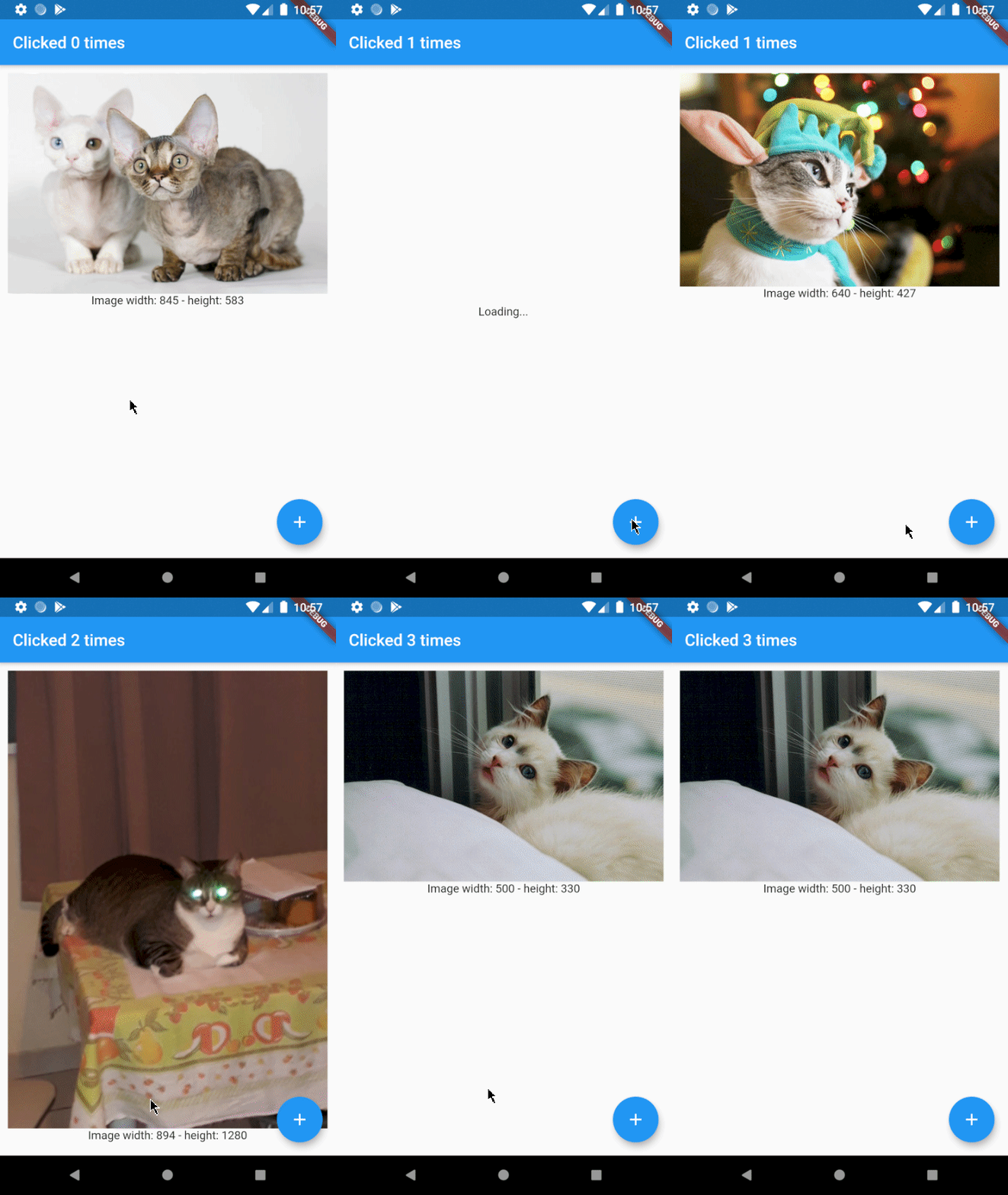
Which results in the following app:

I love cats

As you can see there's a problem. Whenever the button is clicked, a new cat is shown to the user. This is not what we want and can be solved by using EnhancedFutureBuilder. Import the package and change the code to:

@override
Widget build(BuildContext context) {
  return Scaffold(
    appBar: AppBar(
      title: Text('Clicked $_counter times')
    ),
    body: EnhancedFutureBuilder(
      future: widget._api.getRandomCat(),
      // this is where the magic happens
      rememberFutureResult: true,
      whenDone: (dynamic cat) => _showCatWidget(cat),
      whenNotDone: Center(child: Text('Loading...')),
    ),
    floatingActionButton: FloatingActionButton(
      onPressed: _incrementCounter,
      tooltip: 'Increment',
      child: Icon(Icons.add),
    ),
  );
}

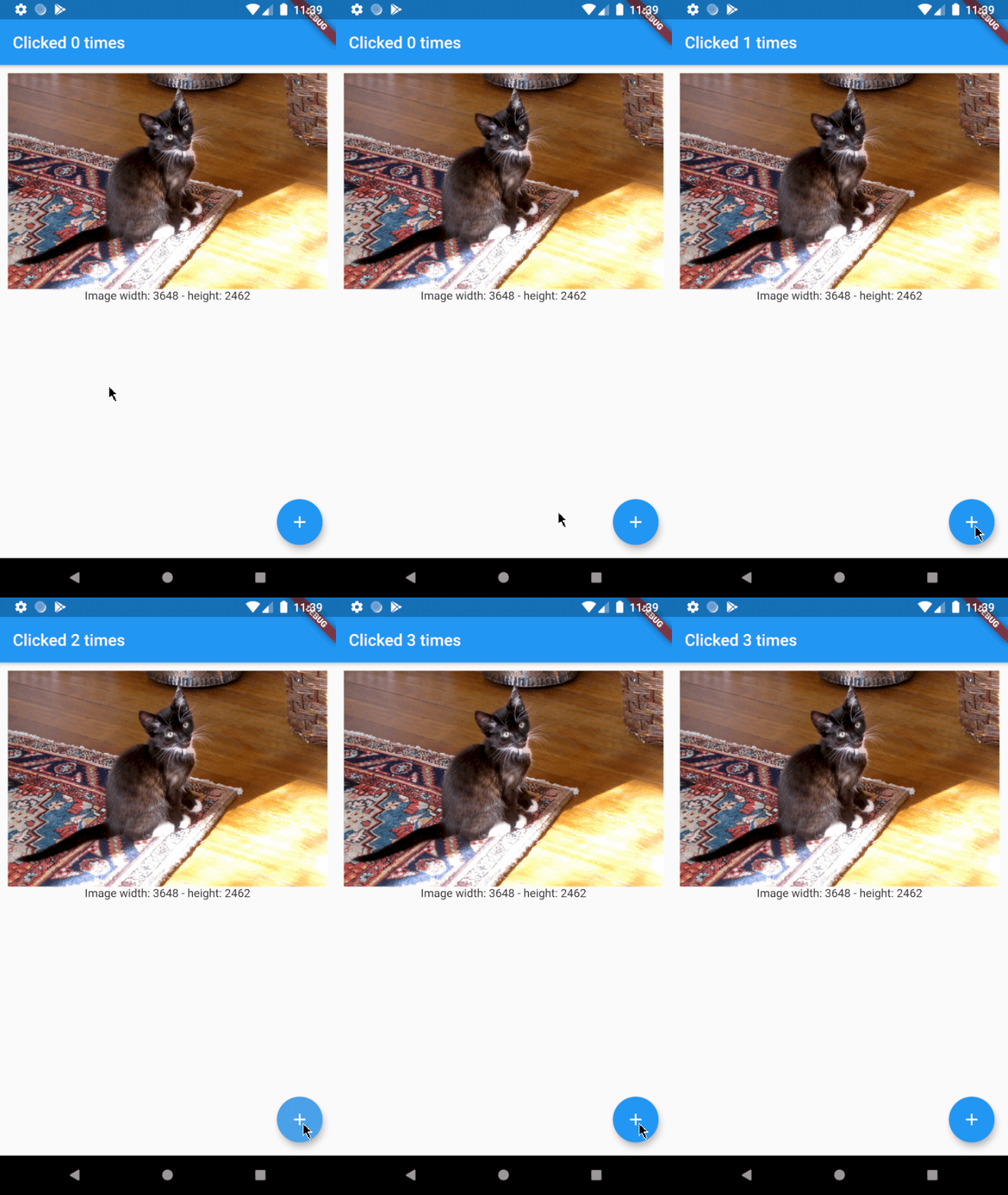
As you can see the code is a little easier to read now and the result will be just how we want it to be:

yeah cats are great

Usage

Ironically, EnhancedFutureBuilder doesn't require a builder anymore.

FutureBuilder:

FutureBuilder(
  future: _futureToResolve(),
  builder: (context, snapshot) {
    if (snapshot.connectionState == ConnectionState.done) {
      return MyWidget(snapshot.data);
    }else if (snapshot.connectionState == ConnectionState.waiting){
      return Center(child: Text('Waiting...'));
    }
    }else if (snapshot.connectionState == ConnectionState.active){
      return Center(child: Text('Active...'));
    }
    // ...
  }
}

EnhancedFutureBuilder:

EnhancedFutureBuilder(
  future: _futureToResolve(),
  rememberFutureResult: false,
  whenDone: (dynamic data) => MyWidget(data),
  whenWaiting: Center(child: Text('Waiting...')),
  whenActive: Center(child: Text('Active...')),
  // whenNone: ...
),

所屬分類

原始碼儲存庫

使用此套件的專案

暫無相關資料。