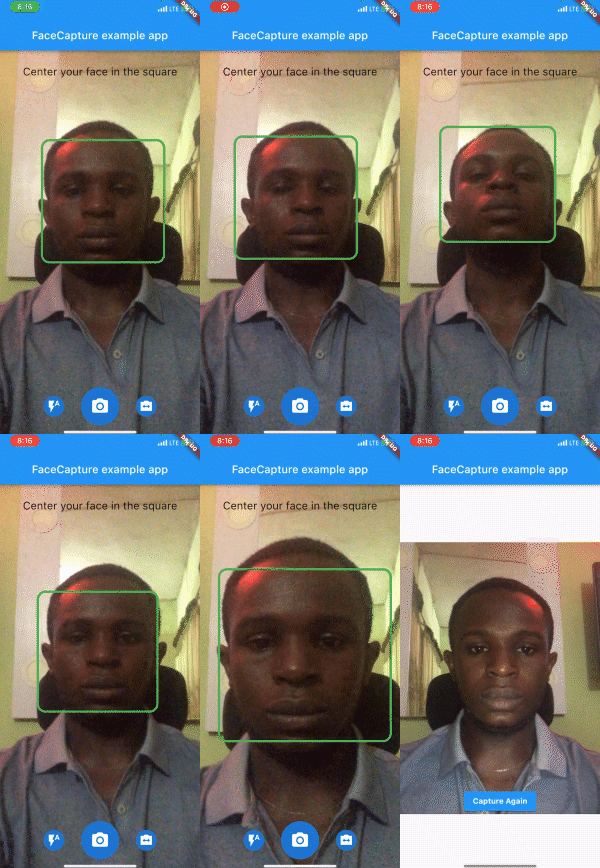
Then render the component in your application using the required options.
@overrideWidgetbuild(BuildContext context) {
returnScaffold(
body: SmartFaceCamera(
controller: controller,
message: 'Center your face in the square',
)
);
}
Customization
Here is a list of properties available to customize your widget:
Name
Type
Description
controller
FaceCameraController
The controller for the [SmartFaceCamera] widget
showControls
bool
set false to hide all controls
showCaptureControl
bool
set false to hide capture control icon
showFlashControl
bool
set false to hide flash control control icon
showCameraLensControl
bool
set false to hide camera lens control icon
message
String
use this pass a message above the camera
messageStyle
TextStyle
style applied to the message widget
lensControlIcon
Widget
use this to render a custom widget for camera lens control
flashControlBuilder
FlashControlBuilder
use this to build custom widgets for flash control based on camera flash mode
messageBuilder
MessageBuilder
use this to build custom messages based on face position
indicatorShape
IndicatorShape
use this to change the shape of the face indicator
indicatorAssetImage
String
use this to pass an asset image when IndicatorShape is set to image
indicatorBuilder
IndicatorBuilder
use this to build custom widgets for the face indicator
captureControlBuilder
CaptureControlBuilder
use this to build custom widgets for capture control
autoDisableCaptureControl
bool
set true to disable capture control widget when no face is detected
Here is a list of properties available to customize your widget from the controller:
Name
Type
Description
onCapture
Function(File?)
callback invoked when camera captures image
onFaceDetected
Function(DetectedFace?)
callback invoked when camera detects face
imageResolution
ImageResolution
use this to set image resolution
defaultCameraLens
CameraLens
use this to set initial camera lens direction
defaultFlashMode
CameraFlashMode
use this to set initial flash mode
enableAudio
bool
set false to disable capture sound
autoCapture
bool
set true to capture image on face detected
ignoreFacePositioning
bool
set true to trigger onCapture even when the face is not well positioned
orientation
CameraOrientation
use this to lock camera orientation
performanceMode
FaceDetectorMode
Use this to set your preferred performance mode
Contributions
Contributions of any kind are more than welcome! Feel free to fork and improve face_camera in any way you want, make a pull request, or open an issue.
Support the Library
You can support the library by donating, liking it on Pub, starring it on GitHub, and reporting any bugs you encounter.