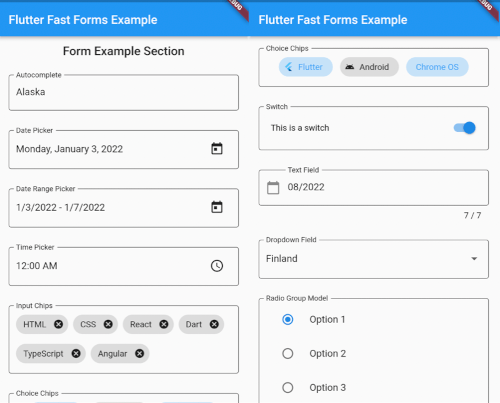
Flutter Fast Forms 是一個 Dart 套件,專為簡化 Flutter 表單的建立而設計,讓開發者能快速建構強大且可重複使用的表單元件。它提供簡單、宣告式的 API 來定義表單欄位、驗證規則與提交邏輯,並大幅減少樣板程式碼。此套件支援所有主要平台,包含 Android、iOS、Web、macOS、Windows 與 Linux,非常適合跨平台應用。內建對常見輸入類型的支援以及可自訂的驗證器,能在不犧牲彈性或效能的情況下加速開發。
適用情境
快速成型原型
跨平台表單開發
複雜驗證工作流程
可重用的表單組件
簡化使用者註冊流程
主要特色
宣告式表單語法
內建驗證輔助函數
跨平台相容性
可擴充的欄位類型
最少的樣板程式碼
適合對象
初學者 Flutter 開發人員
重視速度的團隊
需要動態表單的應用程式
專案有緊迫的截止日期
開發者避免表單複雜性
使用建議
超出預設小工具之外的自訂功能有限
可能需要學習新的類似 DSL 的語法
不太適合高度獨特的表單佈局
依賴於套件維護
最適合標準表單模式
原始 README
以下為關聯原始碼儲存庫的 README 原文快照,最新內容請造訪原始碼儲存庫。
Flutter Fast Forms
Flutter Fast Forms is the only Dart package you need to build Flutter forms fast.
It adds these missing features to the Flutter SDK:
Not all controls in a form are autonomous and act independent of each other.
Occasionally, the state of a form field might be directly related to the state of some other form field as well.
Flutter Fast Forms allows you to define such conditions declaratively.
📓 Example: A FastTextField that is disabled when a FastSwitch is selected.
1. Add the conditions property to the conditional form field and assign an empty Map:
constFastSwitch(
name: 'switch',
titleText: 'Disable text field',
),
FastTextField(
name: 'text_field',
labelText: 'Just some sample text field',
conditions: {},
),
2. Choose a suitable FastConditionHandler as Map key and assign a FastConditionList:
constFastSwitch(
name: 'switch',
titleText: 'Disable text field when selected',
),
FastTextField(
name: 'text_field',
labelText: 'Just some sample text field',
conditions: {
FastCondition.disabled: FastConditionList([]),
},
)
[!NOTE]
A FastConditionHandler is a function that runs whenever a FastConditionList is checked and determines what happens when the condition is either met or not.
3. Add a FastCondition relating the field to another field:
constFastSwitch(
name: 'switch',
titleText: 'Disable text field when selected',
),
FastTextField(
name: 'text_field',
labelText: 'Just some sample text field',
conditions: {
FastCondition.disabled: FastConditionList([
FastCondition(
target: 'switch',
test: (value, field) => value isbool && value,
),
]),
},
),
[!NOTE]
target is the name of the FastFormField that the form field depends on.
📓 Example: A FastTextField that is enabled when a FastSwitchor a FastCheckbox is selected.
constFastCheckbox(
name: 'checkbox',
titleText: 'Enable text field when selected',
),
constFastSwitch(
name: 'switch',
titleText: 'Enable text field when selected',
),
FastTextField(
name: 'text_field',
enabled: false,
labelText: 'Just some sample text field',
conditions: {
FastCondition.enabled: FastConditionList([
FastCondition(
target: 'switch',
test: (value, field) => value isbool && value,
),
FastCondition(
target: 'checkbox',
test: (value, field) => value isbool && value,
),
]),
},
),
📓 Example: A FastTextField that is disabled when both a FastSwitchand a FastCheckbox are selected.
constFastCheckbox(
name: 'checkbox',
titleText: 'Disable text field when selected',
),
constFastSwitch(
name: 'switch',
titleText: 'Disable text field when selected',
),
FastTextField(
name: 'text_field',
labelText: 'Just some sample text field',
conditions: {
FastCondition.enabled: FastConditionList(
[
FastCondition(
target: 'switch',
test: (value, field) => value isbool && value,
),
FastCondition(
target: 'checkbox',
test: (value, field) => value isbool && value,
),
],
match: FastConditionMatch.every,
),
},
),
[!NOTE]
match specifies how all individual test results in the list are evaluated to determine whether the condition is met.
Custom Form Fields
There are use cases where the widget catalog does not fully satisfy your individual requirements.
As a consequence you have to add non-standard controls to your form.
With Flutter Fast Forms you're free to wrap any custom widget into a form field.
📓 Example: A simple widget that provides a random integer whenever a button is pressed.
1. Create a stateful widget class extending FastFormField<T> with a corresponding FastFormFieldState<T>:
[!NOTE]
Always make sure that you apply certain super-initializer parameters like decoration or enabled in your builder functions.
Otherwise assigning those arguments when invoking the constructor won't have any effect.