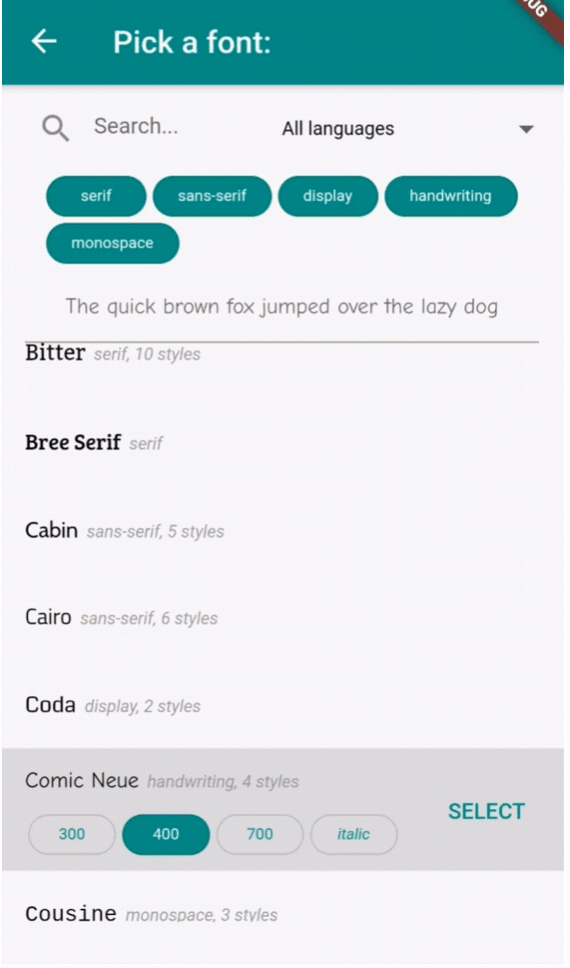
一個 Flutter 套件,提供可自訂的元件,讓使用者從下拉選單或專用畫面中選擇 Google 字型。它能順暢整合至跨多個平台的 Flutter 應用中,讓使用者可以直接在應用介面中瀏覽並套用字型。此套件透過利用 Google 字型的廣泛圖書館,簡化字型整合,提供乾淨且直覺的選擇體驗。非常適合需要動態字型自訂功能的應用,例如設計工具、文字編輯器或創意應用。
適用情境
具有動態文字樣式的應用
設計與排版工具
帶字型選擇的文字編輯器
可自訂的 UI 主題
具有視覺內容的教育應用程式
創意內容創作應用
主要特色
Google 字型整合
可自訂的下拉選單或全螢幕選擇器
跨平台支援
輕鬆套用字型
輕量且快速
支援字型預覽
適合對象
開發文字密集型應用的開發者
注重設計的 Flutter 應用程式
需要使用者字型自訂的應用程式
教育與創意軟體
使用 Flutter 的 UI/UX 設計師
使用建議
字型載入需要網路存取
可能稍微增加應用大小
僅限 Google 字型
字型渲染效能於舊裝置上表現差異
不支援離線字型
大型字體列表的初始載入時間
原始 README
以下為關聯原始碼儲存庫的 README 原文快照,最新內容請造訪原始碼儲存庫。
flutter_font_picker
A Flutter widget that lets the user select and apply a Google Font from a custom dropdown.
Provides a FontPicker widget that can be used in a route or dialog as a UI for choosing a font from Google Fonts.
Depends on the google_fonts package for loading and displaying the fonts.
Localizations available for 🇪🇸🇩🇪🇮🇹🇵🇹🇫🇷🇵🇱🇳🇱🇯🇵.
Simple Example
Inside your build method, use a button that when pressed, will navigate to the font picker screen:
PickerFont? _selectedFont;

ElevatedButton(
  child: Text('Pick a font'),
  onPressed: () {
    Navigator.push(
      context,
      MaterialPageRoute(
          builder: (context) => FontPicker(
              onFontChanged: (PickerFont font) {
                _selectedFont = font;
                print("${font.fontFamily} with font weight ${font.fontWeight} and font style ${font.fontStyle}.}");
              },
          ),
      ),
    );
  }),
The onFontChanged function retrieves the font that the user selects with an object containing details like the font's name, weight, style, etc.
You can then use its toTextStyle() method to style any text with the selected font:
Text('This will be styled with the font: $_selectedFont.fontFamily',
      style: selectedFont.toTextStyle()),
Check the example project for more usages.
FontPicker settings
onFontChanged: (required) the callback that returns a PickerFont object with all the details and methods for the user's selected font.
googleFonts: A list of Google fonts to use in the font picker. By default it contains all 975 fonts included in constants.dart. You should only use a limited number of them for performance and data saving, as each font is downloaded and stored to the app's storage when it comes into view. Using up to 100-200 fonts should work fine.
initialFontFamily: The font family to use initially in the font picker. Defaults to 'Roboto'.
showFontInfo: Whether to show font details (category, number of variants) next to each font tile in the list.
showFontVariants: Whether to show font variants (weights and styles) in the font picker. If set to false, user will only be able to select the default variant of each font.
showInDialog: Set this to true if you want to use the font picker inside an AlertDialog (check examples).
recentsCount: Fonts that the user selected before are saved to be shown at the start of the list. Sets how many you want saved as recents.
lang: The language in which to show the UI. Defaults to English ('en'). Other options are 🇪🇸🇩🇪🇮🇹🇵🇹🇫🇷🇵🇱🇳🇱🇯🇵 ('es', 'de', 'it', 'pt', 'fr', 'pl', 'nl', 'ja'). If you need a translation in another language: take a look at the dictionary variable in translations.dart, and send me (or fix) the translations for your language .
FontPicker features
The user can:
Browse a list of any Google fonts you want.
Select a variant (font weight and/or style) for each font.
Filter the fonts by category (serif, sans-serif, handwriting, etc.) or available font glyphs (Latin, Greek, Cyrillic, etc.).
Search the fonts by name.
See the most recently used fonts at the top of the list.