搜尋套件、儲存庫與 APP 分類

套件詳情v2.0.1

flutter_icp_auth

一個用於自動化互聯網身分驗證的 Flutter-ICP 套件。

AndroidiOS
近 30 天下載
51
喜歡數
22
Pub 分數
130

安裝套件

flutter pub add flutter_icp_auth

套件介紹

根據套件公開資料產生的選型評估,僅供參考。

一個專為簡化應用程式中互聯網身分(ICP)驗證而設計的Flutter套件。它可實現與互聯網身分服務的無縫整合,讓使用者能使用去中心化身分進行驗證,無需密碼。該套件處理整個驗證流程,包括登入、會話管理與身分驗證,同時支援Android與iOS平台。專為Web3開發者打造,簡化了對區塊鏈應用程式的安全存取。

適用情境

  • 去中心化應用登入
  • Web3 使用者驗證
  • 基於區塊鏈的身份管理
  • 安全的移動錢包存取
  • DApp整合ICP
  • 使用者會話持久化

主要特色

  • 自動化ICP認證流程
  • 跨平台支援(Android 與 iOS)
  • 與互聯網身分服務整合
  • 安全的令牌處理
  • 最小化樣板程式碼
  • 內建會話管理

適合對象

  • Flutter 開發者建構 DApps
  • Web3 和區塊鏈應用開發者
  • 需要無密碼登入的行動應用程式
  • 使用 Internet Identity 的專案
  • 專注於去中心化身分的團隊

使用建議

  • 需要互聯網身份後端設定
  • 僅限ICP生態系統
  • 依賴於基於瀏覽器的身份驗證流程
  • 可能需要自定義UI調整
  • 不適用於非ICP區塊鏈專案

原始 README

以下為關聯原始碼儲存庫的 README 原文快照,最新內容請造訪原始碼儲存庫。

flutter_icp_auth:

This Flutter package simplifies integrating ICP internet identity authentication flow within your Flutter application.

✨ Features

  • LOG IN: Enables users to log in using internet identity.
  • AUTO LOGIN: Allows users to log in automatically.
  • RELOAD: Automatically logs in users when the app is reloaded or opened, based on session data/delegationObject.
  • LOGOUT: Provides functionality for users to log out.

⚠️ Important Info

1. isLocal is used to denote whether you are running your application using mainnet links or locally.
  • Change the bool value based on your apps requirement.
  • If isLocal is true then replace the values of backendCanisterId and middlePageCanisterId with the locally deployed canister ids.
  • If isLocal is false then replace the values of backendCanisterId and middlePageCanisterId with the main-net deployed canister ids.
2. For local or main-net backendCanisterId make sure you have the following function in your backend:
  • Rust:

    use ic_cdk::api::caller;
    #[ic_cdk::query]
    fn whoami() -> String {
        let principal_id = caller().to_string();
        format!("principal id - : {:?}", principal_id)
    }
    
  • Motoko:

    import Principal "mo:base/Principal";
    actor {
        public shared (msg) func whoami() : async Text {
            Principal.toText(msg.caller);
        };
    };
    

    For main-net you can use our canisterId as well: cni7b-uaaaa-aaaag-qc6ra-cai

3. For local or main-net middlePageCanisterId make sure you have the following:
  • Local:

    Clone the repo from here and deploy locally: https://github.com/ICP-hub/flutter_icp_auth_middleware

  • Main-net:

    a. You can deploy the cloned middlePage to main net and use the main net canister id.

    OR

    b. You can use our main-net id as well: nplfj-4yaaa-aaaag-qjucq-cai

4. For IDL and Services:
  • You can use candid_dart to generate the did files and the IDL services and then use them in the app as demonstrated in the example app.

    OR

  • You can add/write the file or code manually and then use them accordingly.

🚀 Getting Started & Usage

1. Setup
  • Add these packages in pubspec.yaml:

    dependencies:
      flutter_icp_auth: ^1.0.0
      agent_dart: ^1.0.0-dev.22
    
  • Import the packages in you main.dart:

    import 'package:agent_dart/agent_dart.dart';
    import 'package:flutter_icp_auth/flutter_icp_auth.dart';
    
  • Configure Deep Linking in AndroidManifest.XML:

    Open android → app → src → main → AndroidManifest.XML, , add the following snippet, and replace android:scheme and android:host with your app's values:

    <meta-data android:name="flutter_deeplinking_enabled" android:value="true" />
                <intent-filter android:autoVerify="true">
                    <action android:name="android.intent.action.VIEW"/>
                    <category android:name="android.intent.category.DEFAULT"/>
                    <category android:name="android.intent.category.BROWSABLE" />
                    <data android:scheme="your_app_scheme" android:host="your_app_callback" />
                    <data android:scheme="https" />
                </intent-filter>
    
2. Initialization
  • Declare your variables:

    bool isLocal =
        false; // To confirm if you running your project locally or using main-net. Change it to true if running locally
    Service idlService =
        FieldsMethod.idl; // Idl service (Location: lib/integration.dart)
    String backendCanisterId =
        'cni7b-uaaaa-aaaag-qc6ra-cai'; // Replace it with your backend canisterId
    String middlePageCanisterId =
        'nplfj-4yaaa-aaaag-qjucq-cai'; // Replace it with your middlePage canisterId
    
  • Define the initState and dispose methods:

    @override
    void initState() {
      super.initState();
      AuthLogIn.checkLoginStatus(isLocal, backendCanisterId).then((loggedIn) {
        setState(() {
          isLoggedIn = loggedIn;
          if (loggedIn) {
            _principalId = AuthLogIn.getPrincipal;
          }
        });
        if (!loggedIn) {
          UrlListener.handleInitialUri(_fetchAgent, () {});
          UrlListener.initListener(_fetchAgent);
        }
      });
    }
    
    @override
    void dispose() {
      UrlListener.cancelListener();
      super.dispose();
    } 
    
  • Manual login:

    isLoggedIn and _principalId are used to change the state of the log in/log out button and principal text. You can modify them according to your applications need.

    Future<void> _manualLogin(Uri uri) async {
      List<dynamic> result = await AuthLogIn.fetchAgent(
          uri.queryParameters, isLocal, backendCanisterId, idlService);
      if (result.isNotEmpty) {
        setState(() {
          isLoggedIn = uri.queryParameters['status'] == "true" ? true : false;
          _principalId = result[0];
        });
      } else {
        setState(() {
          isLoggedIn = false;
          _principalId = "Log in to see your principal";
        });
      }
    }
    
3. Using the IIDLogin Button

When passing argument in the IIDLogin button, remember to pass your app:host and app:callback:

For login button call:

Replace the argument host and scheme with your app's host and scheme

AuthLogIn.authenticate(isLocal, middlePageCanisterId, "exampleCallback", "example");

For logout button call:

List<Object> logoutValidation = await AuthLogout.logout(isLocal, backendCanisterId);

❗Troubleshooting

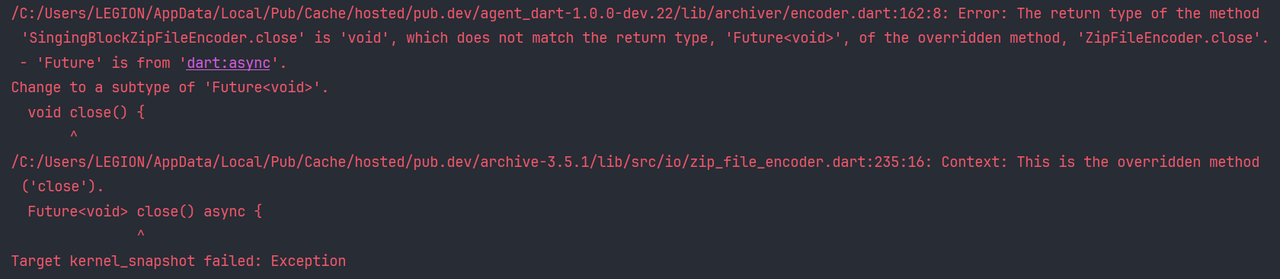
1. ZipFileEncoder.close and SingingBlockZipFileEncoder.close error:

Error

  • Go the agent_dart package location: agent_dart-1.0.0-dev.22/lib/archiver/encoder.dart:162:8

  • Replace:

    void close() {
      _encoder.writeBlock(_output);
      _encoder.endEncode();
      _output.close();
    }
    

    with:

    Future<void> close() async{
    _encoder.writeBlock(_output);
    _encoder.endEncode();
    await _output.close();
    }
    
2. minSdkVersion error:
  • Go the code location: example\android\app\build.gradle

  • Change the minSdkVersion to 23

    defaultConfig {
        minSdkVersion 23
        targetSdkVersion flutter.targetSdkVersion
        versionCode flutterVersionCode.toInteger()
        versionName flutterVersionName
    }
    

ℹ️ Additional Info

📄 Example file location: example/lib/main.dart
This package depends on the following dependencies:
  • agent_dart: ^1.0.0-dev.22
  • flutter_custom_tabs: ^2.0.0+1
  • flutter_secure_storage: ^9.2.1
  • shared_preferences: ^2.2.3
  • uni_links: ^0.5.1

所屬分類

依賴

依賴清單 5 項

原始碼儲存庫

使用此套件的專案

暫無相關資料。