搜尋套件、儲存庫與 APP 分類

flutter_list_view 封面
套件詳情v1.1.29

flutter_list_view

提供增強的列表視圖,包含跳轉索引、保持位置等功能。

AndroidiOSWebmacOSWindowsLinux
近 30 天下載
1.1萬
喜歡數
133
Pub 分數
140

安裝套件

flutter pub add flutter_list_view

套件介紹

根據套件公開資料產生的選型評估,僅供參考。

一個增強標準 ListView 的 Flutter 套件,提供跳轉索引導航、重建期間的位置持續性以及改進的捲動行為等進階功能。設計用於透過維持捲動狀態並在大型資料集中實現快速導航,為列表密集型應用提供更流暢的使用者體驗。適用於需要在多個平台高效且即時管理列表之應用程式。

適用情境

  • 大型數據列表,快速導航
  • 在更新後保持捲動位置
  • 長列表中的增強使用者體驗
  • 跨平台列表一致性
  • 動態內容重新加載時保持滾動狀態
  • 實現字母跳轉索引

主要特色

  • 快速導航的跳轉索引
  • 在重新建構期間保留捲動位置
  • 大型列表的優化效能
  • 支援所有主要的 Flutter 平台
  • 可自訂的索引指示器
  • 平滑滾動過渡

適合對象

  • 開發複雜列表介面的開發者
  • 動態或頻繁更新的清單應用程式
  • 需要直覺式清單導航的使用者
  • 跨平台行動與Web應用
  • 需要高效率列表渲染的應用程式

使用建議

  • 需要與現有清單邏輯仔細整合
  • 可能會稍微增加封裝大小
  • 最適合用於超過50項的清單
  • 對非標準清單佈局的自訂有限
  • 依賴穩定的 Flutter 版本相容性

原始 README

以下為關聯原始碼儲存庫的 README 原文快照,最新內容請造訪原始碼儲存庫。

Flutter List View

Enhance list view to support scroll to index, jump to index, header sticky, enable without scroll when insert data on top and turn performance to reused items.

Features

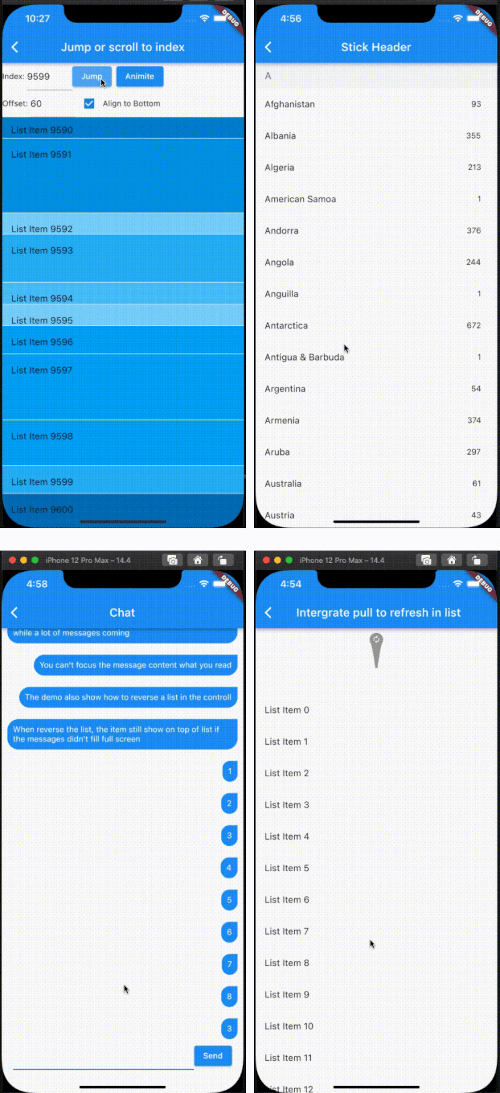
  1. Support the list view to jump to and scroll to index.
  2. Support for inserting data without scrolling
  3. Support for show top in reverse mode if the data can't fill the full viewport.
  4. Support sticky header.
  5. Support integrated pull_to_refresh
  6. When initializing data, allow for scrolling to specify an index.
  7. To save performance, flutter list_view always reuses the rendered item.
  8. Support to keep specifying items without reusing and disposing of them once the item is created.

[!NOTE]
The list item will be reuse when disableCacheItems=false and the invisible item will destroy. This mean, one item may be create or destroy multiple times. So The Item widget must not have any state, as it may lead to unforeseeable issues. If you want work same with list_view which item didn't destroy after create, please put onIsPermanent: (keyOrIndex) => true to FlutterListViewDelegate

FlutterListViewDelegate(
    (BuildContext context, int index) => _renderItem(index),
    childCount: messages.length,
    onItemKey: (index) => messages[index].id.toString(),
    // ...
    disableCacheItems: true,
    onIsPermanent: (keyOrIndex) => true,

Screen

Example

FlutterListView(
      delegate: FlutterListViewDelegate(
    (BuildContext context, int index) =>
        ListTile(title: Text('List Item ${data[index]}')),
    childCount: data.length,
  ))
Jump to index
flutterListViewController.jumpToIndex(100);

OR

/// Declare
FlutterListViewController controller = FlutterListViewController();
...
controller.sliverController
                      .jumpToIndex(100);
...
FlutterListView(
  controller: controller,
  delegate: FlutterListViewDelegate(
    (BuildContext context, int index) => Container(
      color: Colors.white,
      child: ListTile(title: Text('List Item ${data[index]}')),
    ),
    childCount: data.length,
  ))

If you want better user expierence, preferItemHeight or onItemHeight may set to.

  • preferItemHeight The package don't know the item's height, If you don't set, package alway think the item height is 50 util layout the item. If you know the height, you should set it.
  • onItemHeight like preferItemHeight, the function will used to get height of each item util the item layout.
Keep Position
_renderList() {
  return FlutterListView(
      reverse: true,
      delegate: FlutterListViewDelegate(
          (BuildContext context, int index) => Align(
                alignment: Alignment.centerRight,
                child: Padding(
                  padding: const EdgeInsets.all(10.0),
                  child: Container(
                    decoration: const BoxDecoration(
                        color: Colors.blue,
                        borderRadius: BorderRadius.only(
                            topLeft: Radius.circular(20),
                            bottomLeft: Radius.circular(20),
                            bottomRight: Radius.circular(20))),
                    child: Padding(
                      padding: const EdgeInsets.all(10.0),
                      child: Text(
                        chatListContents[index].msg,
                        style: const TextStyle(
                            fontSize: 14.0, color: Colors.white),
                      ),
                    ),
                  ),
                ),
              ),
          childCount: chatListContents.length,
          onItemKey: (index) => chatListContents[index].id.toString(),
          keepPosition: true,
          keepPositionOffset: 80,
          firstItemAlign: FirstItemAlign.end));
}

Notice: Keep positoin need implement onItemKey, the onItemKey used to identify the unique of item. The key should difference with other items' key. We use the key to know what position you insert to current list. if you insert a item before the rendered item, package should increase the scrollOffset.

Sticky header
Widget _renderHeader(String text) {
  return Container(
    color: const Color(0xFFF3F4F5),
    child: Padding(
      padding: const EdgeInsets.symmetric(horizontal: 16.0, vertical: 12.0),
      child: Text(
        text,
        style: const TextStyle(fontSize: 18, color: Color(0xFF767676)),
      ),
    ),
  );
}

Widget _renderItem(CountryModel itemData) {
  return Padding(
      padding: const EdgeInsets.only(right: 12.0),
      child: ListTile(
          title: Text(itemData.name), trailing: Text(itemData.phoneCode)));
}

@override
Widget build(BuildContext context) {
  return Scaffold(
    appBar: AppBar(title: const Text("Stick Header")),
    body: FlutterListView(
        delegate: FlutterListViewDelegate(
          (BuildContext context, int index) {
            var data = _countries[index];
            if (data is AlphabetHeader) {
              return _renderHeader(data.alphabet);
            } else {
              return _renderItem(data as CountryModel);
            }
          },
          childCount: _countries.length,
          onItemSticky: (index) => _countries[index] is AlphabetHeader,
        ),
        controller: controller),
  );
}

You can also check doc/stickyHeader.md

Integrate pull_to_refresh
@override
Widget build(BuildContext context) {
  return Scaffold(
    appBar: AppBar(
      title: const Text("Intergrate pull to refresh in list"),
    ),
    body: SmartRefresher(
      enablePullDown: true,
      enablePullUp: true,
      header: const WaterDropHeader(),
      footer: CustomFooter(
        builder: (context, mode) {
          Widget body;
          if (mode == LoadStatus.idle) {
            body = const Text("pull up load");
          } else if (mode == LoadStatus.loading) {
            body = const CupertinoActivityIndicator();
          } else if (mode == LoadStatus.failed) {
            body = const Text("Load Failed!Click retry!");
          } else if (mode == LoadStatus.canLoading) {
            body = const Text("release to load more");
          } else {
            body = const Text("No more Data");
          }
          return SizedBox(
            height: 55.0,
            child: Center(child: body),
          );
        },
      ),
      controller: _refreshController,
      onRefresh: _onRefresh,
      onLoading: _onLoading,
      child: FlutterListView(
          delegate: FlutterListViewDelegate(
        (BuildContext context, int index) =>
            ListTile(title: Text('List Item ${data[index]}')),
        childCount: data.length,
      )),
    ),
  );
}
Support to keep specifying items without reusing and disposing of them once the item is created.
FlutterListView(
  delegate: FlutterListViewDelegate(
      (BuildContext context, int index) =>
          Item(text: data[index].toString()),
      childCount: data.length,
      // If onItemKey is not given, the key is index
      // The example is indicate the "40" item will not be reused and disposed after it was created
      onIsPermanent: (key) => key == "40"))

所屬分類

原始碼儲存庫

使用此套件的專案