搜尋套件、儲存庫與 APP 分類

flutter_onboarding_screen 封面
套件詳情v2.0.2

flutter_onboarding_screen

一個 Flutter 套件,協助開發者建立應用程式的引導畫面。

AndroidiOSWebmacOSWindowsLinux
近 30 天下載
53
喜歡數
26
Pub 分數
135

安裝套件

flutter pub add flutter_onboarding_screen

套件介紹

根據套件公開資料產生的選型評估,僅供參考。

一個專為簡化行動與Web應用程式啟動畫面建立而設計的Flutter套件。它提供可自訂的捲軸介面,讓開發者能以流暢且互動的方式呈現介紹內容。該套件內建支援多個平台,包括Android、iOS、Web、macOS、Windows及Linux,確保跨裝置的一致啟動體驗。此套件易於整合,並能提升應用程式首次啟動時的使用者參與度。

適用情境

  • 應用入門流程
  • 用戶教程螢幕
  • 首次使用者體驗
  • 產品功能介紹
  • 多頁歡迎螢幕

主要特色

  • 預建構的入門輪播
  • 可客製化的 UI 組件
  • 跨平台相容性
  • 與 Flutter 的輕鬆整合
  • 支援動畫和過渡效果

適合對象

  • 新應用開發者
  • 以使用者體驗為導向的專案
  • 行動和網頁應用
  • 注重引導的應用程式
  • 最低設定要求

使用建議

  • 超出基本樣式的客製化功能有限
  • 依賴外部依賴項
  • 可能需要額外的狀態管理
  • 不太適合複雜的導航模式
  • 無內建分析追蹤

原始 README

以下為關聯原始碼儲存庫的 README 原文快照,最新內容請造訪原始碼儲存庫。

flutter onboarding screen

A new Flutter package for both android and iOS which help developer in creating a onboarding screen of their app.

Bitbucket open issues

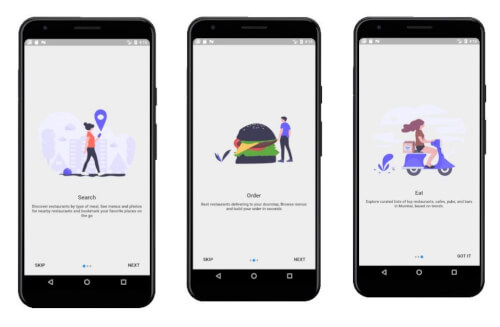
Screenshots

Usage

Example

To use this package :

  dependencies:
    flutter:
      sdk: flutter
    flutter_onboarding_screen:
How to use
class TestScreen extends StatelessWidget {
    /*here we have a list of OnbordingScreen which we want to have, each OnbordingScreen have a imagePath,title and an desc.
      */
  final List<OnbordingData> list = [
    OnbordingData(
      imagePath: "images/pic11.png",
      title: "Search",
      desc:"Discover restaurants by type of meal, See menus and photos for nearby restaurants and bookmark your favorite places on the go",
    ),
    OnbordingData(
      imagePath: "images/pic12.png",
      title: "Order",
      desc:"Best restaurants delivering to your doorstep, Browse menus and build your order in seconds",
    ),
    OnbordingData(
      imagePath: "images/pic13.png",
      title: "Eat",
      desc:"Explore curated lists of top restaurants, cafes, pubs, and bars in Mumbai, based on trends.",
    ),
  ];

  @override
  Widget build(BuildContext context) {
    /* remove the back button in the AppBar is to set automaticallyImplyLeading to false
  here we need to pass the list and the route for the next page to be opened after this. */
    return new IntroScreen(list,MaterialPageRoute(builder: (context) => NextScreen()),
    );
  }
}
Created & Maintained By

Tushar Nikam

  Stackoverflow Buy Me A Coffee

所屬分類

原始碼儲存庫

使用此套件的專案

暫無相關資料。