Add flutter_paypal_native as a dependency in your pubspec.yaml file. If you are targeting Android, make sure to read the Android Platform Views section [very important].
Android Platform Views
Paypal requires that you make changes to your AndroidManifest.xml
Prepare your app
Define the android.permission.INTERNET permission in the AndroidManifest.xml file of your application as follows:
android {
    ...

    compileOptions {
        sourceCompatibility JavaVersion.VERSION_1_8
        targetCompatibility JavaVersion.VERSION_1_8
    }

    defaultConfig {
        // You must have a minSdkVersion of API 21
        //(Android 5.0 Lollipop) or later.

        minSdkVersion 21
        ...
    }
}
Enable the SDK
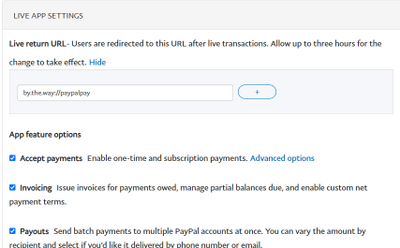
Select your app from the My Apps & Credentials page on the Developer Dashboard.
Enter a Return URL.
You can use an Android App Link registered within the Developer Console to handle SDK redirects.
Alternatively, you can use your application ID (typically referenced via BuildConfig.APPLICATION_ID) and register your application ID with ://paypalpay as the suffix. For example, if your application ID is com.paypal.app, input com.paypal.app://paypalpay in the Developer Console.
The return URL in the Developer Dashboard and the SDK must match exactly.
Note: If you change the return URL in the Developer Dashboard, PayPal must review your app again. The review period automatically begins any time the return URL changes.
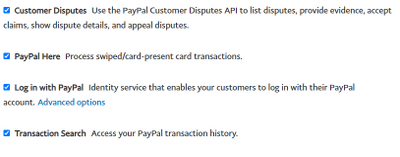
Select the Log in with PayPal checkbox and the Full name and Email checkboxes found within the Advanced options. These are scopes of the Identity API.
The version of the Cardinal Consumer Authentication library used in the PayPal SDK does not support AndroidX natively. To prevent runtime crashes when a buyer needs to be verified through 3D Secure, you should add android.enableJetifier=true to your android/gradle.properties file.
Application ID
Note: If your application ID contains underscores [ _ ] then you need to modify the returnUrl so that it forms a valid URI. For details, read this section or Customize return URL.
A return URL redirects users back to the originating page during a checkout flow. For most integrations, using your application ID and ://paypalpay is the simplest and best returnUrl to use as part of the CheckoutConfig. However, there are circumstances when you may need more control over the returnUrl, such as when your application ID has underscores.
Choose your custom return URL
Your custom return URL:
Can only use lowercase letters.
Can't contain any special characters.
Must end with ://paypalpay.
Must match the return URL on your developer dashboard.
To allow for seamless app switches, make your custom return URL unique. We recommend using reverse domain name notation.
If you're creating a custom return URL because your application ID contains underscores, replace the underscores with periods. For example, change com.paypal.example_payment_application to com.paypal.example.payment.application .
Modify the code
Copy the sample PayPal Mobile Checkout SDK code and paste it into the code for your mobile checkout page.
For both activities, replace YOUR-CUSTOM-SCHEME with the custom return URL that you chose in Step 1. In the example above, instead of com.paypal.example_payment_application, you'd use com.paypal.example.paypal.application.
Your app can now respond to authentication and web checkout deep links.
Migrating from V1?
If you are migrating from Plugin V0.x.x. or V1.x.x
You do not need to add custom activity to your flutter app anymore.
remove the following from your AndroidManifest.xml
import'dart:math';
import'package:flutter/material.dart';
import'package:flutter_paypal_native/flutter_paypal.dart';
import'package:flutter_paypal_native/str_helper.dart';
import'package:flutter_paypal_native/models/environment.dart';
import'package:flutter_paypal_native/models/currency_code.dart';
import'package:flutter_paypal_native/models/purchase_unit.dart';
import'package:flutter_paypal_native/models/user_action.dart';
import'package:flutter_paypal_native/models/order_callback.dart';
voidmain() async {
runApp(constMyApp());
}
classMyAppextendsStatefulWidget{
constMyApp({Key? key}) : super(key: key);
@overrideState<MyApp> createState() => _MyAppState();
}
class_MyAppStateextendsState<MyApp> {
final _flutterPaypalPlugin = FlutterPaypal.instance;
// log queueList<String> logQueue = [];
@overridevoidinitState() {
super.initState();
initPayPal();
}
voidinitPayPal() async {
//set debugMode for error loggingFlutterPaypal.isDebugMode = true;
//initiate payPal pluginawait _flutterPaypalPlugin.init(
//your app id !!! No Underscore!!! see readme.md for help
returnUrl:
"com.piccmaq.flutter.paypal.flutter.paypal.example://paypalpay",
//client id from developer dashboard
clientID: "AZzDS9l0jS.....",
//sandbox, staging, live etc
payPalEnvironment: FPayPalEnvironment.sandbox,
//what currency do you plan to use? default is US dollars
currencyCode: FPayPalCurrencyCode.usd,
//action paynow?
action: FPayPalUserAction.payNow,
);
//call backs for payment
_flutterPaypalPlugin.setPayPalOrderCallback(
callback: FPayPalOrderCallback(
onCancel: () {
//user canceled the paymentshowResult("cancel");
},
onSuccess: (data) {
//successfully paid//remove all items from queue
_flutterPaypalPlugin.removeAllPurchaseItems();
String orderID = data.orderId ?? "";
showResult("Order successful $orderID");
},
onError: (data) {
//an error occuredshowResult("error: ${data.reason}");
},
onShippingChange: (data) {
//the user updated the shipping addressshowResult(
"shipping change: ${data.shippingAddress?.addressLine1 ?? ""}",
);
},
),
);
}
@overrideWidgetbuild(BuildContext context) {
returnMaterialApp(
home: Scaffold(
appBar: AppBar(
title: constText('Plugin example app'),
),
body: Center(
child: Column(
children: [
for (String t in logQueue) Text(t),
ElevatedButton(
child: constText("Do payment"),
onPressed: () {
//add item to cart. Max is between 4 to 8if (_flutterPaypalNativePlugin.canAddMorePurchaseUnit) {
_flutterPaypalPlugin.addPurchaseUnit(
FPayPalPurchaseUnit(
// random prices
amount: Random().nextDouble() * 100,
///please use your own algorithm for referenceId. Maybe ProductID?
referenceId: FPayPalStrHelper.getRandomString(16),
),
);
// initPayPal();
_flutterPaypalPlugin.makeOrder(
action: FPayPalUserAction.payNow,
);
}
},
),
],
),
),
),
);
}
// all to log queueshowResult(String text) {
logQueue.add(text);
setState(() {});
}
}
Notice
Max Number of items you can add to purchase units is between 4-6.
Or else Paypal will throw an Exception!
  if (_flutterPaypalNativePlugin.canAddMorePurchaseUnit) {
    _flutterPaypalPlugin.addPurchaseUnit(
      FPayPalPurchaseUnit(
        // random prices
        amount: Random().nextDouble() * 100,

        ///please use your own algorithm for referenceId. Maybe ProductID?
        referenceId: FPayPalStrHelper.getRandomString(16),
      ),
    );
  }
Troubleshooting Tips
if you have trouble using this library, read these:
Make sure your applicationId is registered in the developer dashboard as applicationID://paypalpay e.g com.piccmaq.flutter.paypal.flutter.paypal.example://paypalpay . after registering it, you may have to wait 3 hours for paypal to review it. You may also have to register your privacy url too.
underscore is not allowed e.g com.piccmaq.flutter.paypal.flutter_paypal_example://paypalpay is not allowed, only com.piccmaq.flutter.paypal.flutter.paypal.example://paypalpay
if you are using an emulator or physical phone for testing in debug mode and you keep getting java.lang.ClassNotFoundException, make sure that all applications with the app id are uninstalled. if you have multiple account on your mobile phone, there is the possiblity that flutter installed a new app on your phone -so you have to uninstall that first.
Caused by: java.lang.ClassNotFoundException: Didn't find class "com.paypal.pyplcheckout.home.view.activities.PYPLInitiateCheckoutActivity" on path: DexPathList[[zip file "/data/app/com.piccmaq.flutter_paypal_native_example-not-b8OWFxjJhuMcKVK0gA==/base.apk"],nativeLibraryDirectories=[/data/app/com.piccmaq.flutter_paypal_native_example-not-b8OWFxjJhuMcKVK0gA==/lib/arm64, /data/app/com.piccmaq.flutter_paypal_native_example-not-b8OWFxjJhuMcKVK0gA==/base.apk!/lib/arm64-v8a, /system/lib64, /hw_product/lib64, /system/product/lib64]]
if you have a problem with the android:label after using the package, add these to the application tag of your Androidmanifest.xml