flutter_popup
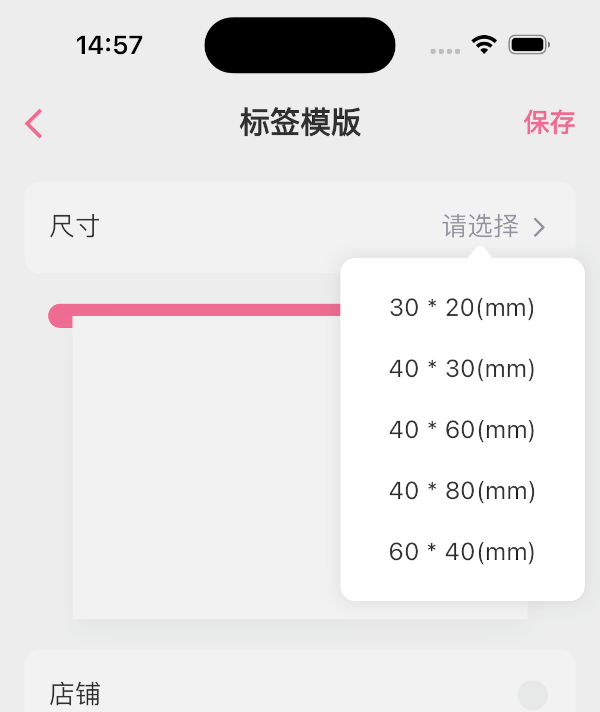
The flutter_popup package is a convenient tool that enables you to display a straightforward and customizable popup within your Flutter application. It offers a highlight feature that can be utilized to direct the user's attention to a specific area as needed.
Getting Started
How to use
dependencies:
  flutter_popup: ^latest_version
import 'package:flutter_popup/flutter_popup.dart' ;
CustomPopup (
content: Text ('George says everything looks fine' ),
child: Icon (Icons .help),
),
CustomPopup (
arrowColor: Colors .orange,
barrierColor: Colors .green.withOpacity (0.1 ),
backgroundColor: Colors .white,
content: Text ('George says everything looks fine' ),
child: Icon (Icons .help),
),
CustomPopup (
content: _Slider (),
position: PopupPosition .top,
child:Text ('slider' ),
)
CustomPopup (
content: Column (
mainAxisSize: MainAxisSize .min,
children: List .generate (5 , (index) => Text ('menu$index ' )),
),
child: const Icon (Icons .add_circle_outline),
)
Container (
decoration: BoxDecoration (color: Colors .white),
padding: EdgeInsets .symmetric (vertical: 10 ),
child: Row (
mainAxisAlignment: MainAxisAlignment .spaceAround,
children: [
CustomPopup (
showArrow: false ,
contentPadding:EdgeInsets .symmetric (horizontal: 30 , vertical: 10 ),
barrierColor: Colors .transparent,
contentDecoration: BoxDecoration (color: Colors .white),
content: SizedBox (
width: double .infinity,
child: Column (
mainAxisSize: MainAxisSize .min,
crossAxisAlignment: CrossAxisAlignment .start,
children: List .generate (4 ,(index) => Text ('item$index ' ),),),),
child: Text ('filter1' ),
),
Text ('filter2' ),
Text ('filter3' ),
],
),
)
final popupKey = GlobalKey <CustomPopupState >();
CustomPopup (
key: popupKey,
content: Text ('George says everything looks fine' ),
child: Icon (Icons .help),
);
popupKey.currentState?.show ();
last
Our full-stack freelance team is opening to new projects
If you have any questions about Flutter, or if you need me to customize a Flutter application for you, please feel free to contact me:
QQ: 965471570 Gmail: herowws90@gmail.com
如果您有任何关于Flutter的问题,或者需要我为您定制一个Flutter应用程序,请联系我: QQ:965471570 Gmail:herowws90@gmail.com