搜尋套件、儲存庫與 APP 分類

flutter_process_text 封面
套件詳情v1.1.2

flutter_process_text

Flutter 插件,用於監聽進程文字串流以取得連續的進程文字意圖資料。

AndroidiOS
近 30 天下載
60
喜歡數
35
Pub 分數
150

安裝套件

flutter pub add flutter_process_text

套件介紹

根據套件公開資料產生的選型評估,僅供參考。

一個 Flutter 插件,可啟用對程序文字串流的監聽,讓應用程式能從外部來源接收連續的意圖資料。此插件專為 Android 與 iOS 所設計,促進與系統層級文字處理工作流程的無縫整合。該插件可即時捕捉文字意圖,非常適合用於剪貼簿監控、文字分享,或與其他應用程式的文字輸出整合等使用情境。本插件以簡易性與跨平台相容性為核心設計,為開發者提供直覺的 API 來存取傳入的文字串流。

適用情境

  • 剪貼簿監控
  • 文字共享整合
  • 即時文字處理
  • 跨應用文本通訊
  • 基於意圖的資料採集

主要特色

  • 即時文字流監聽
  • 跨平台支援(Android 與 iOS)
  • 用於意圖資料的簡單 API
  • 支援連續文字流
  • 內建串流處理

適合對象

  • 開發文字分享應用的開發者
  • 需要剪貼板互動的應用程式
  • 基於意圖的應用程式
  • 跨平台文字處理工具
  • 用於提升效率或自動化的外掛程式

使用建議

  • Android 上需要正確的權限
  • 僅限文字意圖資料
  • 可能需要設定背景執行
  • 不適合非意圖文本來源
  • iOS 可能具有有限的後台功能

原始 README

以下為關聯原始碼儲存庫的 README 原文快照,最新內容請造訪原始碼儲存庫。

Flutter Process Text Plugin

Flutter_Process_Text

GitHub GitHub code size in bytes GitHub language count GitHub last commit

Compatibility

✅   Android
❌   iOS (active issue: iOS support)

Show some :heart: and :star: the repo

GitHub followers

Why use Flutter Process Text?

Flutter Process Text Plugin is known for :

Flutter Process Text Flutter Process Text
Fast, performant & compatible Free & Open-source
Production ready Make App Reactive

Features

✅   Listen process text stream
✅   Open app from process text intent activity
✅   Get pending intent text


Demo

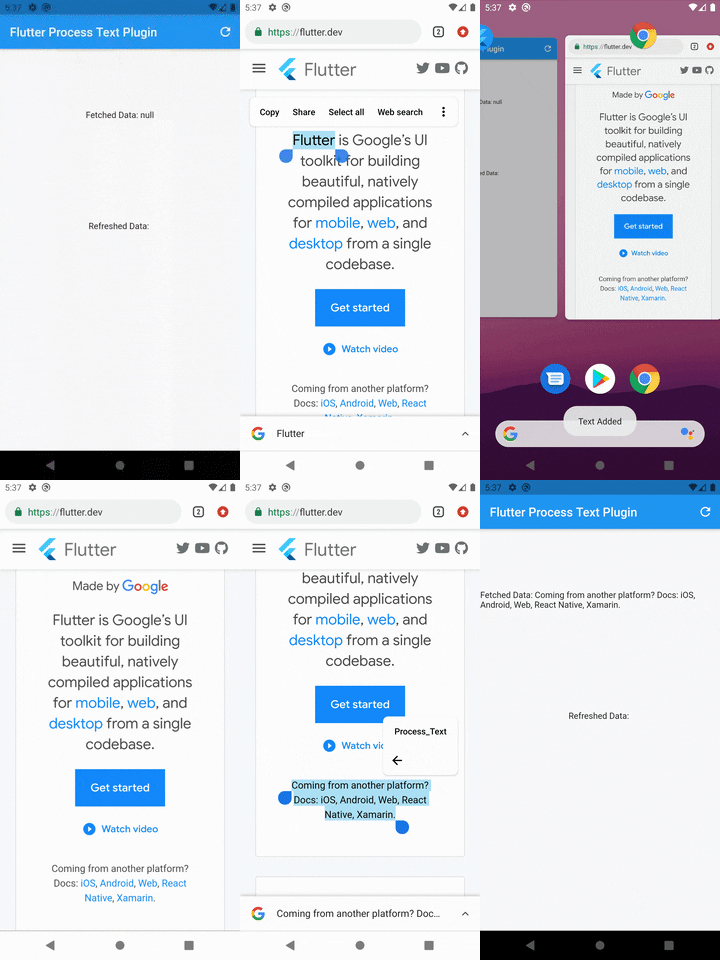
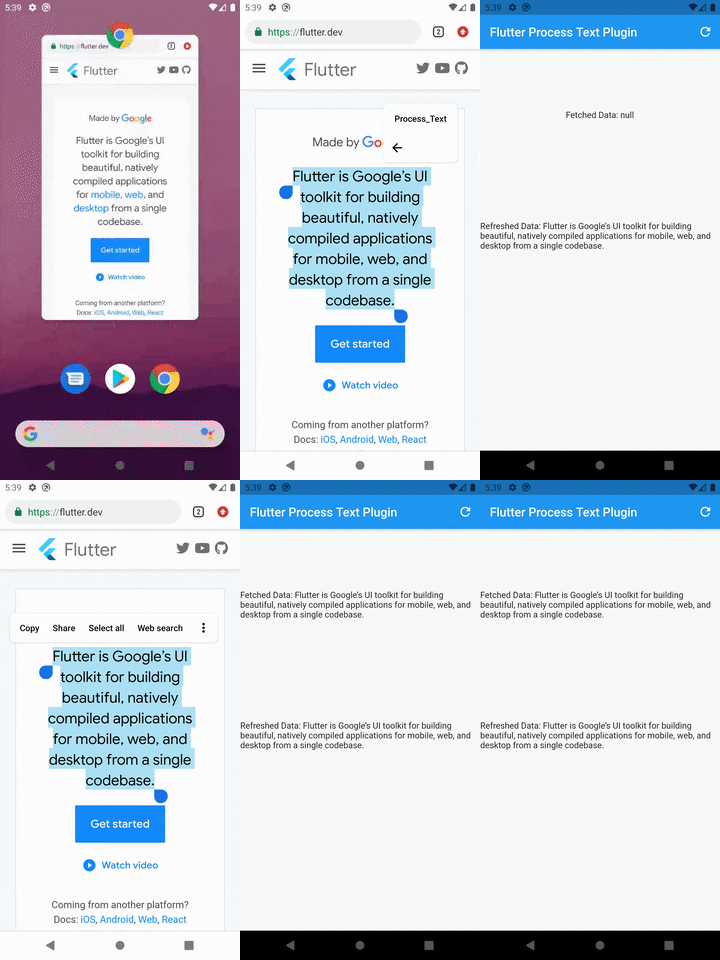
App Running App Not Running
App Running AppNotRunning

Quick start

Step 1: Include plugin to your project
dependencies:
  flutter_process_text: <latest version>

Run pub get and get packages.

Step 2: Create a new activity

Add the below code to your AndroidManifest.xml in the android\app\src\main\ folder.

  <activity 
        android:name=".ProcessTextActivity" 
        android:label="Process_Text"
        android:theme="@android:style/Theme.NoDisplay">
          <intent-filter>
              <action android:name="android.intent.action.PROCESS_TEXT" />
              <data android:mimeType="text/plain"/>
              <category android:name="android.intent.category.DEFAULT" />
          </intent-filter>
  </activity>

Note: You may change the android:name from ProcessTextActivity to anything you want. also change the android:label from Process_Text to the process action text that you want to display.

Step 3: Create new activity class

Create a new Java/Kotlin file with the same name as android:name in step 2.

Copy the below code and paste in the newly created file.

package com.divyanshushekhar.flutter_process_text_example;

import com.divyanshushekhar.flutter_process_text.FlutterProcessTextPlugin;
import io.flutter.embedding.android.FlutterActivity;
import android.os.Bundle;

public class ProcessTextActivity extends FlutterActivity {

    @Override
    public void onCreate(Bundle savedInstanceState) {
        super.onCreate(savedInstanceState);
        boolean issAppRunning = MainActivity.getIsAppRunning();
        FlutterProcessTextPlugin.listenProcessTextIntent(issAppRunning);
    }
}

Note: Don't forget to change the package name in the above code.

Step 4: Changes in MainActivity

Make the necessary changes in the MainActivity class.

package com.divyanshushekhar.flutter_process_text_example;

import io.flutter.embedding.android.FlutterActivity;

import android.app.ActivityManager;
import android.content.Context;
import android.os.Bundle;
import java.util.List;

public class MainActivity extends FlutterActivity {
   private static boolean isAppRunning;

   public static boolean getIsAppRunning() {
     return isAppRunning;
   }

   @Override
   public void onCreate(Bundle savedInstanceState) {
       super.onCreate(savedInstanceState);
        isAppRunning = isAppRunning(this);
   }

    public static boolean isAppRunning(Context context) {
        final String packageName = context.getPackageName();
        final ActivityManager activityManager = (ActivityManager) context.getSystemService(Context.ACTIVITY_SERVICE);
        final List<ActivityManager.RunningAppProcessInfo> processInfo = activityManager.getRunningAppProcesses();
        if (processInfo != null)
        {
            for (final ActivityManager.RunningAppProcessInfo info : processInfo) {
                if (info.processName.equals(packageName)) {
                    return true;
                }
            }
        }
        return false;
    }
}
Step 5: Connect to flutter

First thing you need to do is to call the initialize method from the FlutterProcessText class in the initState() {} of the page.

FlutterProcessText.initialize();

OR

FlutterProcessText.initialize(
    showConfirmationToast: true,
    showRefreshToast: true,
    showErrorToast: true,
    confirmationMessage: "Text Added",
    refreshMessage: "Got all Text",
    errorMessage: "Some Error",
);
Step 6: Working with stream

There are two ways to work with stream, either create a StreamSubscription to listen for the incoming data or store the Stream and use it in StreamBuilder.

  late final StreamSubscription _processText;
  String text? = '';

  @override
  void initState() {
    super.initState();
    FlutterProcessText.initialize(
      showToast: true,
      confirmationMessage: "Text Added",
      refreshMessage: "Got all Text",
      errorMessage: "Some Error",
    );

    _processText = FlutterProcessText.getProcessTextStream.listen((event) {
      setState(() {
        text = event;
      });
    });
  }

  @override
  void dispose() {
    super.dispose();
    _processText.cancel();
  }

OR

late final Stream<String> _processText;
_processText = FlutterProcessText.getProcessTextStream;

Now use the stream in the StreamBuilder.

StreamBuilder<String?>(
  stream: _processText,
  builder: (context, snapshot) {
    return Text('Fetched Data: ${snapshot.data}');
  },
),
Get pending data

Get the pending data by calling the refreshProcessText method in FlutterProcessText class.

String? text = await FlutterProcessText.refreshProcessText;

Project Created & Maintained By

Divyanshu Shekhar

Copyright & License

Code and documentation Copyright (c) 2021 Divyanshu Shekhar. Code released under the BSD 3-Clause License.

所屬分類

原始碼儲存庫

使用此套件的專案

暫無相關資料。