搜尋套件、儲存庫與 APP 分類

flutter_screen_lock 封面
套件詳情v9.2.2+2

flutter_screen_lock

提供在 iOS 和 Android 上鎖定螢幕的功能。除了密碼外,還可以使用生物辨識驗證。

AndroidiOSWebmacOSWindowsLinux
近 30 天下載
3830
喜歡數
309
Pub 分數
160

安裝套件

flutter pub add flutter_screen_lock

套件介紹

根據套件公開資料產生的選型評估,僅供參考。

Flutter Screen Lock 是一個跨平台套件,可在 Android、iOS 及其他支援平台實現螢幕鎖定。它支援密碼與生物辨識驗證(如 Face ID 或指紋),以保護應用介面。適合需要增強安全性之應用,例如銀行或私人資料存取,可與 Flutter 生態系統無縫整合。此套件利用原生平台功能實現可靠驗證,確保跨裝置提供一致的使用者體驗。

適用情境

  • 安全應用存取
  • 保護敏感數據
  • 生物辨識登入
  • 密碼保護
  • 應用鎖功能
  • 注重隱私的應用程式

主要特色

  • 跨平台支援
  • 生物識別認證
  • 密碼備用
  • 原生整合
  • 簡易設定
  • 可自定義的使用者介面

適合對象

  • 需要高安全性應用
  • 金融或健康應用
  • 私人資料儲存
  • 使用者隱私工具
  • 開發人員建構應用鎖

使用建議

  • 需要平台特定權限
  • 某些平台的自訂功能有限
  • Web 支援可能有限制
  • 取決於設備生物識別功能的可用性
  • 不適用於非互動式螢幕
  • 可能需要為網頁進行額外設定

原始 README

以下為關聯原始碼儲存庫的 README 原文快照,最新內容請造訪原始碼儲存庫。

Flutter Screen Lock

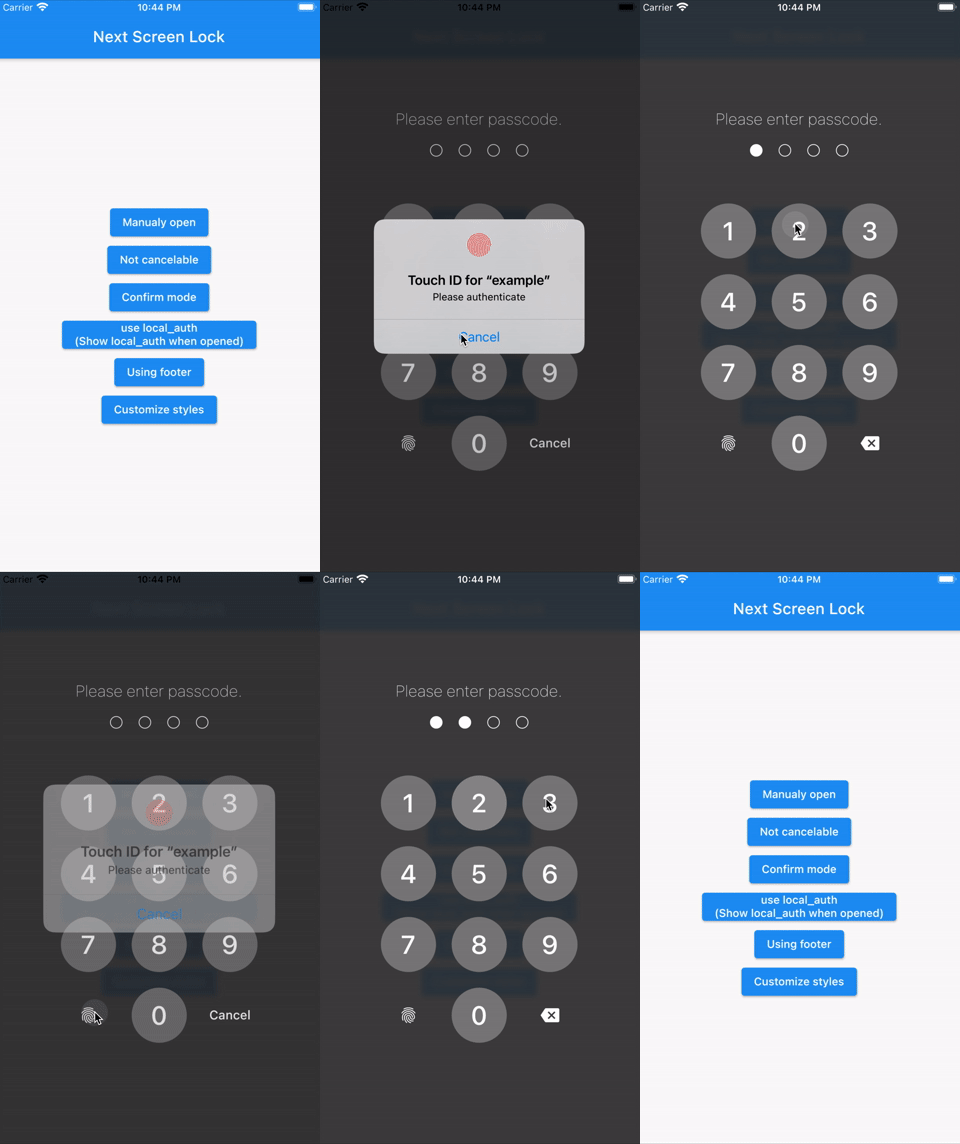
This Flutter plugin provides an feature for screen lock. Enter your passcode to unlock the screen. You can also use biometric authentication as an option.

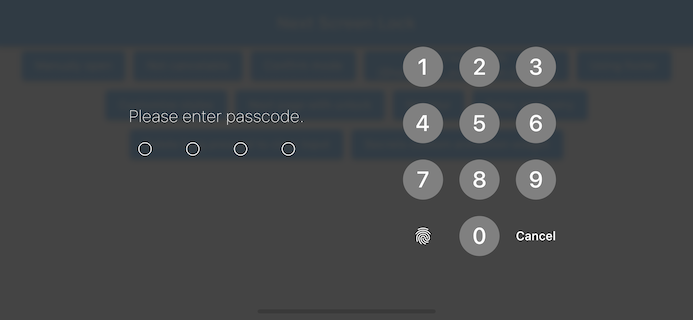
Landscape view

Features

  • By the length of the character count
  • You can change Cancel and Delete widget
  • Optimizes the UI for device size and orientation
  • You can disable cancellation
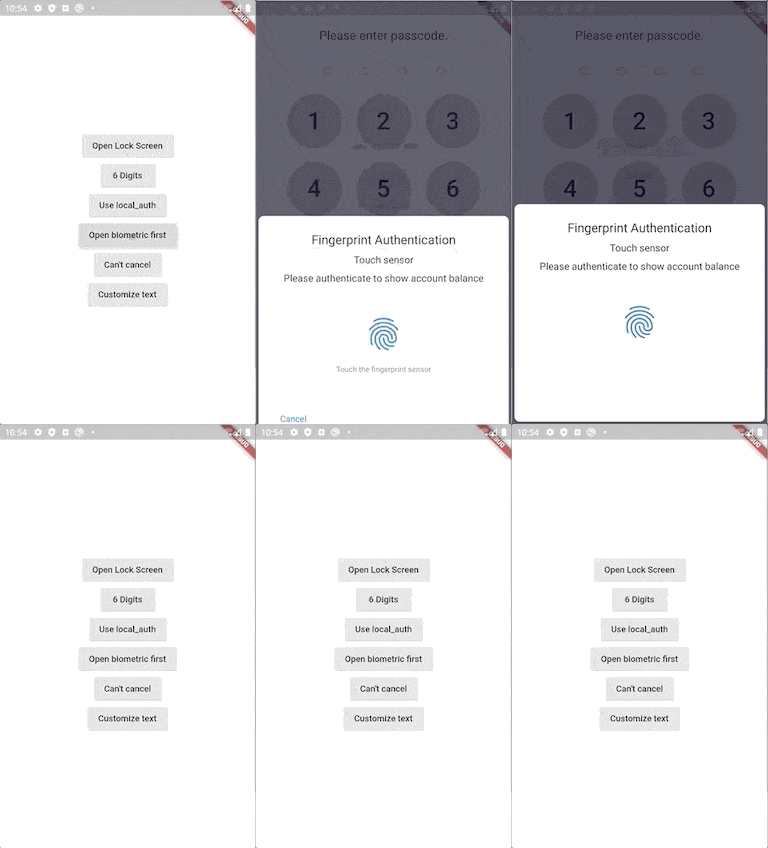
  • You can use biometrics (local_auth plugin)
  • Biometrics can be displayed on first launch
  • Unlocked callback
  • You can specify a mismatch event.
  • Limit the maximum number of retries
  • Keyboard input support for devices with physical keyboards
    • Number keys (0-9) and numpad input
    • Backspace key for deletion
    • Enter key for confirmation
    • Escape key for cancellation

Usage

You can easily lock the screen with the following code.
To unlock, enter correctString.

Simple

If you give the same input as correctString, it will automatically close the screen.

import 'package:flutter_screen_lock/flutter_screen_lock.dart';

screenLock(
  context: context,
  correctString: '1234',
);
Block user

Provides a screen lock that cannot be cancelled.

import 'package:flutter_screen_lock/flutter_screen_lock.dart';

screenLock(
  context: context,
  correctString: '1234',
  canCancel: false,
);
Passcode creation

You can have users create a new passcode with confirmation

import 'package:flutter_screen_lock/flutter_screen_lock.dart';

screenLockCreate(
  context: context,
  onConfirmed: (value) => print(value), // store new passcode somewhere here
);
Control the creation state
import 'package:flutter_screen_lock/flutter_screen_lock.dart';

final inputController = InputController();

screenLockCreate(
  context: context,
  inputController: inputController,
);

// Somewhere else...
inputController.unsetConfirmed(); // reset first and confirm input
Use local_auth

Add the local_auth package to pubspec.yml.

It includes an example that calls biometrics as soon as screenLock is displayed in didOpened.

import 'package:flutter_screen_lock/flutter_screen_lock.dart';
import 'package:local_auth/local_auth.dart';
import 'package:flutter/material.dart';

Future<void> localAuth(BuildContext context) async {
  final localAuth = LocalAuthentication();
  final didAuthenticate = await localAuth.authenticateWithBiometrics(
      localizedReason: 'Please authenticate');
  if (didAuthenticate) {
    Navigator.pop(context);
  }
}

screenLock(
  context: context,
  correctString: '1234',
  customizedButtonChild: Icon(Icons.fingerprint),
  customizedButtonTap: () async => await localAuth(context),
  didOpened: () async => await localAuth(context),
);
Fully customize

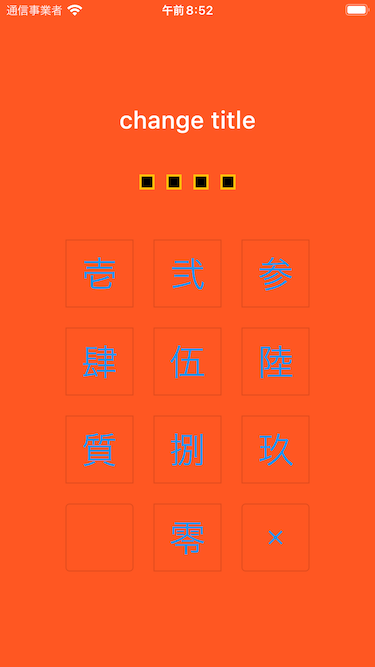
You can customize every aspect of the screenlock. Here is an example:

import 'package:flutter/material.dart';
import 'package:flutter_screen_lock/flutter_screen_lock.dart';

screenLockCreate(
  context: context,
  title: const Text('change title'),
  confirmTitle: const Text('change confirm title'),
  onConfirmed: (value) => Navigator.of(context).pop(),
  config: const ScreenLockConfig(
    backgroundColor: Colors.deepOrange,
  ),
  secretsConfig: SecretsConfig(
    spacing: 15, // or spacingRatio
    padding: const EdgeInsets.all(40),
    secretConfig: SecretConfig(
      borderColor: Colors.amber,
      borderSize: 2.0,
      disabledColor: Colors.black,
      enabledColor: Colors.amber,
      height: 15,
      width: 15,
      build: (context,
              {required config, required enabled}) =>
          Container(
        decoration: BoxDecoration(
          shape: BoxShape.rectangle,
          color: enabled
              ? config.enabledColor
              : config.disabledColor,
          border: Border.all(
            width: config.borderSize,
            color: config.borderColor,
          ),
        ),
        padding: const EdgeInsets.all(10),
        width: config.width,
        height: config.height,
      ),
    ),
  ),
  keyPadConfig: KeyPadConfig(
    buttonConfig: StyledInputConfig(
      textStyle:
          StyledInputConfig.getDefaultTextStyle(context)
              .copyWith(
        color: Colors.orange,
        fontWeight: FontWeight.bold,
      ),
      buttonStyle: OutlinedButton.styleFrom(
        shape: const RoundedRectangleBorder(),
        backgroundColor: Colors.deepOrange,
      ),
    ),
    displayStrings: [
      '零',
      '壱',
      '弐',
      '参',
      '肆',
      '伍',
      '陸',
      '質',
      '捌',
      '玖'
    ],
  ),
  cancelButton: const Icon(Icons.close),
  deleteButton: const Icon(Icons.delete),
);

Version migration

8.x to 9 migration
  • Change screenLockConfig parameter to config
  • Change keyPadConfig parameter to config
7.x to 8 migration
  • Change all callback names from didSomething to onSomething
  • Change screenLock with confirm: true to screenLockCreate
  • Change ScreenLock with confirm: true to ScreenLock.create
  • Replace StyledInputConfig with KeyPadButtonConfig
  • Replace spacingRatio with fixed value spacing in Secrets
6.x to 7 migration
  • Requires dart >= 2.17 and Flutter 3.0
  • Replace InputButtonConfig with KeyPadConfig.
  • Change delayChild to delayBuilder.
    delayBuilder is no longer displayed in a new screen. Instead, it is now located above the Secrets.
  • Accept BuildContext in secretsBuilder.
5.x to 6 migration
  • ScreenLock does not use Navigator.pop internally anymore.
    The developer should now pop by themselves when desired.
    screenLock call will pop automatically if onUnlocked is null.
4.x to 5 migration

Import name has changed from:

import 'package:flutter_screen_lock/functions.dart';

to

import 'package:flutter_screen_lock/flutter_screen_lock.dart';

Apps that use this library

TimeKey

Support me!

Buy Me A Coffee

所屬分類

原始碼儲存庫

使用此套件的專案