搜尋套件、儲存庫與 APP 分類

flutter_screenshot_google_street_view 封面
套件詳情v0.0.2

flutter_screenshot_google_street_view

一個用於捕獲 Google 地圖街景截圖的 Flutter 套件

AndroidiOSWeb
近 30 天下載
34
喜歡數
1
Pub 分數
150

安裝套件

flutter pub add flutter_screenshot_google_street_view

套件介紹

根據套件公開資料產生的選型評估,僅供參考。

一個 Flutter 套件,讓開發者能在應用程式中從 Google Street View 捕獲螢幕截圖。它能無縫整合至 Android、iOS 與 Web 平台,讓使用者能夠對街景影像進行視覺快照。此套件簡化了嵌入與互動 Google Street View API 的流程,非常適合需要視覺記錄或分享真實世界視角的位置相關應用程式。以 Dart 為基礎,確保跨平台的一致性與易用性。

適用情境

  • 為旅行應用捕捉街景影像
  • 在房地產應用中生成視覺報告
  • 支援導航輔助工具的影像參考
  • 啟用街景的用戶產生內容
  • 在社交功能中共享位置視覺效果

主要特色

  • 跨平台支援(Android、iOS、Web)
  • 與 Google 地圖街景 API 的簡單整合
  • 截圖捕獲功能
  • 跨平台一致的使用者介面
  • 輕量級且專注於截圖任務

適合對象

  • 旅行和地圖應用
  • 房地產和物業可視化工具
  • 基於位置的社交平台
  • 導航與路徑尋找應用
  • 字段數據採集系統

使用建議

  • 需要有效的 Google 地圖 API 金鑰
  • 取決於 Google Street View 的可用性
  • 可能根據API計畫有使用限制
  • Web 支援可能因瀏覽器而異
  • 移動平台所需的額外權限

原始 README

以下為關聯原始碼儲存庫的 README 原文快照,最新內容請造訪原始碼儲存庫。

Flutter Screenshot Google Street View

Important Note

For accurate testing and functionality validation, it is essential to test this package on a physical device rather than an emulator.

This package allows capturing and displaying Google Street View images in Flutter applications.

Features

  • Street View image capture
  • Display of captured images
  • Customizable capture settings

Getting started

To start using this package, make sure you have a Google Maps API key enabled for the Street View service.

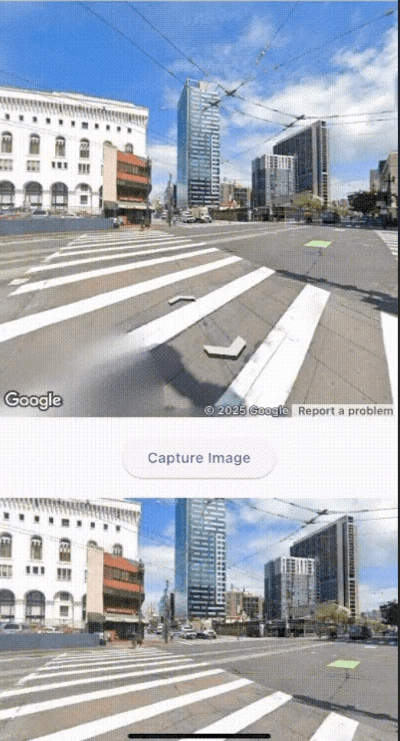
Requirements
Android
  • Minimum SDK: 20
  • Required permissions in AndroidManifest.xml:
<uses-permission android:name="android.permission.INTERNET"/>
<uses-permission android:name="android.permission.ACCESS_FINE_LOCATION"/>
<uses-permission android:name="android.permission.ACCESS_COARSE_LOCATION"/>
  • API key in AndroidManifest.xml:
<meta-data
    android:name="com.google.android.geo.API_KEY"
    android:value="API_KEY"/>
iOS
  • Minimum version: 14.0
  • Configure API key in AppDelegate.swift:
GMSServices.provideAPIKey("API_KEY")
API Configuration
  1. Get an API key at https://cloud.google.com/maps-platform/
  2. Enable Google Maps SDK:
    • Maps SDK for Android
    • Maps SDK for iOS
    • Street View Static API

Usage

Here's an example of how to use the StreetViewCapture and StreetViewPreview widgets:

import 'package:flutter/material.dart';
import 'package:google_maps_flutter/google_maps_flutter.dart';
import 'package:flutter_screenshot_google_street_view/flutter_screenshot_google_street_view.dart';

void main() {
  runApp(MyApp());
}

class MyApp extends StatelessWidget {
  @override
  Widget build(BuildContext context) {
    return MaterialApp(
      home: Scaffold(
        appBar: AppBar(title: Text('Street View Example')),
        body: StreetViewExample(),
      ),
    );
  }
}

class StreetViewExample extends StatefulWidget {
  @override
  _StreetViewExampleState createState() => _StreetViewExampleState();
}

class _StreetViewExampleState extends State<StreetViewExample> {
  String? _imageUrl;

  @override
  Widget build(BuildContext context) {
    return Column(
      children: [
        StreetViewCapture(
          initialPosition: LatLng(37.7749, -122.4194), // San Francisco
          config: StreetViewConfig(apiKey: 'API_KEY'),
          onImageCaptured: (imageUrl, position) {
            setState(() {
              _imageUrl = imageUrl;
            });
          },
        ),
        if (_imageUrl != null)
          StreetViewPreview(
            imageUrl: _imageUrl!,
            fit: BoxFit.cover,
          ),
      ],
    );
  }
}

Additional information

For more information about contributing to the package or reporting issues, visit the project repository.

所屬分類

依賴

依賴清單 2 項

原始碼儲存庫

使用此套件的專案

暫無相關資料。