搜尋套件、儲存庫與 APP 分類

flutter_social_textfield 封面
套件詳情v0.1.2

flutter_social_textfield

TextEditingController 和 RichText / TextSpan 建構器,使用正則表達式偵測標籤、URL 和提及。也支援點擊功能。

AndroidiOSWebmacOSWindowsLinux
近 30 天下載
3020
喜歡數
97
Pub 分數
150

安裝套件

flutter pub add flutter_social_textfield

套件介紹

根據套件公開資料產生的選型評估,僅供參考。

一個增強文字輸入的Flutter套件,提供社群媒體風格的功能,包括使用正則表達式自動偵測與樣式化標籤、URL 和提及。它與 TextEditingController 集成,並透過 RichText 和 TextSpan 支援這些元素的點擊互動。適用於即時通訊應用、社交平台或任何需要具備互動內容的豐富文字編輯應用程式。可在所有主要平台運作:Android、iOS、Web、macOS、Windows 和 Linux。

適用情境

  • 社群媒體應用程式評論
  • 具有可點擊連結的聊天應用
  • 訊息中的使用者標記
  • 具有動態樣式的富文本輸入
  • 帶有元數據強調的內容創作工具

主要特色

  • 話題標籤檢測與樣式
  • URL 與提及的自動連結
  • 可點擊的文字片段
  • RichText 集成
  • 基於正則表達式的解析
  • 跨平台相容性

適合對象

  • 開發社交應用的開發者
  • 需要富文本輸入的團隊
  • 包含使用者產生內容的應用程式
  • 互動式訊息介面
  • 可自訂的文字編輯器

使用建議

  • 需要仔細調整正則表達式以處理邊緣情況
  • 可能需要對長文字進行效能優化
  • 僅限基本格式化,不支援進階樣式
  • 無內建表情符號選擇器
  • 取決於外部正則邏輯的準確性

原始 README

以下為關聯原始碼儲存庫的 README 原文快照,最新內容請造訪原始碼儲存庫。

flutter_social_textfield

Overview

A Flutter plugin that helps detection of common social media contents. The current position of the cursor is used for detecting content. Current detection types are:

  • HashTag (#): Texts start with #
  • Mention (@): Text start with @ sign
  • Web Links: Can detect web links
  • Emojis: can detect emojis [thanks @moazh]

You can see the supported detection types from DetectedType enum

enum DetectedType{
    mention, //By Default texts starting with @sign
    hashtag,  //By default, texts starting with #hashtag
    url, //By default texts starting with http://xxx.yyy or https://aaa.bbb 
    plain_text //Any other type falls into this.
}

You can change the relevant regex for that type if you want, which has been mentioned in Configuring the Text Editing Controller part.

Getting Started

SocialTextField is basically an improved Text Editing Controller, so you can just assign text controller to any text editing widget that you want.

_textEditingController = SocialTextEditingController();

TextField(
    controller: _textEditingController,
    expands: true,
    maxLines: null,
    minLines: null,
    decoration: InputDecoration(
    hintText: "Please Enter a Text"
    ),
)

Configuring the Text Editing Controller

SocialTextEditingController can be configured by calling configuration methods.

There are 2 setter methods for this.

  • setTextStyle: Change how detected content shown.

    setTextStyle(DetectedType.mention, TextStyle(...)

  • setRegexp: Override the detection regexp

    setRegexp(DetectedType.url, RegExp("your_own_regex_fr_this_type"))

It is recommended to set these values on initialization;

_textEditingController = SocialTextEditingController()
    ..setTextStyle(DetectedType.mention, TextStyle(color: Colors.purple,backgroundColor: Colors.purple.withAlpha(50)))
    ..setRegexp(DetectedType.url, RegExp("your_own_regex_fr_this_type"));

Listening Content Detection Events

One of the main reasons that i want to create this plugin was that i needed to listen detection events from different widgets. So flutter_social_textfield provides a stream for detections so you can subscribe and listen events when needed.

StreamSubscription<SocialContentDetection> _streamSubscription;

@override
void initState() {
super.initState();
_textEditingController = SocialTextEditingController()
..text = "Lorem ipsum amet."
..setTextStyle(DetectedType.mention, TextStyle(color: Colors.purple,backgroundColor: Colors.purple.withAlpha(50)))
..setTextStyle(DetectedType.url, TextStyle(color: Colors.blue, decoration: TextDecoration.underline))
..setTextStyle(DetectedType.hashtag, TextStyle(color: Colors.blue, fontWeight: FontWeight.w600));

//Subscribe to events
 _streamSubscription = _textEditingController.subscribeToDetection(onDetectContent);
}

void onDetectContent(SocialContentDetection detection){
 print("Detected Contet: $detection");
}

don't forget to unsubscribe on dispose.

@override
void dispose() {
    _streamSubscription.cancel();
    super.dispose();
}

The Stream Subscriptoin returns SocialContentDetection class:

class SocialContentDetection{
    final DetectedType type; //mention, url, hashtag, plan_text
    final TextRange range; //range of detected content
    final String text; //detected content
    SocialContentDetection(this.type, this.range, this.text);
    
    @override
    String toString() {
        return 'SocialContentDetection{type: $type, range: $range, text: $text}';
    }
}

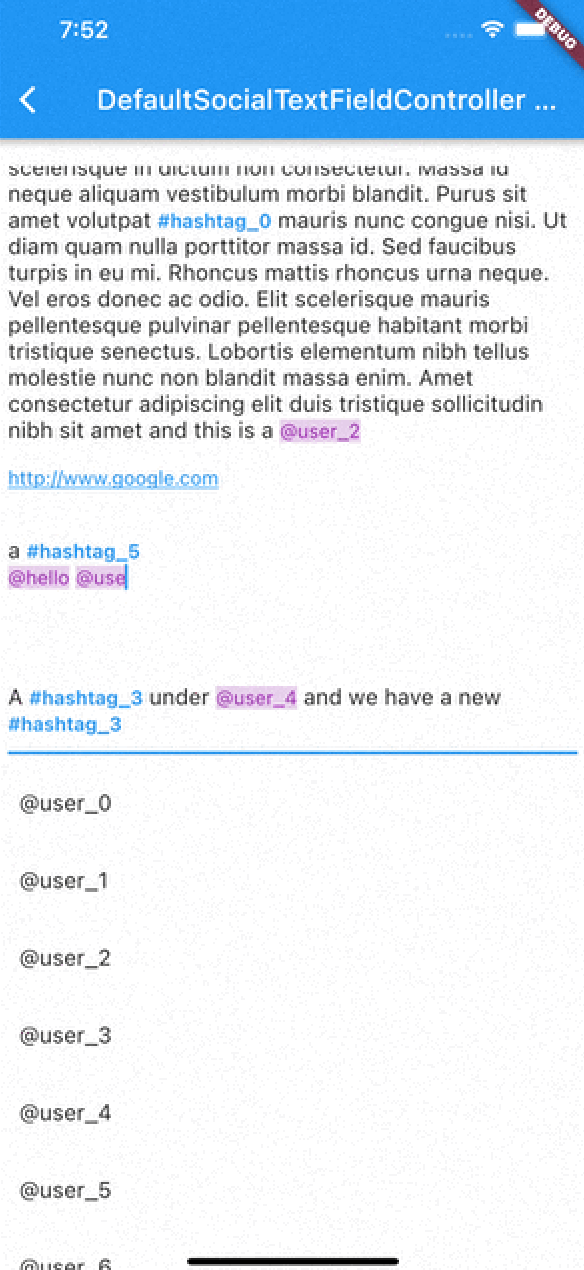
DefaultSocialTextFieldController

I've implemented an experimental widget for ease of use. DefaultSocialTextFieldController puts the main content inside a Stack and allows users to show relevant content when curser comes over a detected content

As with version 0.0.9 There are 2 different types of presentation of detection content:

Detection Presentation Mode

DetectionPresentationMode.split_screen : Shows detection view but moving from bottom to determined widget size. useful for full screen textfields like text editors

DetectionPresentationMode.above_text_field : Useful for showing detection view from above the textfield. The location of textfield is detected from the FocusNode automatically.

Please notice the 'scrollPhysics' property of the TextField;

DefaultSocialTextFieldController(
        detectionPresentationMode: DetectionPresentationMode.above_text_field,
        focusNode: _focusNode,
        scrollController: _scrollController,
        textEditingController: _textEditingController,
        child: Container(
          padding: EdgeInsets.all(8),
          child: Column(
            mainAxisAlignment: MainAxisAlignment.start,
            children: <Widget>[
              Expanded(
                child: TextField(
                  scrollPhysics: ClampingScrollPhysics(), //Use this for unnecessary scroll bounces
                  scrollController: _scrollController,
                  focusNode: _focusNode,
                  controller: _textEditingController,
                  expands: true,
                  maxLines: null,
                  minLines: null,
                  decoration: InputDecoration(
                      hintText: "Please Enter a Text"
                  ),
                ),
              ),
            ],
          ),
        ),
        detectionBuilders: {
          DetectedType.mention:(context)=>mentionContent(height),
          DetectedType.hashtag:(context)=>hashtagContent(height),
          DetectedType.url:(context)=>urlContent(height)
        },
      )

DefaultSocialTextFieldController in action

Using DefaultSocialTextFieldController

An example usage of the DefaultSocialTextFieldController can be seen in the example project. The main goal is to provide an easy way to implement features that have been seen in most of the social media applications.

SocialTextSpanBuilder

flutter_social_textfield uses SocialTextSpanBuilder for rendering the text inside the attached textfield. So if you just want to show formatted text content instead of using inside an editor you can use it like this:

With version 0.0.3 you can also implement onTapDetection function for adding tap gestures to detected strings.

void initBuilder(){
    final Map<DetectedType, RegExp> _regularExpressions = {
        DetectedType.mention:atSignRegExp,
        DetectedType.hashtag:hashTagRegExp,
        DetectedType.url:urlRegex
    };

    final Map<DetectedType, TextStyle> _detectionTextStyles = {
        DetectedType.mention:TextStyle(...)
    };

    final TextStyle _defaultTextStyle = TextStyle();

    final _textSpanBuilder = SocialTextSpanBuilder(regularExpressions: _regularExpressions,defaultTextStyle:_defaultTextStyle,detectionTextStyles: _detectionTextStyles, onTapDetection: (detection){print("Tapped on detection: $detection");});
}

//And you can return RichText content bu calling build(context) method afterwards.
@override
    Widget build(BuildContext context) {
        var height = MediaQuery.of(context).size.height * 0.4;
        return Scaffold(
            appBar: AppBar(
                title: Text(widget.title),
            ),
        body: Container(
           child:RichText(
              text:_textSpanBuilder.build(context)
            )
        )// This trailing comma makes auto-formatting nicer for build methods.
    );  
}   

Acknowledgements

Thanks https://github.com/Bhupesh-V (@Bhupesh-V) for his contribution to url regex 👌

This widget's default regular expressions taken from this wonderful widget:

detectable_text_field

所屬分類

原始碼儲存庫

使用此套件的專案

暫無相關資料。