搜尋套件、儲存庫與 APP 分類

套件詳情v0.0.3

flutter_sticky_widgets

實作行為類似於 CSS 中 position: sticky 的 Flutter 小部件。

AndroidiOSWebmacOSWindowsLinux
近 30 天下載
1600
喜歡數
91
Pub 分數
160

安裝套件

flutter pub add flutter_sticky_widgets

套件介紹

根據套件公開資料產生的選型評估,僅供參考。

一個 Flutter 套件,讓組件行為類似於 CSS 的 'position: sticky'——在捲動過程中保持可見,直到達到指定邊界。非常適合用於標題、導航列或任何應在內容捲動時保持在螢幕上的 UI 元素。此套件可在所有主要平台(包括 Android、iOS、Web、macOS、Windows 和 Linux)上運作,提供一致的黏性行為,無需撰寫原生平台特定程式碼。可輕鬆整合至現有的 Flutter 範本中,設定簡單。

適用情境

  • 列表中的滾動標題
  • 黏性導航欄
  • 持久化操作按鈕
  • 固定滾動視圖中的側邊面板
  • 動態佈局元素,跟隨使用者捲動
  • 表單中的浮動工具列

主要特色

  • 類似 CSS 的黏性定位
  • 跨平台相容性
  • 最小設定
  • 自動邊界檢測
  • 支援嵌套滾動視圖
  • 滾動時的平滑過渡

適合對象

  • 開發可滾動介面的開發者
  • 需要黏附式UI元件的設計師
  • 包含長清單或表單的應用程式
  • 需要響應式佈局的 Web 與行動應用程式
  • 希望在跨平台環境中實現一致的黏性行為的團隊

使用建議

  • 可能影響大型清單中的效能
  • 需要仔細的佈局嵌套
  • 不適合複雜的重疊場景
  • 超出基本黏性行為之外的自訂功能有限
  • 最適合與單向滾動的上下文一起使用
  • 如果未妥善管理,可能與其他滾動控制器衝突

原始 README

以下為關聯原始碼儲存庫的 README 原文快照,最新內容請造訪原始碼儲存庫。

Build Status

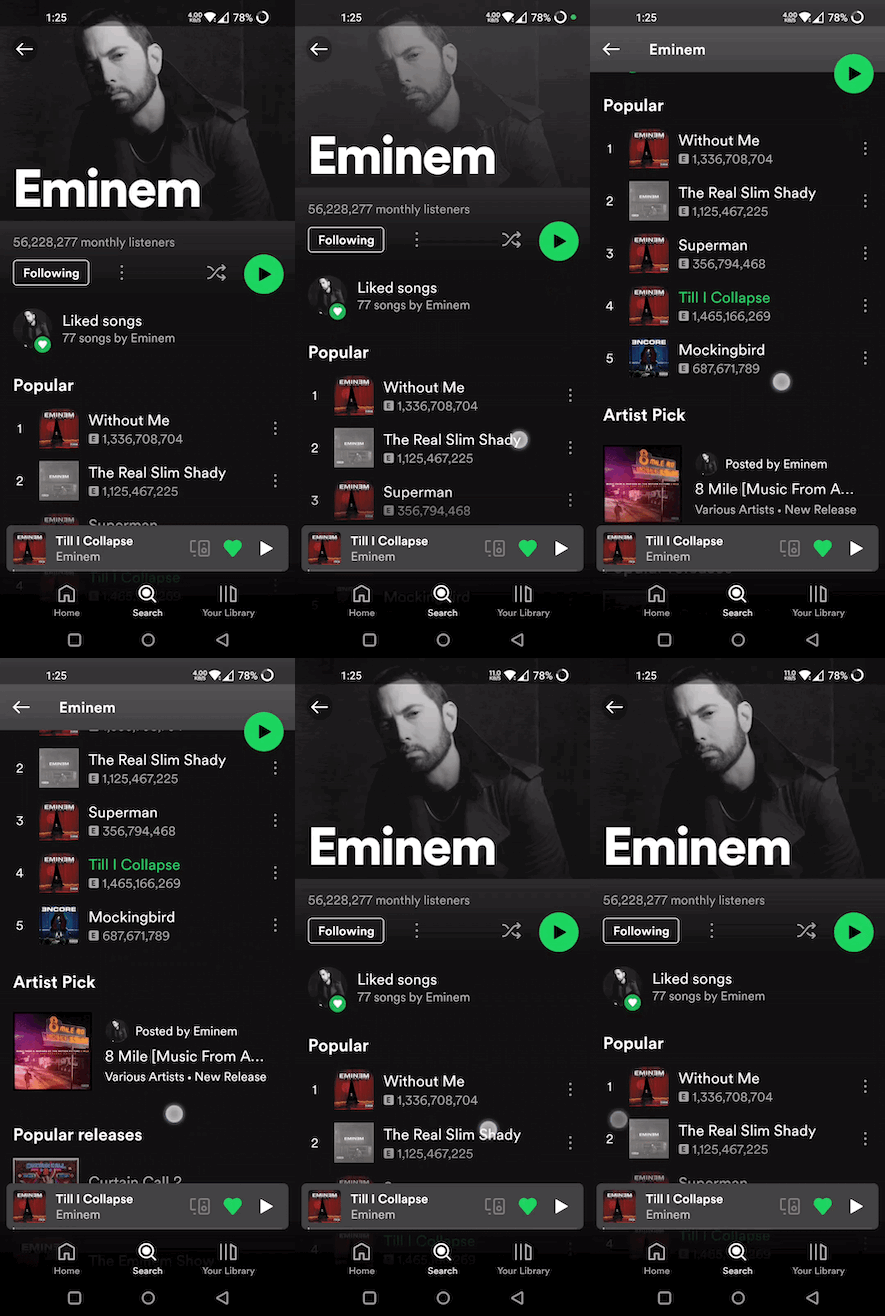
With flutter_sticky_widgets you can use a widget as if it is position: sticky; in CSS.

Sticky widgets is an UI pattern where we want widgets to scroll along with the UI upto a certain point, and then stick to the screen instead of scrolling off the screen.

(Green play button in first image, and shuffle play button in second image are examples for position: sticky)

Getting started

import 'package:flutter_sticky_widgets/flutter_sticky_widgets.dart';
StickyContainer(
    stickyChildren: [
        StickyWidget(
            initialPosition: StickyPosition(bottom: 20, right: 20),
            finalPosition: StickyPosition(
                bottom: MediaQuery.of(context).size.height - 80, right: 20),
            controller: _controller,
            child: Container(
            width: 40,
            height: 40,
            decoration: const BoxDecoration(
                shape: BoxShape.circle,
                color: Colors.green,
            ),
            child: const Center(child: Icon(Icons.pause)),
            ),
        ),
    ],
    child: ListView.builder(
    controller: _controller,
    itemCount: 50,
    itemBuilder: (context, index) {
        return ListTile(
            title: Text("Tile $index"),
        );
    }),
);
StickyWidget

Widget used to implement the sticky pattern.

  • initialPosition (StickyPosition): indicates the position of the widget before the scrolling has started. Position is represented by a custom class StickyPosition.

  • finalPosition (StickyPosition): indicates the position of the widget where it will remain sticky after sufficient amount of scrolling. Widget will return to its initial position if scrolled in reverse direction.

  • controller (ScrollController): used by StickyWidget to detect scrolling. Same ScrollController must be attached to your Scrollable (ListView, SingleChildScrollView, CustomScrollView, ...) for StickyWidgets to work. It is also used to determine if the scroll axis is vertical or horizontal.

  • callback (Function(double)?) (optional): An optional callback function, which gets called on every scroll. It receives scrolloffset as parameter which can be used to animate the StickyWidget.

StickyContainer

It must be the parent element of the Scrollable widget used. StickyContainer's size is used as reference size by StickWidgets to position themselves. So make sure StickyContainer's size is same as the size of the Scrollable widget.

  • child (Widget): ideally Scrollable widget should be supplied for this parameter, if not you have to make sure StickyContainer's size is same as Scrollable's size.

  • stickyChildren (List<StickyWidget>): you can supply one or more StickyWidgets.

  • displayOverFlowContent (bool) (optional): true if you want to display the StickyWidgets overflowing outside of the StickyContainer's bounds.

StickyPosition

A Custom class used to represent initial and final positions of StickyWidget. It takes 4 parameters (top, bottom, left, right). But you should supply only 2 of them (top / bottom, right / left)

Note: Make sure to pass same set of parameters for StickyPosition used in initialPosition and finalPosition

Eg:

Correct ✅
initialPosition: StickyPosition(top: .., left: ..)
finalPosition: StickyPosition(top: .., left: ..)

Wrong ❌
(should supply top instead of bottom for finalPosition also)

initialPosition: StickyPosition(top: .., left: ..)
finalPosition: StickyPosition(bottom: .., left: ..)

所屬分類

原始碼儲存庫

使用此套件的專案

暫無相關資料。