搜尋套件、儲存庫與 APP 分類

flutter_stripe_payment 封面
套件詳情v0.0.18

flutter_stripe_payment

將 Stripe 加入您的 Flutter 應用程式,使用具有強 SCA 3DS 合規性的 Payment Intents 接受信用卡付款。

AndroidiOS
近 30 天下載
85
喜歡數
57
Pub 分數
125

安裝套件

flutter pub add flutter_stripe_payment

套件介紹

根據套件公開資料產生的選型評估,僅供參考。

flutter_stripe_payment 是一個 Flutter 套件,可實現將 Stripe 支付處理無縫整合到行動應用程式中。它支援透過 Payment Intents 進行信用卡付款,確保符合強客戶認證(SCA)與 3D 安全(3DS)的要求。此套件專為 Android 與 iOS 設計,透過內建的權杖化支援與即時支付確認,簡化安全交易處理。開發者可實作穩健且符合 PCI 標準的支付流程,無需直接管理敏感的卡片資料。SDK 處理複雜的認證流程,提升結帳成功率,同時維持高安全性標準。

適用情境

  • 應用內購買
  • 電子商務結帳
  • 訂閱計費
  • 數位服務付款
  • 在線捐贈

主要特色

  • 符合SCA與3DS要求
  • 付款意圖支援
  • 安全的卡片權杖化
  • 即時支付確認
  • 跨平台(Android & iOS)

適合對象

  • 移動電子商務應用
  • 基於訂閱的服務
  • 需要安全支付的應用
  • 使用 Stripe 的開發者
  • 需要 SCA 合規的專案

使用建議

  • 需要設定 Stripe 帳戶
  • 需要後端來建立付款意圖
  • 僅限 Stripe 的付款方式
  • 依賴網路連接
  • 可能需要為測試環境進行額外設定

原始 README

以下為關聯原始碼儲存庫的 README 原文快照,最新內容請造訪原始碼儲存庫。

flutter_stripe_payment

Add Stripe to your Flutter Application to Accept Card Payments using Payment Intents and the Latest SCA Compliance 3DS Requirements

Getting Started

Strong Customer Authentication (SCA), a new rule coming into effect on September 14, 2019, as part of PSD2 regulation in Europe, will require changes to how your European customers authenticate online payments. Card payments will require a different user experience, namely 3D Secure, in order to meet SCA requirements. Transactions that don’t follow the new authentication guidelines may be declined by your customers’ banks.

The Payment Intents API is a new way to build dynamic payment flows. It tracks the lifecycle of a customer checkout flow and triggers additional authentication steps when required by regulatory mandates, custom Radar fraud rules, or redirect-based payment methods.

Initialize

final _stripePayment = FlutterStripePayment();
_stripePayment.onCancel = (){
  print("User Cancelled the Payment Method Form");
};

Setup Stripe Environment


_stripePayment.setStripeSettings(
        appConfig.values.stripePublishableKey,
        appConfig.values.applePayMerchantId);

Show Payment Form

var paymentResponse = await _stripePayment.addPaymentMethod();
if(paymentResponse.status == PaymentResponseStatus.succeeded)
  {
    print(paymentResponse.paymentMethodId);
  }

Create Payment Intent On Server

var intent = PaymentIntent();
    intent.amount = widget.order.cart.total;
    intent.isManual = true;
    intent.isConfirmed = false;
    intent.paymentMethodId = paymentResponse.paymentMethodId;
    intent.currency = "usd";
    intent.isOnSession = true;
    intent.isSuccessful = false;
    intent.statementDescriptor = "Dorm Mom, Inc";
    var response = await widget.clientDataStore.createPaymentIntent(intent);

Confirm Payment Intent to Kick Off 3D Authentication

var intentResponse = await _stripePayment.confirmPaymentIntent(
          response.clientSecret, paymentResponse.paymentMethodId, widget.order.cart.total);

      if (intentResponse.status == PaymentResponseStatus.succeeded) {
        widget.order.paymentIntentId = intentResponse.paymentIntentId;
        widget.order.paymentMethodId = paymentResponse.paymentMethodId;
        _submitOrder();
      } else if (intentResponse.status == PaymentResponseStatus.failed) {
        setState(() {
          hideBusy();
        });
        globals.Utility.showAlertPopup(
            context, "Error Occurred", intentResponse.errorMessage);
      } else {
        setState(() {
          hideBusy();
        });
      }

Setup Payment Intent For Future Payments

var intentResponse = await _stripePayment.setupPaymentIntent(
        response.clientSecret, paymentResponse.paymentMethodId);

    if (intentResponse.status == PaymentResponseStatus.succeeded) {
      await _addCardToAccount(paymentResponse.paymentMethodId);
    } else if (intentResponse.status == PaymentResponseStatus.failed) {
      setState(() {
        hideBusy();
      });
      globals.Utility.showAlertPopup(
          context, "Error Occurred", intentResponse.errorMessage);
    } else {
      setState(() {
        hideBusy();
      });
    }

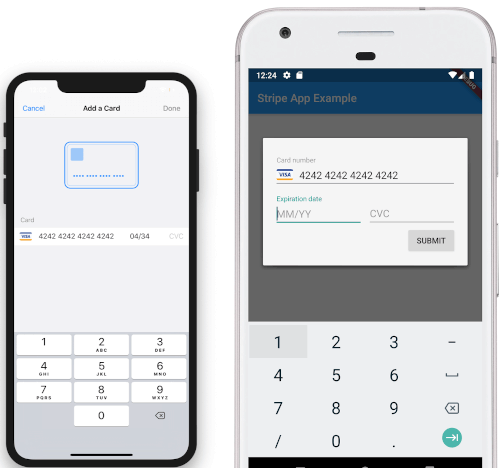
Screenshots

iOS View Android View

To Do

  • [DONE]Android Implementation
  • STPaymentCardTextField Inline Embedding

所屬分類

原始碼儲存庫

使用此套件的專案

暫無相關資料。