Actively maintained, community-driven Supabase BaaS for chat applications with an optional chat UI.
⚠️⚠️ This project has been optimized to support scalability, but careful evaluation is recommended before integrating it into large-scale projects, considering specific requirements and available resources. ⚠️⚠️
Have you ever wanted to implement a chat in your application? Do you think it's difficult and complex?
Try this, thanks to the magnificent Supabase platform and the Flutter Chat UI package, you can achieve it in just a few minutes and effortlessly.
Flyer Chat is a platform for creating in-app chat experiences using Flutter. This repository contains Supabase BaaS implementation for Flutter. We are also working on our more advanced SaaS and self-hosted solutions.
Free, open-source and community-driven. We offer no paid plugins and strive to create an easy-to-use, almost drop-in chat experience for any application. Contributions are more than welcome! Please read our Contributing Guide.
Chat UI agnostic. You can choose the chat UI you prefer. But if you don't have one, we provide our own free and open-source Flutter Chat UI, which can be used to create a working chat in minutes.
Easy to use. Returns streams of data for messages, rooms and users. Supabase Security Rules control access to the data. Check our documentation for the info.
Getting Started
The example project that you find in the package repository allows you to have a cross-platform chat app in just a few minutes.
Requirements
Dart >=2.19.0 and Flutter >=3.0.0, Supabase project.
Insert a secure password for new Postgres database (Save this in a secure location)
Obtain your REFERENCE ID (After command select your project, for example demo-chat):
supabase projects list
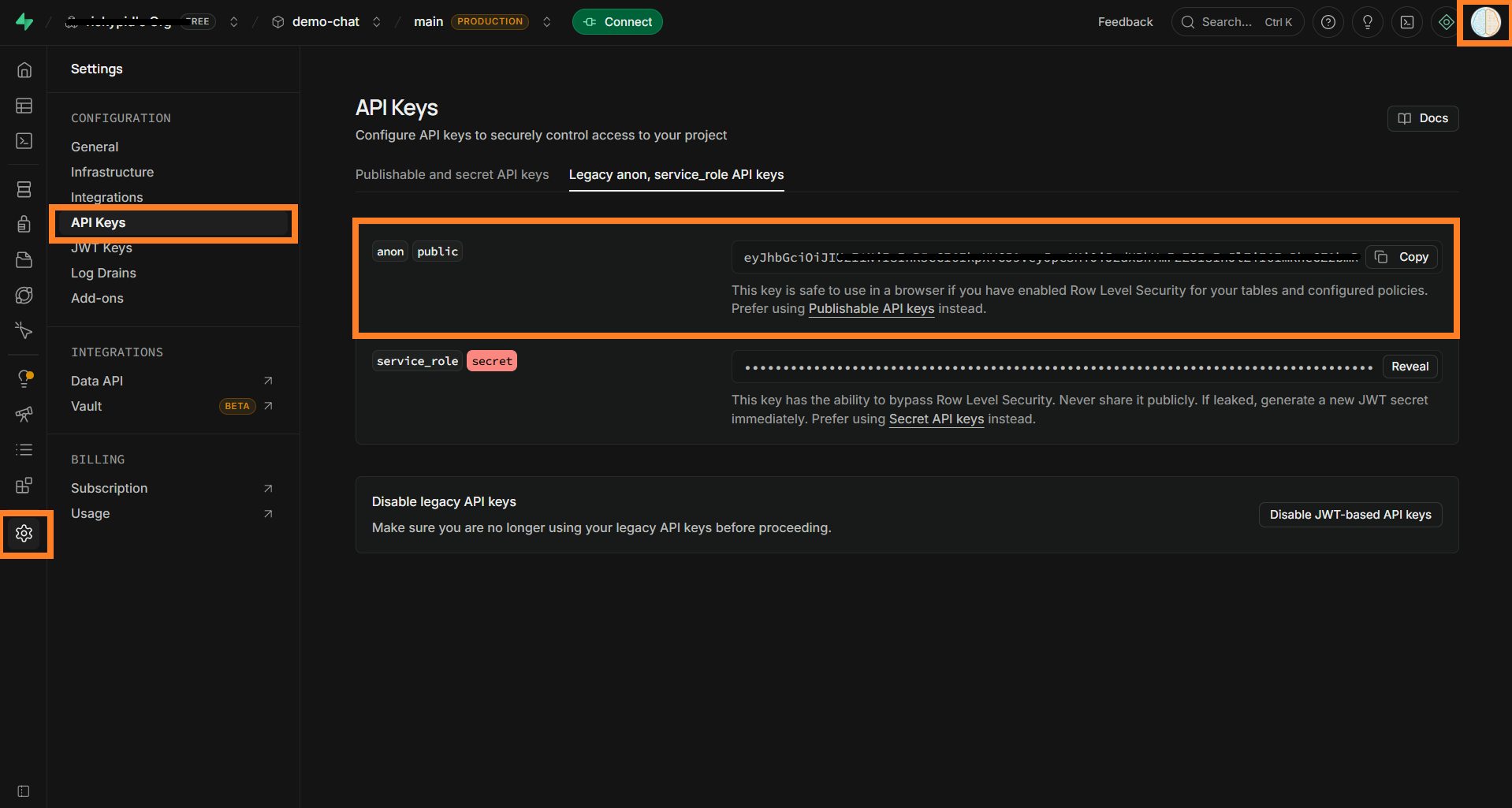
Obtain your anon key (After command select your project, for example demo-chat):
supabase projects api-keys
Edit example project file example/lib/supabase_options.dart, insert your project {{your_project_reference_id}} and {{supabase_anon_key}}
Prepare Supabase project
Inside the example project (example/utils) there is a script, running the latter will automatically configure the Supabase project, creating tables, security rules, buckets and everything that is necessary for the example project to function.
In order to run the script you need to be aware of the following information about your Supabase project:
host : Project host
port : Database port
database : Database name
user : Database user
password : Database password
This information, except the password which is provided only during the creation of the database (if necessary, you can use the password reset function of your database to obtain it), can be found very easily from the Dashboard of your Supabase project:
Running prepare script
Below are the commands for running the scripts (During execution you will be asked for the password for your database user):
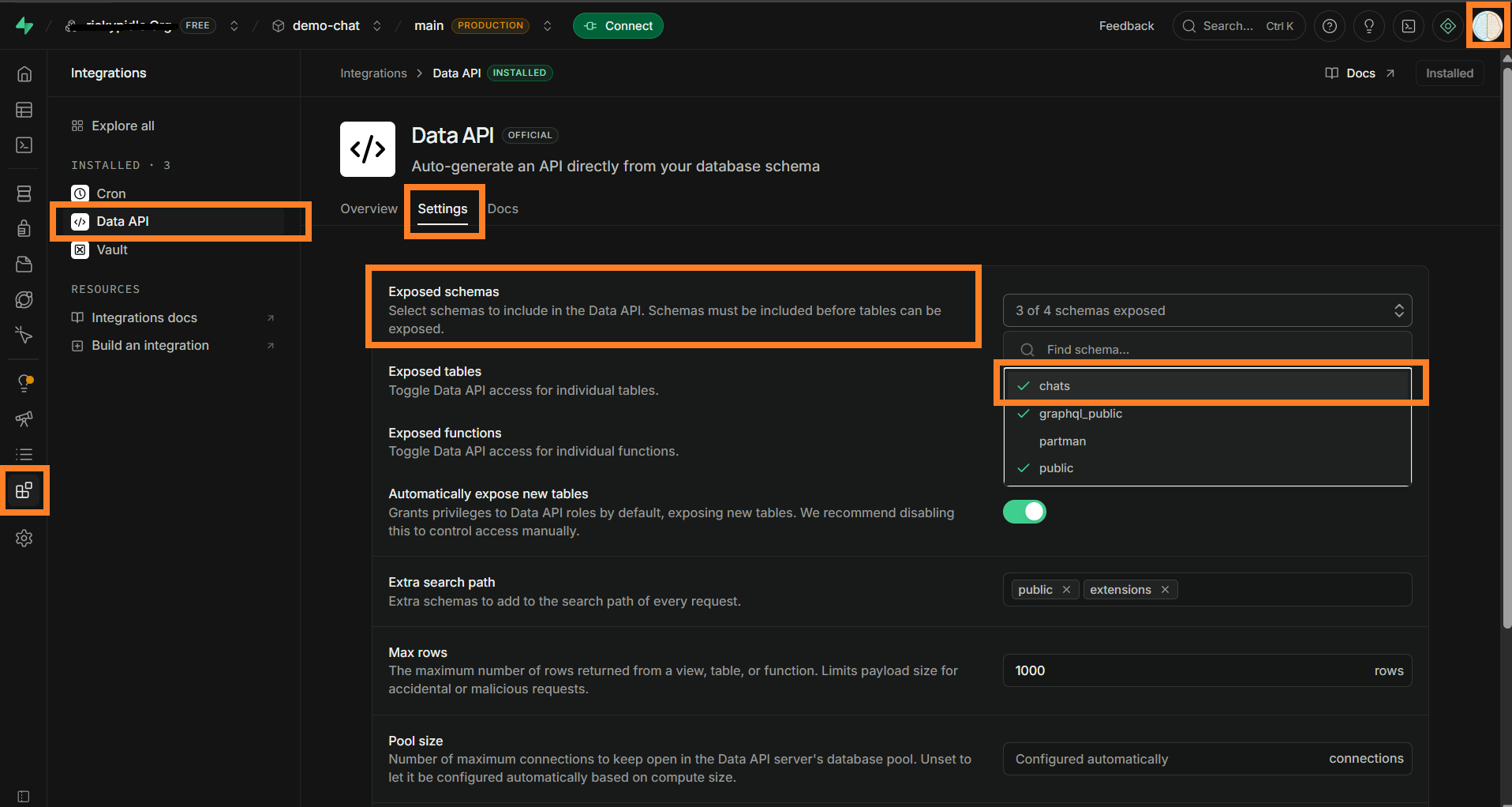
after running the database preparation script. you need to change the database schema exposure setting by adding the chats schema (from the supabase dashboard):
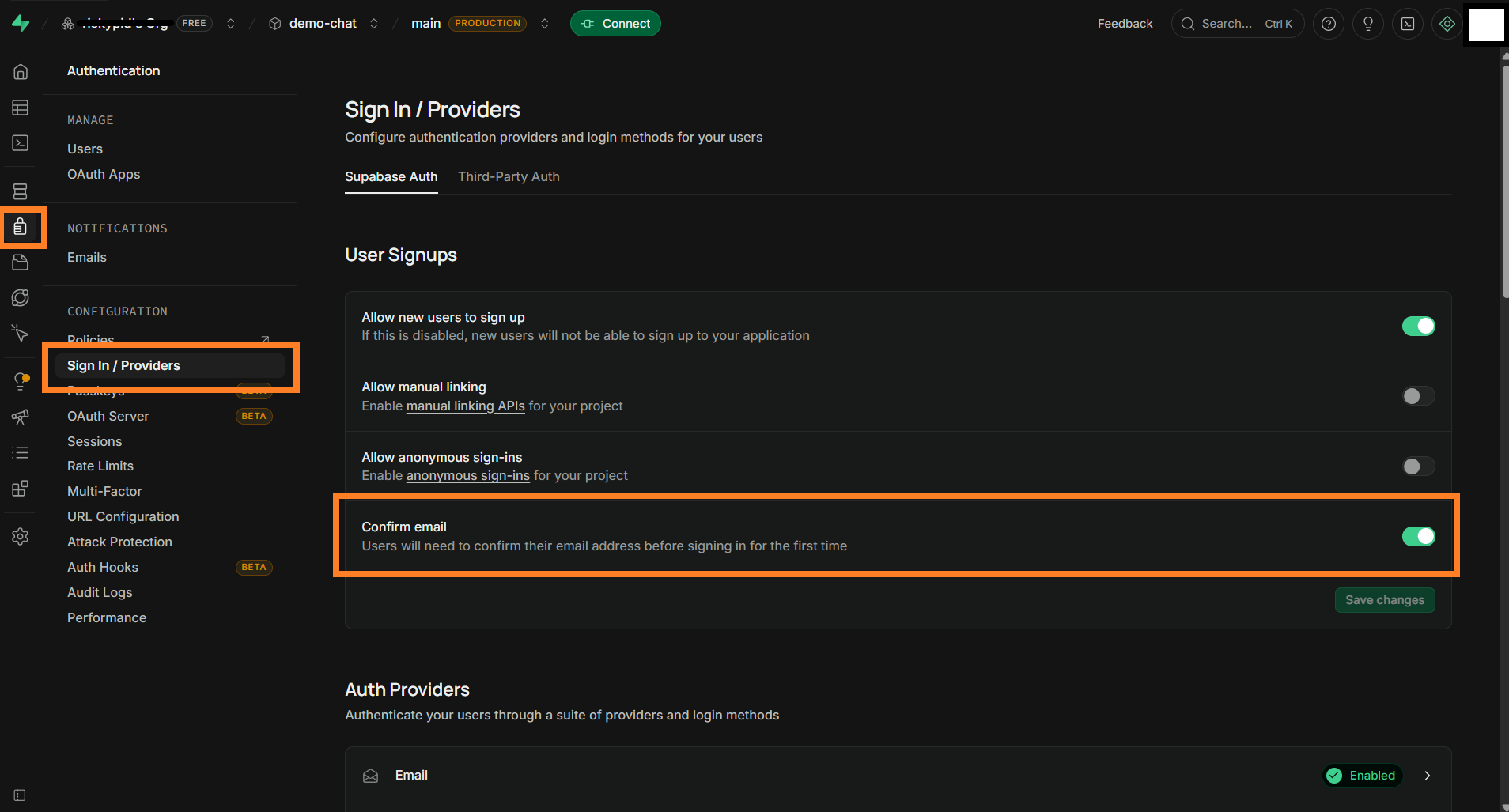
Optional (Only for test): Disable email verification and save the configuration (To speed up testing and allow user registration in just one click, it is advisable to disable mailbox verification):
After all of this is done you will need to register a couple of users and the example app will automatically suggest email and password on the register screen, default password is Qawsed1-. To set up Supabase Security Rules so users can see only the data they should see, continue with our documentation.
Package Widgets
This package implements some purely logical widgets (Without implementation of a specific UI). These wedgets make it easy to implement some chat-related logic without any effort.
UserOnlineStateObserver
This widget should be placed in the widget tree as soon as possible, this is because this component is responsible for checking and updating the status of the user who logged into the app. When the app is in the foreground other users are notified of the online status, vice versa when the app is closed.
This server widget to get the status of a specific user. It can be used, for example, to animate a user's avatar with an LED to indicate their online/offline status.
@overrideWidgetbuild(BuildContext context) {
returnUserOnlineStatusWidget(
uid: user.id,
builder: (status) {
//Use status == UserOnlineStatus.online to animate your avatar
},
);
}
RLS (Row level security)
The preparation script automatically configures the security rules on the database tables and storage buckets, below is a summary of the rules that are applied:
Tables
Table chats.users
INSERT : Nobody, this table is populate by trigger on auth.users.
SELECT : All users authenticated.
UPDATE : Only the user himself.
DELETE : Nobody.
Table chats.rooms
INSERT : All users authenticated.
SELECT : All users who are members of the chat room.
UPDATE : All users who are members of the chat room.
DELETE : All users who are members of the chat room.
Table chats.messages
INSERT : All users who are members of the chat room.
SELECT : All users who are members of the chat room.
UPDATE : All users who are members of the chat room.
DELETE : All users who are members of the chat room.
Storage buckets
Bucket chats_assets
INSERT : All users who are members of the chat room.
SELECT : All users who are members of the chat room.
UPDATE : All users who are members of the chat room.
DELETE : All users who are members of the chat room.
Bucket chats_user_avatar
INSERT : Only the user himself.
SELECT : All users authenticated.
UPDATE : Only the user himself.
DELETE : Only the user himself.
Contributing
Please read our Contributing Guide before submitting a pull request to the project.
Code of Conduct
Flyer Chat has adopted the Contributor Covenant as its Code of Conduct, and we expect project participants to adhere to it. Please read the full text so that you can understand what actions will and will not be tolerated.