搜尋套件、儲存庫與 APP 分類

flutter_upi_india 封面
套件詳情v1.0.1

flutter_upi_india

一個 Flutter 插件,可在 Android 和 iOS 上啟動 UPI 支付應用程式,以進行 UPI 支付。

AndroidiOS
近 30 天下載
1530
喜歡數
13
Pub 分數
140

安裝套件

flutter pub add flutter_upi_india

套件介紹

根據套件公開資料產生的選型評估,僅供參考。

一個 Flutter 插件,可實現 Android 與 iOS 移動應用程式中的 UPI(統一支付介面)付款整合。它允許使用者透過啟動裝置上安裝的預設 UPI 應用程式(例如 Google Pay 或 PhonePe)來發起 UPI 付款。此插件透過最少設定即可處理對 UPI 應用程式的深度連結,簡化付款流程。它支援 Android 與 iOS 平台,非常適合需要無縫數位交易的印度市場應用。

適用情境

  • 在電子商務應用中啟用UPI支付
  • 將數位支付整合到本地服務平台
  • 透過UPI支援帳單付款
  • 促進點對點資金轉帳
  • 在移動應用中添加即時支付選項

主要特色

  • 啟動裝置上的預設UPI應用程式
  • Android 與 iOS 的跨平台支援
  • 用於啟動 UPI 支付的簡易 API
  • 無需處理敏感支付資料
  • 適用於所有主要的 UPI 應用程式,例如 Google Pay、PhonePe

適合對象

  • 印度金融科技新創企業
  • 面向印度用戶的移動應用
  • 電子商務和實用程式應用
  • 需要UPI整合的支付網關
  • 開發低程式碼支付解決方案的開發者

使用建議

  • 需要在使用者裝置上安裝支援UPI的應用程式
  • 發布後對付款流程的控制有限
  • 取決於使用者的UPI應用設定
  • 不適用於伺服器端交易處理
  • 若未將UPI應用設為預設,可能無法使用

原始 README

以下為關聯原始碼儲存庫的 README 原文快照,最新內容請造訪原始碼儲存庫。

flutter_upi_india

version

Curruntly Working in android only with some specific banks. Open for Query and Discussion.

Find installed UPI payment apps on your phone and make payments using any one of them.

Package implements UPI Deep Linking And Proximity Integration Specification.

Android iOS
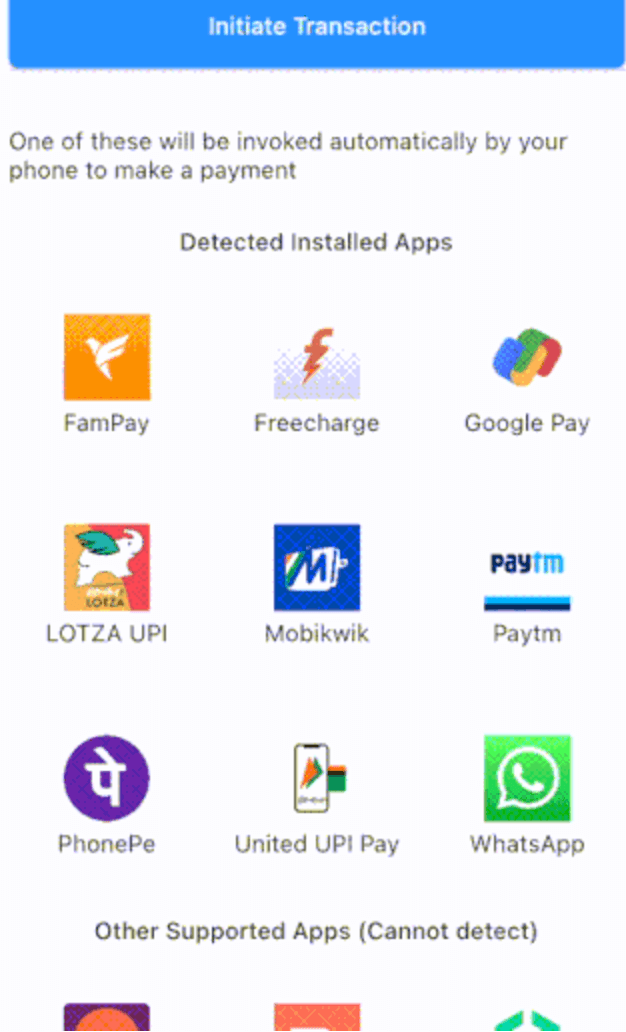
Android Screen Capture IOS Screen Capture

Getting Started

Add this package to your flutter project's pubspec.yaml as a dependency as follows:

dependencies:
  ...
  flutter_upi_india: ^1.0.1

Import the package as follows:

import 'package:flutter_upi_india/flutter_upi_india.dart';
iOS configuration

In Runner/Info.plist add or modify the LSApplicationQueriesSchemes key so it includes custom query schemes shown as follows:

  <key>LSApplicationQueriesSchemes</key>
  <array>
    ...
    <string>freecharge</string>
    <string>gpay</string>
    <string>in.fampay.app</string>
    <string>lotza</string>
    <string>mobikwik</string>
    <string>paytm</string>
    <string>phonepe</string>
    <string>upi</string>
    <string>upibillpay</string>
    <string>whatsapp</string>
    ...
  </array>
Usage
Get list of installed apps
final List<ApplicationMeta> appMetaList = await UpiPay.getInstalledUpiApplications();

Filter for mandate-capable apps:

final List<ApplicationMeta> mandateApps =
    await UpiPay.getInstalledUpiApplications(isForMandateApps: true);
Show an app's details
Widget appWidget(ApplicationMeta appMeta) {
  return Column(
    mainAxisAlignment: MainAxisAlignment.center,
    children: <Widget>[
      appMeta.iconImage(48), // Logo
      Container(
        margin: EdgeInsets.only(top: 4),
        alignment: Alignment.center,
        child: Text(
          appMeta.application.getAppName(),
          textAlign: TextAlign.center,
        ),
      ),
    ],
  );
}
Do a UPI transaction
Future doUpiTransation(ApplicationMeta appMeta) {
  final UpiTransactionResponse response = await UpiPay.initiateTransaction(
    amount: '100.00',
    app: appMeta.application,
    receiverName: 'John Doe',
    receiverUpiAddress: 'john@doe',
    transactionRef: 'UPITXREF0001',
    transactionNote: 'A UPI Transaction',
     // merchantCode: '7372',
  );
  print(response.status);
}

Send a mandate request (uses upi://mandate):

Future doUpiMandate(ApplicationMeta appMeta) {
  return UpiPay.initiateTransaction(
    amount: '100.00',
    app: appMeta.application,
    receiverName: 'John Doe',
    receiverUpiAddress: 'john@doe',
    transactionRef: 'UPIMANDATE0001',
    transactionNote: 'UPI Mandate',
    isForMandate: true,
  );
}
Mandate parameters

Mandate requests can include additional parameters when isForMandate: true. Only non-null values are sent to the UPI app.

Future doUpiMandateWithParams(ApplicationMeta appMeta) {
  return UpiPay.initiateTransaction(
    amount: '250.00',
    app: appMeta.application,
    receiverName: 'Acme Subscriptions',
    receiverUpiAddress: 'acme@upi',
    transactionRef: 'UPIMANDATE0002',
    transactionNote: 'Monthly plan',
    isForMandate: true,
    // Mandate-specific parameters
    amountRule: 'MAX', // amrule
    blockFlag: 'Y', // block
    merchantName: 'ACME', // mn
    mode: 'UPI', // mode
    orgId: 'ACME001', // orgid
    purpose: '00', // purpose
    recurrence: 'MONTHLY', // recur
    recurrenceType: 'BEFORE', // recurtype
    recurrenceValue: '1', // recurvalue
    revocable: 'Y', // rev
    transactionId: 'TID12345', // tid
    txnType: 'CREATE', // txnType
    validityStart: '01012025', // validitystart
    validityEnd: '31122025', // validityend
  );
}

Mandate-capable apps can be filtered via UpiPay.getInstalledUpiApplications(isForMandateApps: true). Availability varies by app and platform, so verify with the target UPI app before production use.

Behaviour, Limitations & Measures

Android
Flow
  • On Android, the UPI Deep Linking And Proximity Integration Specification is implemented using Intents.
  • An Intent call with transaction request parameters includes the specific UPI app to be invoked.
  • Post the UPI transaction being processed by the chosen Android UPI app, it returns a response as per the format defined in the specification to the package's Android plugin layer.
  • The plugin layer parses this response to create a UpiTransactionResponse object that is returned to your calling code. This object clearly indicates the status of the UPI payment, i.e. was it successful, failed or being processed.
Measures

It is advised that you implement a server-side payment verification on top of this status reporting, to avoid being affected by any hacks in the UPI transaction workflow on client's phone.

iOS
Flow
  • On iOS, the UPI Deep Linking And Proximity Integration Specification is implemented using iOS custom schemes.
  • Each UPI payment app can listen to a payment request of the form upi://pay?... or upi://mandate?... sent by a caller app to iOS.
  • The specification does not let you specify the target app's identifier in this request. On iOS, there is no other disambiguation measure available such as any ordering of the UPI payment apps that can be retrieved using any iOS APIs. Hence, it's impossible to know which UPI payment app will be invoked.
  • One of the applicable apps gets invoked and it processes the payment. The custom schemes mechanism has no way to return a transaction status to your calling code. The calling code can only know if a UPI payment app was launched successfully or not.
How does the package then implement getInstalledUpiApps?

The apps that implement any other unique custom scheme other than upi are discovered using such custom schemes. In the list of returned apps, both the reliably discovered apps and the supported but undetectable apps are returned.

Your code can distinguish if an app in the list of discovered apps was detected or not by checking as follows:

bool isAppReallyDiscovered(ApplicationMeta applicationMeta) {
  return applicationMeta.application.discoveryCustomScheme != null
}
Measures
  • You will have to implement a payment verification on top of functionality available through this package.
  • You should distinguish discovered and supported-only apps using the mechanism in the above section. The example app can be used for reference.

UPI Apps' Functional Status Dynamics

UPI standards and systems are evolving, and accordingly behaviour and functionality of the UPI payment apps are changing. See Apps for details of current functional status of various applications that were verified by us.

Support for merchant and non-merchant payments

The UPI Deep Linking And Proximity Integration Specification is designed for merchant payments. It includes parameters in payment request that can be provided only if the payment was made to a merchant e.g. the merchant code (mc parameter), and a signature (crypto-hash) of the request created using merchant's private key.

However; various applications have been accepting requests without merchant details and signature and successfully processing payments. Possibly, the dilution could be due to the reason that such a package can only automate filling a payment form, and unless the user verifies the details in the form and enters the UPI pin, no damaging payments can be really made.

Over last few months, few applications have started changing their behaviour around non-merchant payments and one or more of the following are seen in few apps:

  • An implicit "unverified source" warning or a direct warning indicating that merchant data in the request is not correct
  • Z7 error, "Transaction Frequency Limit Exceeded": See UPI Error and Response Codes
  • U16 error, "Risk Threshold Exceeded", see UPI Error and Response Codes
  • An implicit "Security error"

This behaviour sometimes is not consistent even for the same app. For example, WhatsApp successfully completes transactions on iOS; but rejects non-merchant transactions on Android.

If you believe that your app's users' money is secure via their UPI pin, and you can let them use apps that successfully complete non-merchant transactions, then go ahead and pick the working apps in Apps and integrate this package.

Regressions

It's seen that post the Bank mergers of 2020-21 some of the bank apps have stopped working, even though they are still in Play Store and/or App Store.

iOS minimum versions

Several BHIM apps have stopped working on <iOS 13.5. This package's iOS support is verified on iPhone with iOS 14+.

Love to experiment yourself?

Default behaviour of the getInstalledUpiApps API is to give you only the completely successfully working UPI apps. You can make the package return other apps by passing relevant values for parameters of this API. Please see API documentation. To support this experimentation, we would add further tweaking to allow you to access UPI apps not seen and supported by this package shortly on Android.

Contributors ✨

This project follows the all-contributors specification. Contributions of any kind welcome and will be recognised!

Other related solutions

  • upi_india (repo) - Another solid flutter package for payment gateway free UPI integration. We often share issues faced / solution approaches and more. Go check them out as well!

所屬分類

依賴

依賴清單 2 項

原始碼儲存庫

使用此套件的專案

暫無相關資料。