搜尋套件、儲存庫與 APP 分類

flutter_week_view 封面
套件詳情v1.4.5

flutter_week_view

顯示一個高度可自訂的週視圖(或日視圖),能夠顯示事件,支援捲動、縮放等更多功能!

AndroidiOSWebmacOSWindowsLinux
近 30 天下載
1660
喜歡數
121
Pub 分數
150

安裝套件

flutter pub add flutter_week_view

套件介紹

根據套件公開資料產生的選型評估,僅供參考。

FlutterWeekView 是一個高度可自訂的日曆組件,可顯示週或日視圖,讓使用者能以流暢的捲動和縮放功能來視覺化與管理事件。它支援動態事件呈現、直觀導航,以及跨多個平台的響應式設計。適合排程應用程式,提供廣泛的樣式與行為自訂選項。該套件可無縫整合至 Flutter 應用程式中,並由其發行者積極維護。

適用情境

  • 安排預約
  • 管理日常任務
  • 顯示事件時間線
  • 規劃工作週
  • 建立日曆儀表板

主要特色

  • 可自訂的週/日檢視
  • 使用拖曳與放置進行事件渲染
  • 縮放功能
  • 平滑的水平/垂直捲動
  • 跨平台的響應式設計
  • 可擴充的樣式選項

適合對象

  • 生產力應用
  • 日曆應用
  • 任務管理工具
  • 時間追蹤軟體
  • 活動規劃平台

使用建議

  • 需要謹慎處理大型事件資料集
  • 密集日曆可能需要效能優化
  • 有限的內建地區化支援
  • 自訂樣式可能需要進階的 Flutter 知識

原始 README

以下為關聯原始碼儲存庫的 README 原文快照,最新內容請造訪原始碼儲存庫。

Flutter Week View

Likes Pub points

Displays a highly customizable week view (or day view) which is able to display events, to be scrolled, to be zoomed-in & out and a lot more !

Flutter Week View is highly inspired by Android Week View.

Getting Started

Getting started with Flutter Week View is very straight forward. You have the choice between two widgets : DayView and WeekView. Use the first one to display a single day and use the second one to display multiple days.

Example

If you want a real project example, you can check this one on Github.

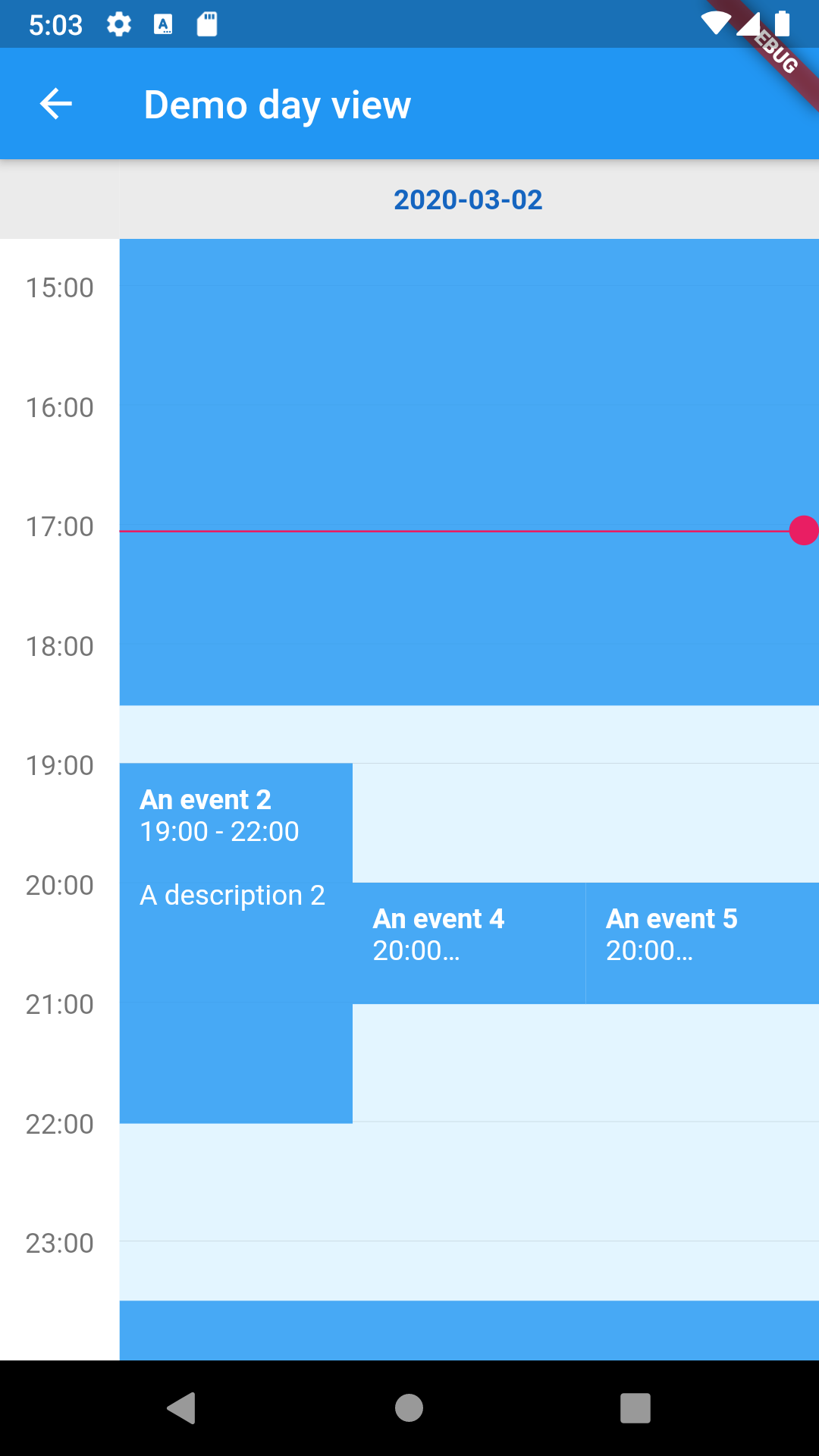
Day View

Snippet :

// Let's get two dates :
DateTime now = DateTime.now();
DateTime date = DateTime(now.year, now.month, now.day);

// And here's our widget !
return DayView(
  date: now,
  events: [
    FlutterWeekViewEvent(
      title: 'An event 1',
      description: 'A description 1',
      start: date.subtract(Duration(hours: 1)),
      end: date.add(Duration(hours: 18, minutes: 30)),
    ),
    FlutterWeekViewEvent(
      title: 'An event 2',
      description: 'A description 2',
      start: date.add(Duration(hours: 19)),
      end: date.add(Duration(hours: 22)),
    ),
    FlutterWeekViewEvent(
      title: 'An event 3',
      description: 'A description 3',
      start: date.add(Duration(hours: 23, minutes: 30)),
      end: date.add(Duration(hours: 25, minutes: 30)),
    ),
    FlutterWeekViewEvent(
      title: 'An event 4',
      description: 'A description 4',
      start: date.add(Duration(hours: 20)),
      end: date.add(Duration(hours: 21)),
    ),
    FlutterWeekViewEvent(
      title: 'An event 5',
      description: 'A description 5',
      start: date.add(Duration(hours: 20)),
      end: date.add(Duration(hours: 21)),
    ),
  ],
  style: const DayViewStyle.fromDate(
    date: now,
    currentTimeCircleColor: Colors.pink,
  ),
);

Result :

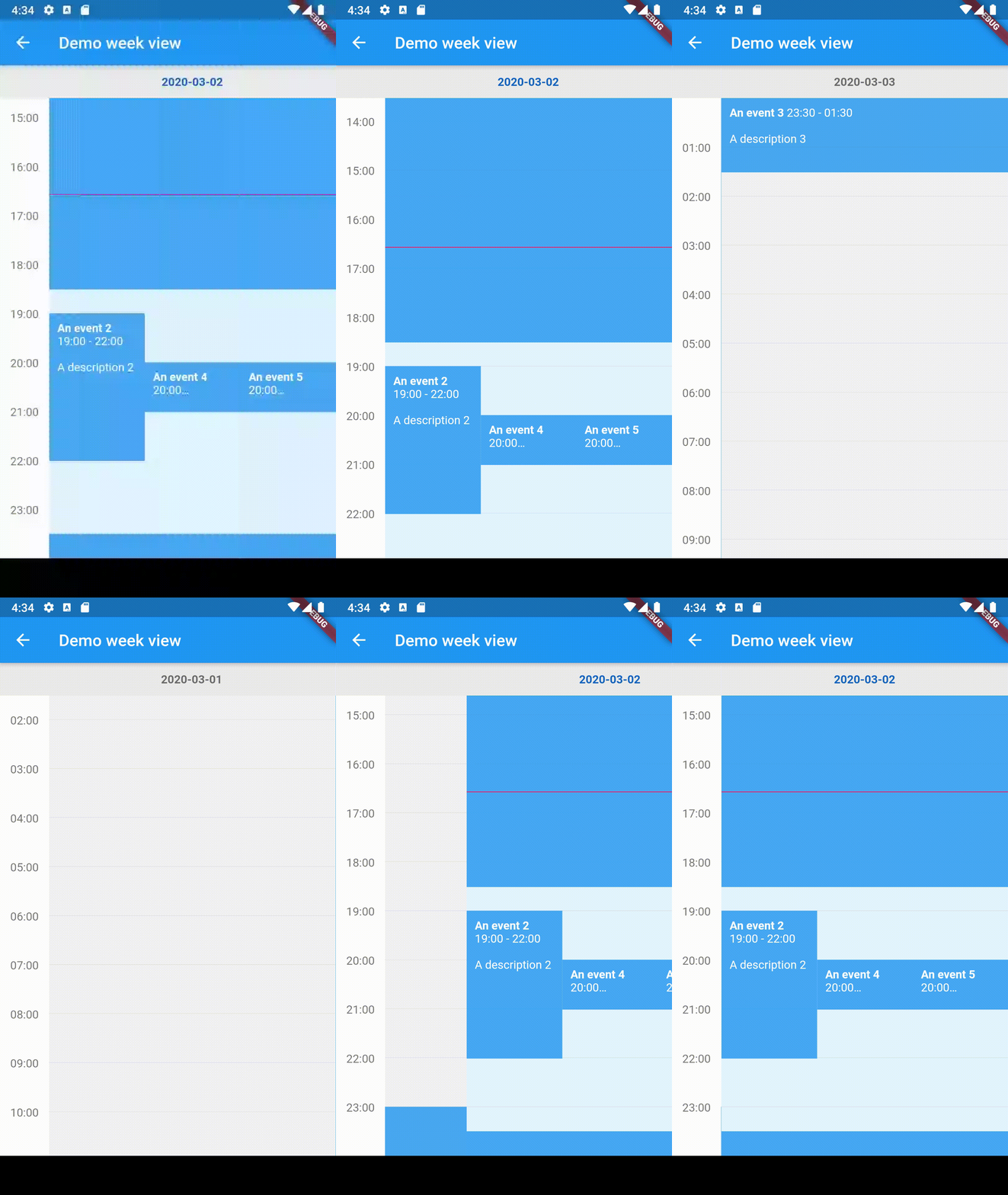
Week view

Snippet :

// Let's get two dates :
DateTime now = DateTime.now();
DateTime date = DateTime(now.year, now.month, now.day);

// And here's our widget !
return WeekView(
  dates: [date.subtract(Duration(days: 1)), date, date.add(Duration(days: 1))],
  events: [
    FlutterWeekViewEvent(
      title: 'An event 1',
      description: 'A description 1',
      start: date.subtract(Duration(hours: 1)),
      end: date.add(Duration(hours: 18, minutes: 30)),
    ),
    FlutterWeekViewEvent(
      title: 'An event 2',
      description: 'A description 2',
      start: date.add(Duration(hours: 19)),
      end: date.add(Duration(hours: 22)),
    ),
    FlutterWeekViewEvent(
      title: 'An event 3',
      description: 'A description 3',
      start: date.add(Duration(hours: 23, minutes: 30)),
      end: date.add(Duration(hours: 25, minutes: 30)),
    ),
    FlutterWeekViewEvent(
      title: 'An event 4',
      description: 'A description 4',
      start: date.add(Duration(hours: 20)),
      end: date.add(Duration(hours: 21)),
    ),
    FlutterWeekViewEvent(
      title: 'An event 5',
      description: 'A description 5',
      start: date.add(Duration(hours: 20)),
      end: date.add(Duration(hours: 21)),
    ),
  ],
);

Result :

Options

Common options

Here are the options that are available for both DayView and WeekView :

  • events Events to display.
  • style Allows you to style your widget. A lot of different styles are available so don't hesitate to try them out !
  • hourColumnStyle Same, it allows you to style the hour column on the left.
  • controller Controllers allow you to manually change the zoom settings.
  • inScrollableWidget Whether to put the widget in a scrollable widget (disable if you want to manage the scroll by yourself).
  • minimumTime The minimum hour and minute to display in a day.
  • maximumTime The maximum hour and minute to display in a day.
  • initialTime The initial hour and minute to put the widget on.
  • userZoomable Whether the user is able to (un)zoom the widget.
  • currentTimeIndicatorBuilder Allows you to change the default current time indicator (rule and circle).
  • onHourColumnTappedDown Provides a tapped down callback for the hour column. Pretty useful if you want your users to add your own events at a specific time.
  • onBackgroundTappedDown Provides a similar callback as the above, but when the user clicks on the background (an empty region of the calendar).
  • onDayBarTappedDown Provides a tapped down callback for the day bar.
  • dragAndDropOptions Enables drag-and-drop of events.
  • resizeEventOptions Enables resizing events, by dragging the bottom of the event up/down.
  • eventWidgetBuilder The widget builder that customizes how events are rendered.
Flutter day view

Here are the specific options of DayView :

  • date The widget date.
  • dayBarStyle The day bar style.
Flutter week view

Here are the specific options of WeekView :

  • dates The widget dates.
  • dayViewStyleBuilder The function that allows to build a Day View style according to the provided date.
  • dayBarStyleBuilder The function that allows to build a Day Bar style according to the provided date.

Please note that you can create a WeekView instance using a builder. All previous options are still available but you don't need to provide the dates list. However, you need to provide a DateCreator (and a date count if you can, if it's impossible for you to do it then scrollToCurrentTime will not scroll to the current date).

Contributions

You have a lot of options to contribute to this project ! You can :

所屬分類

原始碼儲存庫

使用此套件的專案

暫無相關資料。