搜尋套件、儲存庫與 APP 分類

footer 封面
套件詳情v0.0.4

footer

一個全新的 Flutter 套件,協助開發者為 Android 與 IOS 應用程式建立可自訂的頁尾。

AndroidiOSWebmacOSWindowsLinux
近 30 天下載
1910
喜歡數
35
Pub 分數
140

安裝套件

flutter pub add footer

套件介紹

根據套件公開資料產生的選型評估,僅供參考。

footer 套件是適用於 Android、iOS、Web、macOS、Windows 和 Linux 應用的可自訂 Flutter 解決方案,可用來建立一致且具響應式的頁尾。它透過內建樣式、動畫與佈局彈性,簡化底部導航或內容區塊的實作。專為尋求無需撰寫重複程式碼即可獲得統一頁尾體驗的開發者設計,支援動態內容與適應性設計。此套件可透過 pub.dev 隨意整合至現有的 Flutter 專案中。

適用情境

  • 新增一致的底端導航列
  • 使用動態內容創建自訂應用頁腳
  • 在多個平台上實現響應式佈局
  • 設計互動式底部面板
  • 構建可重用的頁腳組件
  • 增強設備間的UI一致性

主要特色

  • 跨平台相容性
  • 可自訂的外觀與行為
  • 內建動畫與轉場效果
  • 對動態內容的支援
  • 與 Flutter 項目的輕鬆整合
  • 適用於所有螢幕尺寸的響應式設計

適合對象

  • Flutter 開發者建構跨平台應用
  • 需要在各類裝置上維持一致使用者介面的團隊
  • 希望減少頁腳樣板程式碼的開發者
  • UI/UX 設計師協同開發 Flutter 項目
  • 需要可適應底部面板的專案

使用建議

  • 可能需要額外的樣式來適應複雜佈局
  • 除了基本用法外,文件內容有限
  • 大量動畫可能帶來的效能影響
  • 未針對頁腳內容中的大型資料集進行優化
  • 依賴 Flutter 版本相容性

原始 README

以下為關聯原始碼儲存庫的 README 原文快照,最新內容請造訪原始碼儲存庫。

Flutter Footer Widget

The released package here on pubstore A new Flutter package which helps developers in creating Customisable Footer for both Android and IOS Apps.

Show some :heart: and :star: the repo to support the project

Support my work and fuel the next open source project! 🙌 ☕ Buy Me a Coffee: https://buymeacoffee.com/stackdev.io

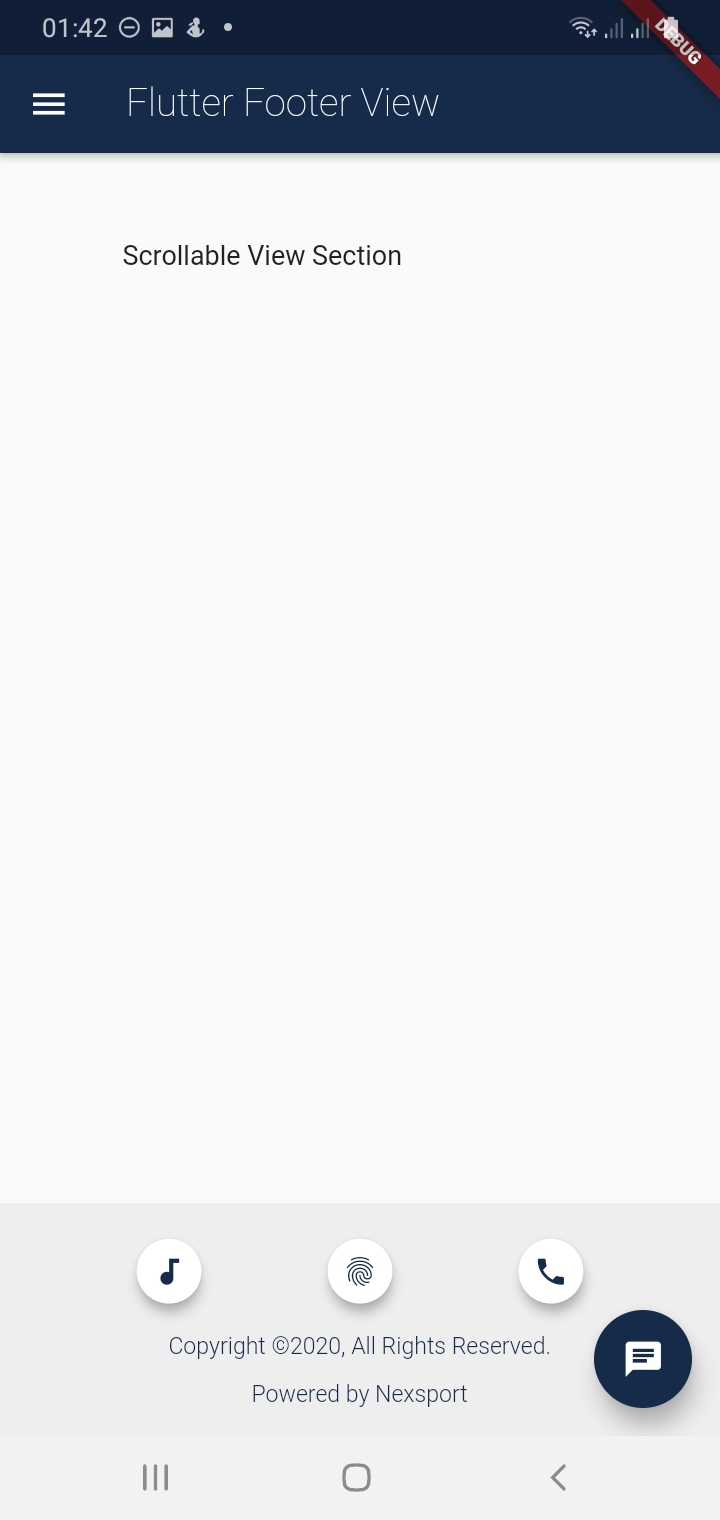
Screenshots

Getting Started

Usage

Example

To use this package :

    dependencies:
     flutter:
       sdk:flutter
     footer:
How to Use

The flutter footer uses a component called FooterView. The FooterView Component takes three arguments which are as follows:

    1. children : this is a Scrollable List of Widgets
    1. footer : Takes a Footer Component that takes a Customizable Widget e.g a Container Widget
    1. flex : This takes an interger from 1-10. This flex the footer space of the screen with 2 being the default.
  • NB: The children and footer parameters are mandatory. See Example

FooterView(
  children: <Widget>[
    ...                      //this is a Scrollable List of Widgets
  ],
  footer : Footer(           //this takes the Footer Component which has 4 arguments with one being mandatory ie the child
    child:  Container(),     //This take a Cusstomisable Widget eg Container, Column e.t.c
    ...                      //See Description Below for the other arguments of the Footer Component
  ),
  flex: 2                    //this take an interger that ranges from 1-10 with 2 being the default for the Footer Area
)

The Footer Component takes four arguments with one being Mandatory ie child Widget ,see Fig below.

Footer(
  child: Container(),  //The child Widget is mandatory takes any Customisable Widget for the footer
  backgroundColor : Colors.grey.shade200  // defines the background Colors of the Footer with default Colors.grey.shade200
  padding: EdgeInsets.all(5.0),// Takes EdgeInsetsGeometry with default being EdgeInsets.all(5.0)
  alignment: Alignment.bottomCenter //this is of type Aligment with default being Alignment.bottomCenter
)

Imports

After installing the footer package remember the imports

import 'package:footer/footer.dart';
import 'package:footer/footer_view.dart';

Simple Example

In this Example i will show you how you can simply use the FooterView Widget inside a Scaffold body.

  • Note that when the children list is not overflowing the Footer will be fixed right at the bottom of the Page.
  • If there is overflow the whole page will become scrollable and the footer wont be fixed . See gif image below.
import 'package:footer/footer.dart';
import 'package:footer/footer_view.dart';


@override
  Widget build(BuildContext context) {
    return Scaffold(
      appBar:AppBar(
        title: new Text('Footer View Example')
      ),
      body: new FooterView(
        children:<Widget>[
          new Padding(
            padding: new EdgeInsets.only(top:200.0),
            child: Center(
              child: new Text('Scrollable View'),
            ),
          ),
        ],
        footer: new Footer(
          child: Text('I am a Customizable footer!!'),
          padding: EdgeInsets.all(10.0),
        ),
        flex: 1, //default flex is 2
      ),
    );
  }

Below is a Full Example

import 'package:flutter/material.dart';
import 'package:footer/footer.dart';
import 'package:footer/footer_view.dart';
void main() {
  runApp(MyApp());
}

class MyApp extends StatelessWidget {
  // This widget is the root of your application.
  static Map<int, Color> color = {
    50:Color.fromRGBO(4, 131, 184, .1),
    100:Color.fromRGBO(4, 131, 184, .2),
    200:Color.fromRGBO(4, 131, 184, .3),
    300:Color.fromRGBO(4, 131, 184, .4),
    400:Color.fromRGBO(4, 131, 184, .5),
    500:Color.fromRGBO(4, 131, 184, .6),
    600:Color.fromRGBO(4, 131, 184, .7),
    700:Color.fromRGBO(4, 131, 184, .8),
    800:Color.fromRGBO(4, 131, 184, .9),
    900:Color.fromRGBO(4, 131, 184, 1),
  };
  //MaterialColor myColor = MaterialColor(0xFF162A49, color);
  
  @override
  Widget build(BuildContext context) {
    return MaterialApp(
      title: 'Flutter Footer',
      theme: ThemeData(
        primarySwatch: MaterialColor(0xFF162A49, color),
        visualDensity: VisualDensity.adaptivePlatformDensity,
      ),
      home: FooterPage(),
    );
  }
}

class FooterPage extends StatefulWidget {
  @override
  FooterPageState createState() {
    return new FooterPageState();
  }
}

class FooterPageState extends State<FooterPage> {

  @override
  Widget build(BuildContext context) {
    return Scaffold(
      appBar: AppBar(
        title: new  Text('Flutter Footer View',style: TextStyle(fontWeight:FontWeight.w200),)
      ),
      drawer: new Drawer(),
      body: FooterView(
          children: <Widget>[
            new Column(
              crossAxisAlignment: CrossAxisAlignment.start,
              children: <Widget>[
                new Padding(
                  padding: EdgeInsets.only(top:50,left: 70),
                    child: new Text('Scrollable View Section'),
                )
              ],
            ),
          ],
          footer: new Footer(
              child: new Column(
                crossAxisAlignment: CrossAxisAlignment.center,
                mainAxisAlignment: MainAxisAlignment.spaceAround,
                children:<Widget>[
                  new Center(
                    child:new Row(
                      mainAxisAlignment: MainAxisAlignment.spaceEvenly,
                      children: <Widget>[
                        new Container(
                          height: 45.0,
                          width: 45.0,
                          child: Center(
                            child:Card(
                              elevation: 5.0,
                              shape: RoundedRectangleBorder(
                                borderRadius: BorderRadius.circular(25.0), // half of height and width of Image
                              ),
                              child: IconButton(
                                icon: new Icon(Icons.audiotrack,size: 20.0,),
                                color: Color(0xFF162A49),
                                onPressed: () {},
                              ),
                            ),
                          )
                        ),
                        new Container(
                          height: 45.0,
                          width: 45.0,
                          child: Center(
                            child:Card(
                              elevation: 5.0,
                              shape: RoundedRectangleBorder(
                                borderRadius: BorderRadius.circular(25.0), // half of height and width of Image
                              ),
                              child: IconButton(
                                icon: new Icon(Icons.fingerprint,size: 20.0,),
                                color: Color(0xFF162A49),
                                onPressed: () {},
                              ),
                            ),
                          )
                        ),
                        new Container(
                          height: 45.0,
                          width: 45.0,
                          child: Center(
                            child:Card(
                              elevation: 5.0,
                              shape: RoundedRectangleBorder(
                                borderRadius: BorderRadius.circular(25.0), // half of height and width of Image
                              ),
                              child: IconButton(
                                icon: new Icon(Icons.call,size: 20.0,),
                                color: Color(0xFF162A49),
                                onPressed: () {},
                              ),
                            ),
                          )
                        ),
                      ],
                    ),
                  ),

                  Text('Copyright ©2020, All Rights Reserved.',style: TextStyle(fontWeight:FontWeight.w300, fontSize: 12.0, color: Color(0xFF162A49)),),
                  Text('Powered by Nexsport',style: TextStyle(fontWeight:FontWeight.w300, fontSize: 12.0,color: Color(0xFF162A49)),),
                ]
              ),
              padding: EdgeInsets.all(5.0),
            
          )
      ),
      floatingActionButton: new FloatingActionButton(
              elevation: 10.0,
              child: new Icon(Icons.chat),
              backgroundColor: Color(0xFF162A49),
              onPressed: (){
              }
      ),
    );
  }
}

Scrollable FooterView

Pull Requests

I Welcome and i encourage all Pull Requests

Created and Maintained by

  • Author: Tafadzwa Lameck Nyamukapa :
  • Email: [tafadzwalnyamukapa@gmail.com]
  • Open for any colleboration and Remote Work!!
  • Happy Fluttering!!
License
MIT License

Copyright (c) 2020 Tafadzwa Lameck Nyamukapa

Permission is hereby granted, free of charge, to any person obtaining a copy
of this software and associated documentation files (the "Software"), to deal
in the Software without restriction, including without limitation the rights
to use, copy, modify, merge, publish, distribute, sublicense, and/or sell
copies of the Software, and to permit persons to whom the Software is
furnished to do so, subject to the following conditions:

The above copyright notice and this permission notice shall be included in all
copies or substantial portions of the Software.

THE SOFTWARE IS PROVIDED "AS IS", WITHOUT WARRANTY OF ANY KIND, EXPRESS OR
IMPLIED, INCLUDING BUT NOT LIMITED TO THE WARRANTIES OF MERCHANTABILITY,
FITNESS FOR A PARTICULAR PURPOSE AND NONINFRINGEMENT. IN NO EVENT SHALL THE
AUTHORS OR COPYRIGHT HOLDERS BE LIABLE FOR ANY CLAIM, DAMAGES OR OTHER
LIABILITY, WHETHER IN AN ACTION OF CONTRACT, TORT OR OTHERWISE, ARISING FROM,
OUT OF OR IN CONNECTION WITH THE SOFTWARE OR THE USE OR OTHER DEALINGS IN THE
SOFTWARE.


This project is a starting point for a Dart package, a library module containing code that can be shared easily across multiple Flutter or Dart projects.

所屬分類

原始碼儲存庫

使用此套件的專案

暫無相關資料。