Force Update Helper


A package for showing a force update prompt that is controlled remotely.
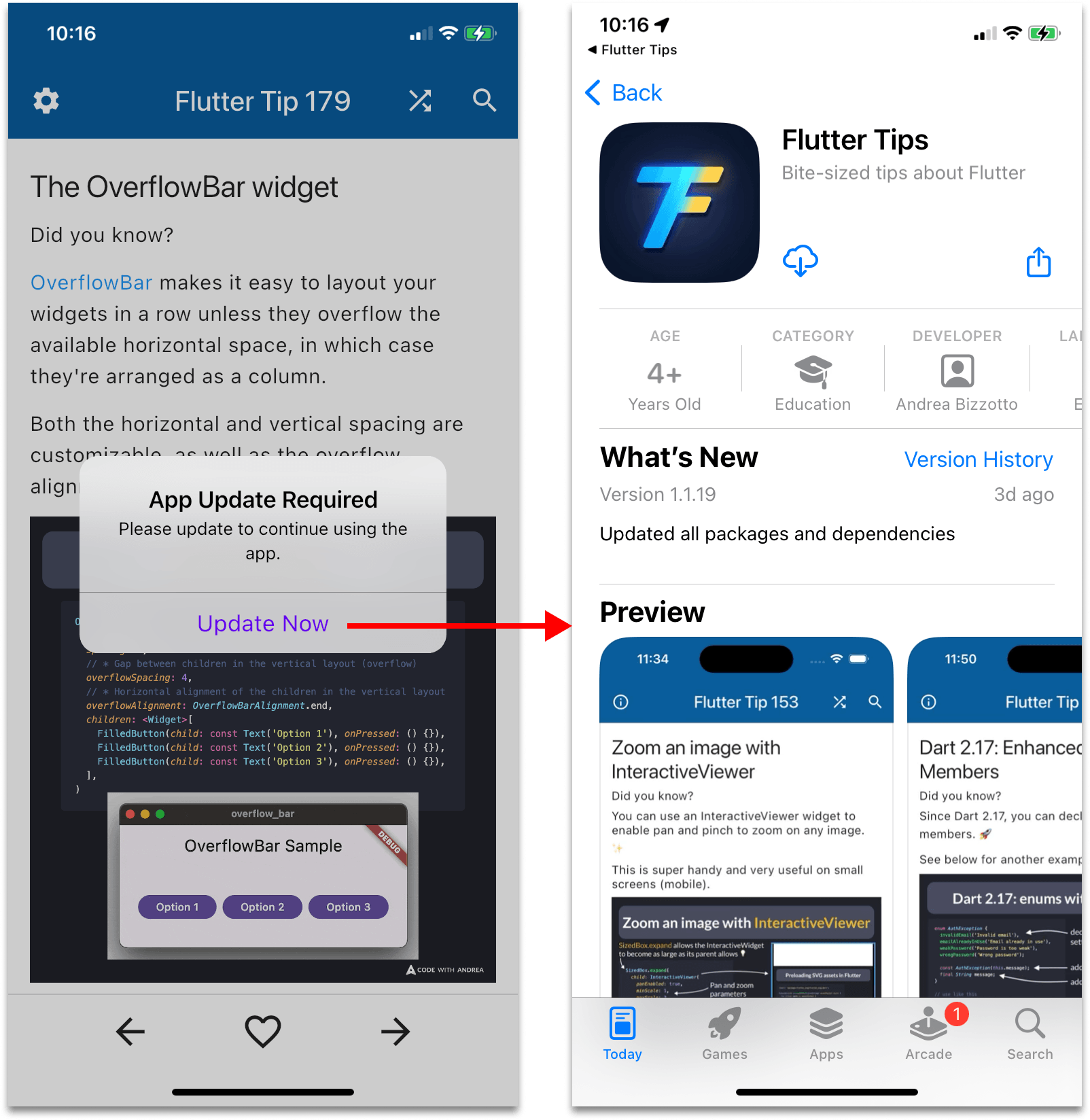
Features
- Remote control: control the force update logic remotely with a custom backend, or Firebase Remote Config, or anything that resolves to a
Future<String>.
- UI-agnostic: the package tells you when to show the update UI, you decide how to show it (localization is up to you).
- Small and opinionated: the package is made of only two classes. Use it as is, or fork it to suit your needs.
Getting started
Depend on it:
dependencies:
  force_update_helper:
Use it by adding a ForceUpdateWidget to your MaterialApp's builder property:
void main() {
runApp(const MainApp());
}
final _rootNavigatorKey = GlobalKey<NavigatorState>();
class MainApp extends StatelessWidget {
const MainApp({super.key});
@override
Widget build(BuildContext context) {
return MaterialApp(
navigatorKey: _rootNavigatorKey,
builder: (context, child) {
return ForceUpdateWidget(
navigatorKey: _rootNavigatorKey,
forceUpdateClient: ForceUpdateClient(
fetchRequiredVersion: () => Future.value('2.0.0'),
iosAppStoreId: '6482293361',
),
allowCancel: false,
showForceUpdateAlert: (context, allowCancel) => showAlertDialog(
context: context,
title: 'App Update Required',
content: 'Please update to continue using the app.',
cancelActionText: allowCancel ? 'Later' : null,
defaultActionText: 'Update Now',
),
showStoreListing: (storeUrl) async {
if (await canLaunchUrl(storeUrl)) {
await launchUrl(
storeUrl,
mode: LaunchMode.externalApplication,
);
} else {
log('Cannot launch URL: $storeUrl');
}
},
onException: (e, st) {
log(e.toString());
},
child: child!,
);
},
home: const Scaffold(
body: Center(
child: Text('Hello World!'),
),
),
);
}
}
Note that in order to show the update dialog, a root navigator key needs to be added to MaterialApp (this is the same technique used by the upgrader package).
How the package works
Unlike the upgrader package, this package does not use the app store APIs to check if a newer version is available.
Instead, it allows you to store the required version remotely (using a custom backend or Firebase Remote Config), and compare it with the current version from your pubspec.yaml.
Here's how you may use this in production:
- Submit a new version of your app to the stores
- Once it's approved, publish it
- Wait for an hour or so, to account for the time it takes for the new version to be visible on all stores/countries
- Update the
required_version endpoint in your custom backend or via Firebase Remote Config
- Once users open the app, the force update logic will kick in and force them to update
Additional details
The package is made of two classes: ForceUpdateClient and ForceUpdateWidget.
- The
ForceUpdateClient class fetches the required version and compares it with the current version from package_info_plus. Versions are compared using the pub_semver package.
- The
fetchRequiredVersion callback should fetch the required version from an API endpoint or Firebase Remote Config.
- When creating your iOS app in App Store Connect, copy the app ID and use it as the
iosAppStoreId, otherwise the force upgrade alert will not show. I recommend storing an APP_STORE_ID as an environment variable that is set with --dart-define or --dart-define-from-file and read with String.fromEnvironment.
- The Play Store URL is automatically generated from the package name (which is retrieved with the package_info_plus package)
- If you want to make the update optional, pass
allowCancel: true to the ForceUpdateWidget and use it to add a cancel button to the alert dialog. This will make the alert dismissable, but the prompt will still show on the next app start.
- You can catch and handle any exceptions with the
onException handler. Alternatively, omit the onException and handle exceptions globally.
- If you use the url_launcher package to open the app store URLs (which is the recommended way), don't forget to add the necessary query intent inside
AndroidManifest.xml:
    <queries>
        <intent>
            <action android:name="android.intent.action.VIEW" />
            <category android:name="android.intent.category.BROWSABLE" />
            <data android:scheme="https"/>
        </intent>
    </queries>
When is the Force Update Alert shown?
The force update logic is triggered in two cases:
- when the app has just started (from a cold boot)
- when the app returns to the foreground (common when switching between apps)
Then, the update alert will show if all these conditions are true:
- the app is running on iOS or Android (web and desktop are not supported)
- the
requiredVersion is fetched successfully
- the
requiredVersion is greater than the currentVersion
- (iOS only) the
iosAppStoreId is a non-empty string
If the user clicks on "Update Now" and lands on the app store page but does not update the app, the force update alert will show again when returning to the app.
If the update alert shows on Android and the back button is pressed, it will be shown again unless allowCancel is true.
Where to find the iosAppStoreId
Once you have created your app in App Store Connect, you can grab the app ID from the browser URL:
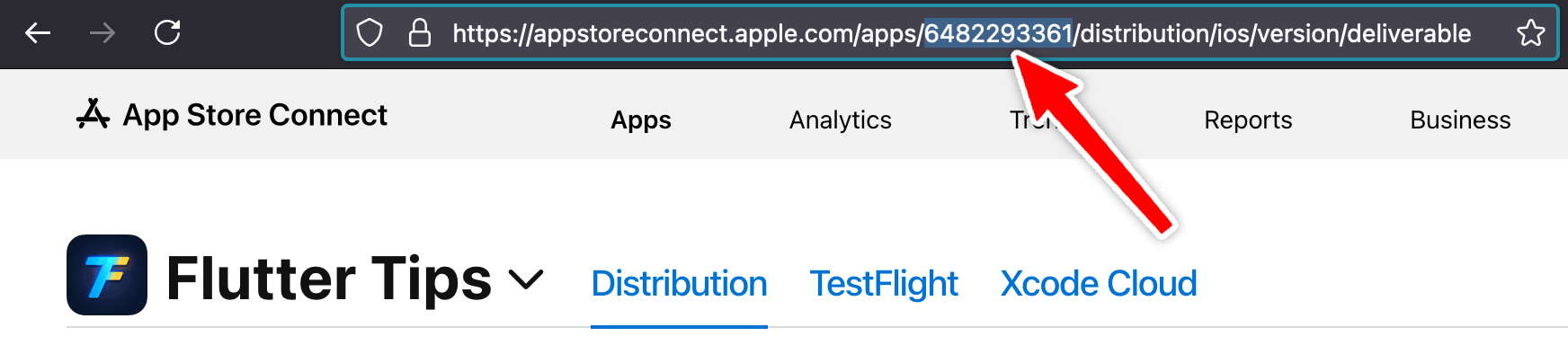
Make sure to set the correct iosAppStoreId before releasing the first version of your app, otherwise users on old version won't be able to update.
Example: fetching a remote config JSON from a GitHub Gist
The example app shows how to fetch some remote config JSON from a RemoteConfigGistClient:
ForceUpdateWidget(
navigatorKey: _rootNavigatorKey,
forceUpdateClient: ForceUpdateClient(
fetchRequiredVersion: () async {
final client = RemoteConfigGistClient(dio: Dio());
final remoteConfig = await client.fetchRemoteConfig();
return remoteConfig.requiredVersion;
},
iosAppStoreId: '6482293361',
),
allowCancel: false,
showForceUpdateAlert: (context, allowCancel) => showAlertDialog(
context: context,
title: 'App Update Required',
content: 'Please update to continue using the app.',
cancelActionText: allowCancel ? 'Later' : null,
defaultActionText: 'Update Now',
),
showStoreListing: (storeUrl) async {
if (await canLaunchUrl(storeUrl)) {
await launchUrl(
storeUrl,
mode: LaunchMode.externalApplication,
);
} else {
log('Cannot launch URL: $storeUrl');
}
},
onException: (e, st) {
log(e.toString());
},
child: child!,
)
The RemoteConfigGistData class can be used to fetch and parse some JSON in this format:
{
  "config" : {
    "required_version": "2.0.0"
  }
}
Here's the reference RemoteConfigGistData class:
import 'dart:convert';
import 'package:dio/dio.dart';
class RemoteConfigGistData {
RemoteConfigGistData({required this.requiredVersion});
final String requiredVersion;
factory RemoteConfigGistData.fromJson(Map<String, dynamic> json) {
final requiredVersion = json['config']?['required_version'];
if (requiredVersion == null) {
throw FormatException('required_version not found in JSON: $json');
}
return RemoteConfigGistData(requiredVersion: requiredVersion);
}
}
class RemoteConfigGistClient {
const RemoteConfigGistClient({required this.dio});
final Dio dio;
Future<RemoteConfigGistData> fetchRemoteConfig() async {
const owner = 'bizz84';
const gistId = 'e5b8041b35c58a3eba2baa23096d1678';
const fileName = 'app_name_remote_config.json';
const url =
'https://gist.githubusercontent.com/$owner/$gistId/raw/$fileName';
final response = await dio.get(url);
final jsonData = jsonDecode(response.data);
return RemoteConfigGistData.fromJson(jsonData);
}
}
For more info, see this example app:
Example: fetching the required version from a backend endpoint
The package comes with a sample server-side app that implements a required_version endpoint using Dart Shelf.
This can be used as part of the force update logic in your Flutter apps.
For more info, see this example app:
Are contributions welcome?
I created this package so I can reuse the force update logic in my own apps.
While you're welcome to suggest improvements, I don't want the package to become bloated, and I only plan to make changes that suit my needs.
If the package doesn't suit your use case, consider forking and maintaining it yourself.

