搜尋套件、儲存庫與 APP 分類

glassmorphism_widgets 封面
套件詳情v0.2.2

glassmorphism_widgets

一組可用於 Flutter 應用的組件。您可以輕鬆自訂和開發玻璃擬態組件。

AndroidiOSWebmacOSWindowsLinux
近 30 天下載
601
喜歡數
79
Pub 分數
150

安裝套件

flutter pub add glassmorphism_widgets

套件介紹

根據套件公開資料產生的選型評估,僅供參考。

一個 Flutter 套件,提供一組可自訂的元件,用於在應用程式中建立玻璃形態效果。它簡化了模糊、半透明 UI 元素的實作,具備現代感十足的霜花玻璃美學。開發者可以輕鬆整合並調整這些元件,以符合各種設計需求,適用於多個平台。此套件支援 Android、iOS、Web、macOS、Windows 與 Linux,非常適合尋求時尚、現代外觀的跨平台專案。

適用情境

  • 建立現代應用程式介面
  • 設計帶有模糊效果的浮動卡片
  • 建構視覺上吸引人的疊加層
  • 透過深度增強使用者體驗
  • 實現半透明UI元件

主要特色

  • 易於使用的玻璃擬態小部件
  • 可自定義的模糊和透明度級別
  • 跨平台相容性
  • 支援多種主題
  • 內建動畫支援
  • 透過 pub add 簡單整合

適合對象

  • 尋求現代美學的UI設計師
  • 開發跨平台應用的開發者
  • 需要磨砂玻璃效果的項目
  • 專注於視覺吸引力的應用程式
  • 使用 Flutter 進行快速原型設計的團隊

使用建議

  • 使用重度模糊效果時的性能影響
  • 可能需要額外的樣式以支援深色模式
  • 超出基本屬性的自訂功能有限
  • 不適用於低階設備
  • 某些平台可能會出現渲染不一致的情況

原始 README

以下為關聯原始碼儲存庫的 README 原文快照,最新內容請造訪原始碼儲存庫。

Glassmorphism Widgets

About

This package allows you to easily create a Glassmorphism UI.
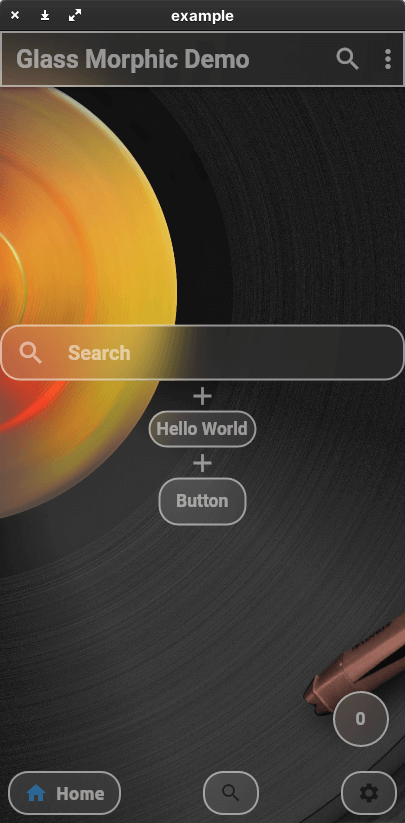
The AppBar, ListTile, and even the BottomNavigationBar work like Material Design widgets.
The color, shape, and size of the glass are all up to you.
Create your ideal Glassmorphism App!
This package currently supports only stable channel.

Getting started

You should add the following to the pubspec.yaml file:

dependencies:
  glassmorphism_widgets:

You should then run flutter packages get in your terminal so as to get the package.

Now import the package in the dart file:

import 'package:glassmorphism_widgets/glassmorphism_widgets.dart';

Usage

Here is an example of how to use Glassmorphism Widgets.
Many of the parameters are based on the original Material Design widget.
If you want to know glass specific parameter.
You should look here.

GlassContainer

a simple glass container.

GlassContainer(
    child: Padding(
      padding: EdgeInsets.all(8),
      child: GlassText("Hello World"),
    ),
),
GlassFlexContainer
Container(
    height:200,
    width:200,
    GlassFlexContainer(
        child: Padding(
        padding: EdgeInsets.all(8),
        child: GlassText("Hello World"),
        ),
    ),
),
GlassApp & GlassThemeData

If you want to change glass widgets look all together.
You should use GlassApp and GlassThemeData.

GlassApp(
  theme: GlassThemeData(
    blur: 10,
  ),
  home: MaterialApp(
    title: 'Flutter Demo',
    theme: ThemeData(
      primarySwatch: Colors.blue,
    ),
    home: const MyHomePage(title: 'Flutter Demo Home Page'),
  ),
)
GlassTheme

If you want to access GlassThemeData.
You should use GlassTheme.

GlassThemeData data = GlassTheme.of(context);
GlassText

It is a thin white text.

GlassText("Hello World"),
GlassAppBar

a simple glass app bar.

appBar: GlassAppBar(
    title: GlassText(
        'Glass Morphic Demo',
        fontWeight: FontWeight.bold,
        color: Colors.white,
    ),
),
GlassListTile

a simple glass list tile

GlassListTile(
    leading: GlassIcon(Icons.search),
    title: TextField(
        decoration: InputDecoration(
        hintText: 'Search',
        border: InputBorder.none,
        hintStyle: glassTextStyle,
        ),
        style: glassTextStyle,
    ),
    onTap: () {},
),
GlassButton

a simple glass button

GlassButton(
    onPressed: () {
    showGlassBottomSheet(
        context: context,
        child: Center(
            child: GlassText("Hello World", fontSize: 20)));
    },
    child: GlassText("Button"),
),
showGlassBottomSheet

Display bottom sheet like glass

showGlassBottomSheet(
    context: context,
    child: Center(
        child: GlassText("Hello World", fontSize: 20)));
GlassFloatingActionButton
floatingActionButton: GlassFloatingActionButton(
    onPressed: () {
        setState(() {
            index++;
        });
    },
    child: GlassText("$index"),
),
GlassBottomBar
bottomNavigationBar: GlassBottomBar(
            items: [
              GlassBottomBarItem(
                icon: Icon(Icons.home),
                title: GlassText("Home"),
              ),
              GlassBottomBarItem(
                icon: Icon(Icons.search),
                title: GlassText("Search"),
              ),
              GlassBottomBarItem(
                icon: Icon(Icons.settings),
                title: GlassText("Settings"),
              ),
            ],
            onTap: (i) {
              setState(() {
                index = i;
              });
            },
            currentIndex: index,
          ),
GlassIcon
IconButton(
    icon: GlassIcon(Icons.search),
    onPressed: () {},
),

a specific Glass widget parameter

How to change widgets gradient?

You should add parameter linearGradient.

How to change widgets shape?

You should add parameter radius or borderRadius.
borderRadius takes precedence over radius.

I want to create more clear glass or more frosted glass

You should add parameter blur.
If you set blur lower value. GlassWidgets will become clear.

Problem

Master Channel cannot use GlassFloatingActionButton.

Contact

If you have anything you want to inform me (@yama-yeah), such as suggestions to enhance this package or functionalities you want etc, feel free to make issues on GitHub

所屬分類

原始碼儲存庫

使用此套件的專案

暫無相關資料。