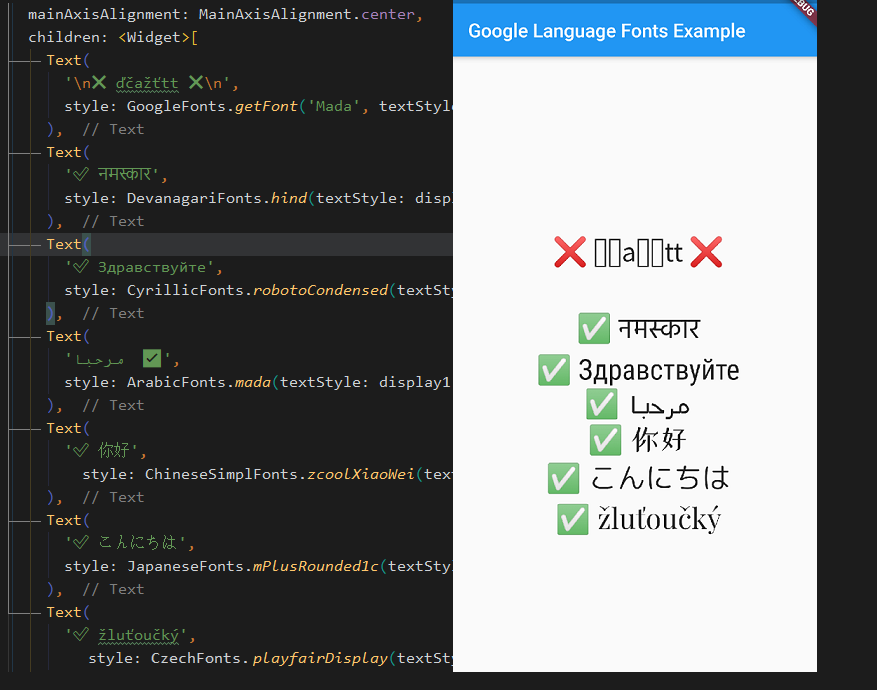
google_language_fonts 套件簡化了將支援多種語言的 Google 字型整合至 Flutter 應用程式的過程。它讓開發者能輕鬆加入與語言相容的字型,無需手動設定或資源管理。此套件自動處理字型載入,並確保在不同文字系統與地區中的正確呈現。非常適合多語系應用,可提升排版的一致性與可存取性。僅需單一指令進行最小設定,即可簡化字型引入流程,同時維持效能與可擴展性。
適用情境
多語言應用介面
國際化內容顯示
跨腳本改善文字可讀性
動態字型切換
以可存取性為重點的設計
在地化使用者體驗
主要特色
與 Flutter 的輕鬆整合
自動字體載入
支援多種語言腳本
所需設定最少
優化效能
跨平台相容性
適合對象
開發國際應用的開發者
面向全球受眾的應用
需要多種腳本支援的專案
重視排版一致性的團隊
需要可存取性文字呈現的應用程式
使用建議
僅限 Google 字型
無離線字型快取
依賴網路連接進行首次載入
可能稍微增加應用大小
不適合高度自訂的字型工作流程
需要仔細選擇語言特定的字形
原始 README
以下為關聯原始碼儲存庫的 README 原文快照,最新內容請造訪原始碼儲存庫。
google_language_fonts
A simple way to use compatible fonts with your languages, without worrying about unrecognized characters.
This unofficial google_language_fonts package is an extension of the google_fonts package and it allows you to easily use more than 950 fonts
(and their variants) from fonts.google.com in your Flutter app.
These fonts are matched with the 27 languages listed below so you can use them right away from your IDE.
To use it as a language font simply add Fonts suffix to any of these currently supported languages below
** This language subset contains almost all fonts (same as base GoogleFonts)
Getting Started
With the google_language_fonts package, .ttf or .otf files do not need to be stored in your assets folder and mapped in
the pubspec. Instead, they can be fetched once via http at runtime, and cached in the app's file system. This is ideal for development, and can be the preferred behavior for production apps that
are looking to reduce the app bundle size. Still, you may at any time choose to include the font file in the assets, and the Google Fonts package will prioritize pre-bundled files over http fetching.
Because of this, the Google Fonts package allows developers to choose between pre-bundling the fonts and loading them over http, while using the same API.
For example, say you want to use any of the Cyrillic fonts from Google Fonts in your Flutter app. You would need to try one by one until you find what satisfies your needs. With this package, you can try your fonts right away from IDE thanks to auto-suggestions.
To use for example LatinFonts with the default TextStyle:
Text(
  'This is Google Fonts',
  style: LatinFonts.playfairDisplay(),
),
Or, if you want to load the font dynamically:
Text(
  'This is Google Fonts',
  style: GoogleFonts.getFont('Lato'),
),
To use GoogleFonts with an existing TextStyle:
Text(
  'This is Google Fonts',
  style: CyrillicFonts.robotoCondensed(
    textStyle: TextStyle(color: Colors.blue, letterSpacing: .5),
  ),
),
or
Text(
  'This is Google Fonts',
  style: CyrillicFonts.robotoCondensed(textStyle: Theme.of(context).textTheme.display1),
),
To override the fontSize, fontWeight, or fontStyle:
Text(
  'This is Google Fonts',
  style: LatinFonts.playfairDisplay(
    textStyle: Theme.of(context).textTheme.display1,
    fontSize: 48,
    fontWeight: FontWeight.w700,
    fontStyle: FontStyle.italic,
  ),
),
You can also use for example CyrillicFonts.robotoCondensedTextTheme() to make or modify an entire text theme to use the "robotoCondensedTextTheme" font.
The google_language_fonts package will automatically use matching font files in your pubspec.yaml's
assets (rather than fetching them at runtime via HTTP). Once you've settled on the fonts
you want to use:
Download the font files from https://fonts.google.com.
You only need to download the weights and styles you are using for any given family.
Italic styles will include Italic in the filename. Font weights map to file names as follows:
Move those fonts to a top-level app directory (e.g. google_fonts).
Ensure that you have listed the folder (e.g. google_fonts/) in your pubspec.yaml under assets.
Note: Since these files are listed as assets, there is no need to list them in the fonts section
of the pubspec.yaml. This can be done because the files are consistently named from the Google Fonts API
(so be sure not to rename them!)
Compatibility
In this package calling fonts from the GoogleFonts class is not possible due to having faster IDE auto-suggestions and to not clash with the official package. However, this package is compatible with the official google_fonts package. If you want to access any font without having to be limited to a language then you can either:
just use LatinFonts prefix, which contains almost all fonts from the base GoogleFonts, e.g.: LatinFonts.lato(),
or call a font dynamically: GoogleFonts.getFont('Lato'),
// you can not access e.g.: GoogleFonts.lato(), only dynamically via GoogleFonts.getFont('Lato')import'package:google_language_fonts/google_language_fonts.dart';
or add official google_fonts package and use GoogleFonts in this way:
// only if you add google_fonts package then you can access it with 'as' keyword like:import'package:google_fonts/google_fonts.dart'as basic; // basic.GoogleFonts.lato()
Licensing Fonts
The fonts on fonts.google.com include license files for each font. For
example, the Lato font comes with an OFL.txt file.
Once you've decided on the fonts you want in your published app, you should download and add the appropriate
licenses to your flutter app's LicenseRegistry.