搜尋套件、儲存庫與 APP 分類

hashtagable 封面
套件詳情v2.3.0+1

hashtagable

用於實現標籤裝飾文字的組件和函數。將以 `#` 開頭的單詞像 Twitter 一樣進行裝飾。

近 30 天下載
151
喜歡數
136
Pub 分數
70

安裝套件

flutter pub add hashtagable

套件介紹

根據套件公開資料產生的選型評估,僅供參考。

一個 Flutter 套件,可實現類似 Twitter 的標籤裝飾文字。它提供小部件和實用功能,可自動偵測並樣式化以 '#' 符號開頭的單字,增強社交媒體風格的文字顯示。適用於需要在使用者產生內容中展示互動式或視覺上顯著標籤的應用程式。該套件可透過簡單指令輕鬆整合,且為開源專案,託管於 GitHub。目前無平台特定限制,但進階樣式需求可能需要額外自訂。

適用情境

  • 社群媒體應用動態
  • 使用者評論區
  • 話題追蹤介面
  • 互動式文字輸入欄位
  • 內容標記系統

主要特色

  • 自動話題標籤檢測
  • Twitter風格的標籤樣式
  • 可自訂的裝飾選項
  • 透過 pub 的簡單整合
  • 開源程式碼庫

適合對象

  • 開發社交平台的開發者
  • 使用者產生內容的應用程式
  • 帶元數據高亮的文本渲染
  • 需要視覺上區分標籤的介面
  • 使用輕量級文字裝飾的項目

使用建議

  • 僅限基礎標籤樣式
  • 輕觸無內建導航
  • 可能需要為邊緣情況定制處理
  • 依賴外部 GitHub 倉庫
  • 除了原始碼外,沒有官方文件

原始 README

以下為關聯原始碼儲存庫的 README 原文快照,最新內容請造訪原始碼儲存庫。

All Contributors

hashtagable

test pub package License: MIT

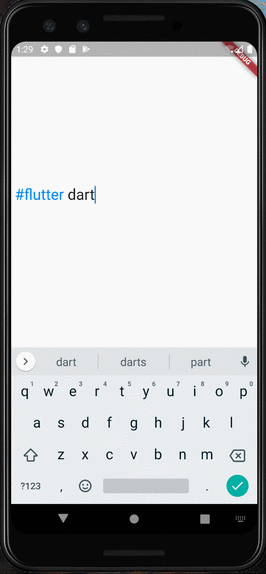
Widgets and functions to implement hashTag decorated text.

Detects the words start with # like a Twitter.

RPReplay_Final1599932903

Usage

  • As TextField

You can use HashTagTextField to decorate input text.

    HashTagTextField(
    decoratedStyle: TextStyle(fontSize: 14, color: Colors.blue),
    basicStyle: TextStyle(fontSize: 14, color: Colors.black),
    ),

decoratedStyle is the textStyle of tagged text. basicStyle is for untagged text.

Other arguments are basically same as those of material TextField

  • As ReadOnlyText

If you want to decorate the text only to display, HashTagText will help you.

    HashTagText(
        text: "#Welcome to #hashtagable \n This is #ReadOnlyText",
        decoratedStyle: TextStyle(fontSize: 22,color:Colors.red),
        basicStyle: TextStyle(fontSize: 22,color:Colors.black),
        onTap: (text) {
          print(text);
        },
    )

The argument onTap(String) is called when user tapped a hashTag.

You can add some actions in this callback with the tapped hashTag.

Customize with useful functions

  • Check if the text has hashTags
   print(hasHashtags("Hello #World")); 
   // true
   
   print(hasHashtags("Hello World"));
   // false
   
  • Extract hashTags from text
   final List<String> hashTags = extractHashTags("#Hello World #Flutter Dart #Thank you");
   // ["#Hello", "#Flutter", "#Thank"]

Tips

  • DetectableTextField is published as a refinement of this package. hashtagale forces you to use hashtag, but this one allows you to detect anything you want.

  • If you also want to decorate At sign, you can do that by adding the argument decorateAtSign: true.

    HashTagText(
        text: "#Hello World @flutter_developers",
        decoratedStyle: TextStyle(fontSize: 14,color:Colors.red),
        basicStyle: TextStyle(fontSize: 14,color:Colors.black),
        onTap: (text) {
          print(text);
        },
        decorateAtSign: true,
    )

Then HashTagText and HashtagTextField come to decorate the words start with # or @.

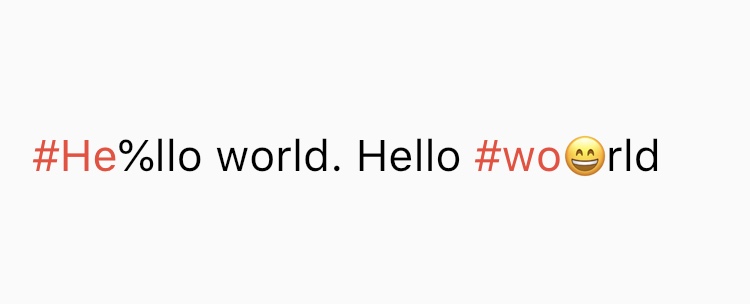
  • The decoration rules are almost same as twitter. It does not decorate the tags which contain emoji or symbol. It needs space before # (or @) to decorate.
  • Supported Languages are English, Japanese, Korean, Spanish, Arabic, Thai, Norwegian and German.

If you have any requests or questions, please feel free to ask on github.


Contributors: Santa Takahashi, Matheus Perez, Marcel Schneider, Ho Kim, Burak

Contributors ✨

Thanks goes to these wonderful people (emoji key):

JorisObert
JorisObert

💻

This project follows the all-contributors specification. Contributions of any kind welcome!

所屬分類

原始碼儲存庫

使用此套件的專案

暫無相關資料。