搜尋套件、儲存庫與 APP 分類

套件詳情v1.8.0

highlight_text

使用此套件,您可以突出顯示文字並建立特定樣式和動作。

AndroidiOSWebmacOSWindowsLinux
近 30 天下載
1.1萬
喜歡數
133
Pub 分數
150

安裝套件

flutter pub add highlight_text

套件介紹

根據套件公開資料產生的選型評估,僅供參考。

highlight_text 套件讓開發者能夠在文字中強調特定字詞,並套用自訂樣式與互動動作。非常適合需要對特定關鍵字進行視覺強調或功能處理的富文字顯示情境,例如可點擊的詞語。此套件支援 Android、iOS、Web、macOS、Windows 與 Linux 多個平台,適用於跨平台應用程式。透過 Flutter pub add 簡單整合,藉由動態文字互動提升使用者參與度。

適用情境

  • 在文章中突出關鍵字
  • 建立互動式文字元素
  • 增強搜尋結果預覽
  • 顯示樣式化的提及或標籤
  • 建構富文本編輯器
  • 實現可點擊的單字操作

主要特色

  • 可自定義的強調樣式
  • 支援對強調文字的點按手勢
  • 跨平台相容性
  • 與 Flutter 的輕鬆整合
  • 靈活的文字渲染
  • 可設定的強調顏色與效果

適合對象

  • 內容密集型應用
  • 教育類應用
  • 互動式文件
  • 社群媒體功能
  • 搜尋和篩選介面
  • 使用者產生內容平台

使用建議

  • 大段文字帶來的效能影響
  • 內建樣式選項有限,僅支援基本自訂
  • 需要仔細處理嵌套的 widget
  • 可能需要額外的邏輯來處理複雜互動
  • 不適用於即時協作編輯
  • 最適合中等文字複雜度

原始 README

以下為關聯原始碼儲存庫的 README 原文快照,最新內容請造訪原始碼儲存庫。

Highlight Text Plugin

A flutter package to highlight words from a text.

Usage

To use this package, add highlight_text as a dependency in your pubspec.yaml file.

Getting Started

With this package you can highlight words and create specific actions for each highlighted word, you can customize the style of each word separately or create a unique style for all of them, you can also customize the style of the rest of the text.

Example

Import the highlight library

import 'package:highlight_text/highlight_text.dart';

You should use the HighlightedWord class to specify the dictionary words in a Map object

Map<String, HighlightedWord> words = {
    "Flutter": HighlightedWord(
        onTap: () {
            print("Flutter");
        },
        textStyle: textStyle,
    ),
    "open-source": HighlightedWord(
        onTap: () {
            print("open-source");
        },
        textStyle: textStyle,
    ),
    "Android": HighlightedWord(
        onTap: () {
            print("Android");
        },
        textStyle: textStyle,
    ),
};

Now you can call the TextHighlight widget

TextHighlight(
    text: text, // You need to pass the string you want the highlights
    words: words, // Your dictionary words
    textStyle: TextStyle( // You can set the general style, like a Text()
        fontSize: 20.0,
        color: Colors.black,
    ),
    textAlign: TextAlign.justify, // You can use any attribute of the RichText widget
),

Package example image

1.1.0 Update

Now you can customize better the words you highlight, just like a Container. It was added decoration and padding fields to HighlightedWord object, so you can do whatever you want to customize it.

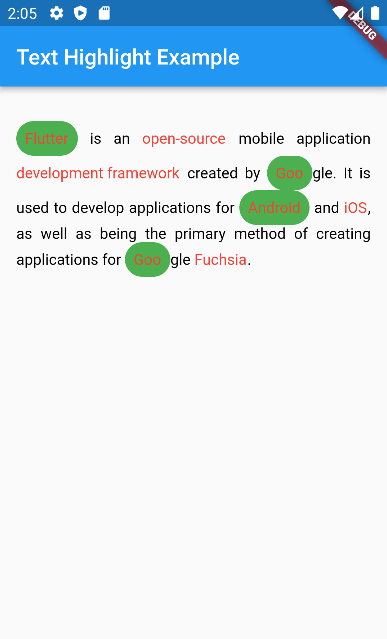
HighlightedWord(
    onTap: () {},
    textStyle: textStyle,
    decoration: BoxDecoration(
        color: Colors.green,
        borderRadius: BorderRadius.circular(50),
    ),
    padding: EdgeInsets.all(8.0),
),

1.2.0 Breaking changes

enableCaseSensitive renamed to matchCase to be clearer about what it does

TextHighlight(
    text: text,
    words: words,
    matchCase: true // will highlight only exactly the same string
),

所屬分類

原始碼儲存庫

使用此套件的專案