搜尋套件、儲存庫與 APP 分類

套件詳情v0.0.3

highlighter_coachmark

教練標記會透過模糊背景並強調目標元素,在覆蓋層中顯示提供的提示或說明。

近 30 天下載
63
喜歡數
142
Pub 分數
40

安裝套件

flutter pub add highlighter_coachmark

套件介紹

根據套件公開資料產生的選型評估,僅供參考。

Highlighter Coachmark 是一個 Flutter 套件,透過顯示提示或說明作為覆蓋層,引導使用者了解應用程式功能。它會模糊背景並強調特定的 UI 元素,非常適合用於引導或功能介紹。此套件透過吸引使用者注意關鍵元件,同時不干擾介面,進而提升使用者體驗。支援可自訂樣式與流暢動畫,呈現精緻外觀。設計簡潔且易於整合,幫助開發者以最少努力實作直覺的引導流程。

適用情境

  • 引導新使用者
  • 突出顯示新功能
  • 引導式教程
  • 應用中的使用者教育
  • 改進複雜介面的使用者體驗

主要特色

  • 背景模糊效果
  • 目標元素高亮
  • 可自定義疊加設計
  • 平滑過渡動畫
  • 與現有小部件的輕鬆整合

適合對象

  • 行動應用程式入門
  • 功能發現工具
  • 用戶培訓模組
  • 使用者體驗改進措施
  • 尋求輕量級教練標記的開發者

使用建議

  • 有限的平台特定自訂
  • 無內建地區化支援
  • 需要手動處理點擊事件
  • 可能影響低階裝置的效能
  • 依賴於正確的控件位置

原始 README

以下為關聯原始碼儲存庫的 README 原文快照,最新內容請造訪原始碼儲存庫。

Highlighter Coach Mark

There are different ways for user on-boarding. It can be a show of screenshots or overlay with directions to features, feature discovery as in Material design or coach mark. This coach mark makes blurred background and highlights desired element.

This coach mark makes blurred background and highlights desired element.

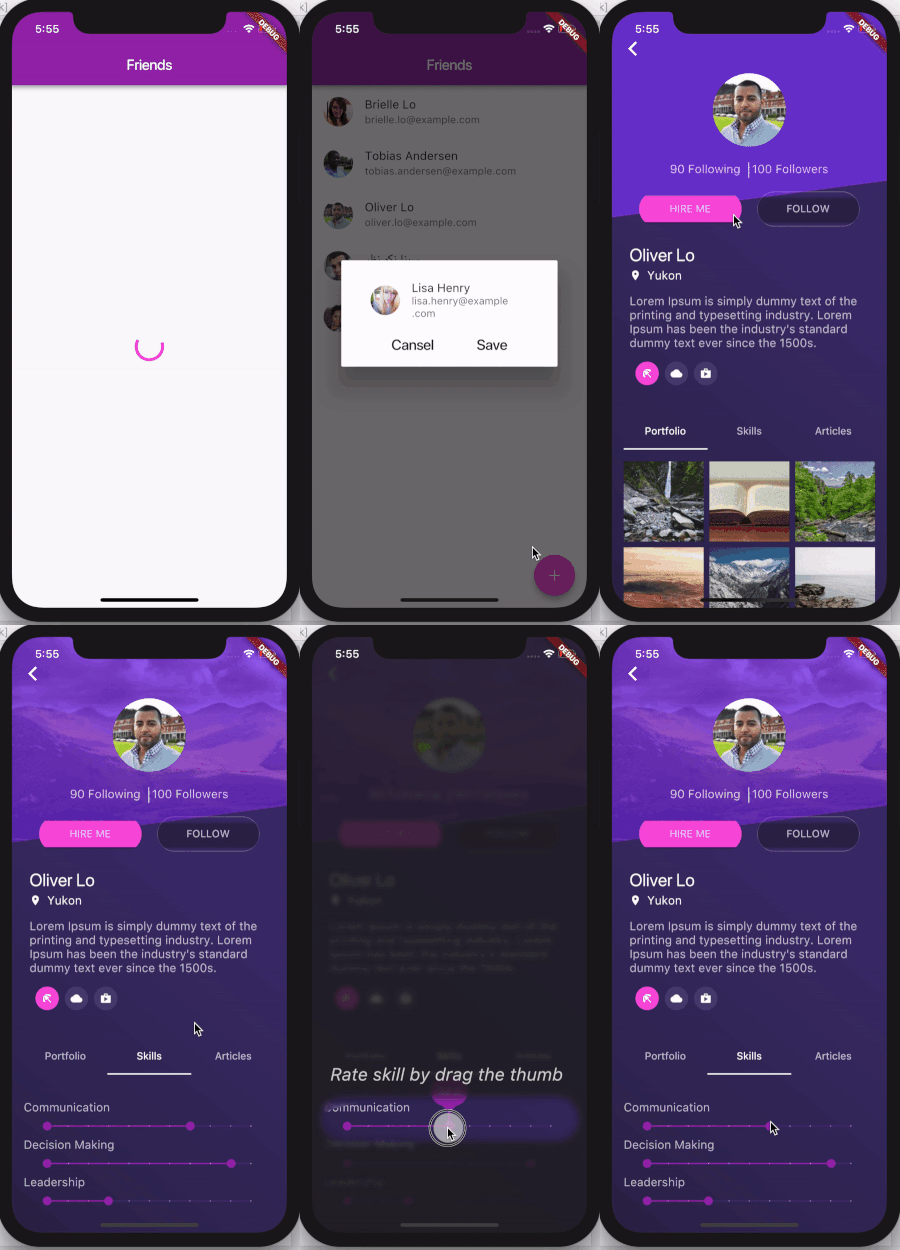
A picture is worth a thousand words, so take a look at gif

And a few tips from UX

Presenting hints one-by-one, at the right moment, makes it a lot easier for users to understand and learn instructions.

To have their full effect, coach marks should focus on particularly innovative or unexpected elements.

Usage

Take a look at example folder. There are also 4 coach marks there. They are all presented in gif above

  CoachMark coachMark = CoachMark();
  RenderBox target = targetGlobalKey.currentContext.findRenderObject();
  Rect markRect = target.localToGlobal(Offset.zero) & target.size;
  markRect = Rect.fromCircle(center: markRect.center, radius: markRect.longestSide * 0.6);
  coachMark.show(
      targetContext: targetGlobalKey.currentContext,
      markRect: markRect,
      children: [
        Positioned(
            top: markRect.top + 5.0,
            right: 10.0,
            child: Text("Long tap on button to see options",
                style: const TextStyle(
                  fontSize: 24.0,
                  fontStyle: FontStyle.italic,
                  color: Colors.white,
                )))
      ],
      duration: null,
      onClose: () {
         appState.setCoachMarkIsShown(true);
      });
Similar packages
Thanks

所屬分類

原始碼儲存庫

使用此套件的專案

暫無相關資料。