搜尋套件、儲存庫與 APP 分類

image_picker_gallery_camera 封面
套件詳情v0.3.0

image_picker_gallery_camera

用於從相簿或相機選擇圖片的 Flutter 套件。此套件支援從相機、相簿以及相機和相簿兩者中選擇圖片。

AndroidiOSWeb
近 30 天下載
228
喜歡數
46
Pub 分數
140

安裝套件

flutter pub add image_picker_gallery_camera

套件介紹

根據套件公開資料產生的選型評估,僅供參考。

一個 Flutter 套件,讓使用者能從裝置相簿、相機或兩者中選擇圖片。它在 Android、iOS 與 Web 平台上提供簡單且一致的介面。此套件可無縫整合至需要圖像輸入的 Flutter 應用程式,適用於個人檔案、上傳或媒體處理。支援單張與多張圖片選擇,非常適合表單、社交功能與內容創作工具。設計時著重於易用性,抽象化平台相關的複雜性。

適用情境

  • 使用者資料圖片上傳
  • 社交媒體貼文創建
  • 使用攝像頭進行文件掃描
  • 電子商務產品圖像捕捉
  • 基於表單的圖像提交

主要特色

  • 從相簿或相機中選擇
  • 支援相簿與相機模式
  • 跨平台相容性(Android、iOS、Web)
  • 簡單的 API 結合
  • 多圖選擇
  • 內建權限處理

適合對象

  • 行動應用程式開發人員
  • 需要影像輸入的Web應用程式
  • 需要使用者產生內容的應用
  • 帶圖像附件的表單
  • 內容管理系統

使用建議

  • Android 和 iOS 需要適當的權限
  • Web 支援可能會因瀏覽器而有局限性
  • 大尺寸影像可能影響效能
  • 選擇器 UI 的自訂功能有限
  • 無內建影像編輯功能
  • 依賴於底層平台的相機/圖庫 API

原始 README

以下為關聯原始碼儲存庫的 README 原文快照,最新內容請造訪原始碼儲存庫。

image_picker_gallery_camera

Flutter Package to Pick Image From Gallery or Camera

Getting Started

A Flutter plugin for iOS and Android for picking images from the image library, and taking new pictures with the camera. You can use both Camera and Gallery Option.

Installation

First, add image_picker_gallery_camera as a dependency in your pubspec.yaml file.

iOS

Add the following keys to your Info.plist file, located in /ios/Runner/Info.plist:

NSPhotoLibraryUsageDescription - describe why your app needs permission for the photo library. This is called Privacy - Photo Library Usage Description in the visual editor.
NSCameraUsageDescription - describe why your app needs access to the camera. This is called Privacy - Camera Usage Description in the visual editor.
NSMicrophoneUsageDescription - describe why your app needs access to the microphone, if you intend to record videos. This is called Privacy - Microphone Usage Description in the visual editor.
Android

No configuration required - the plugin should work out of the box.

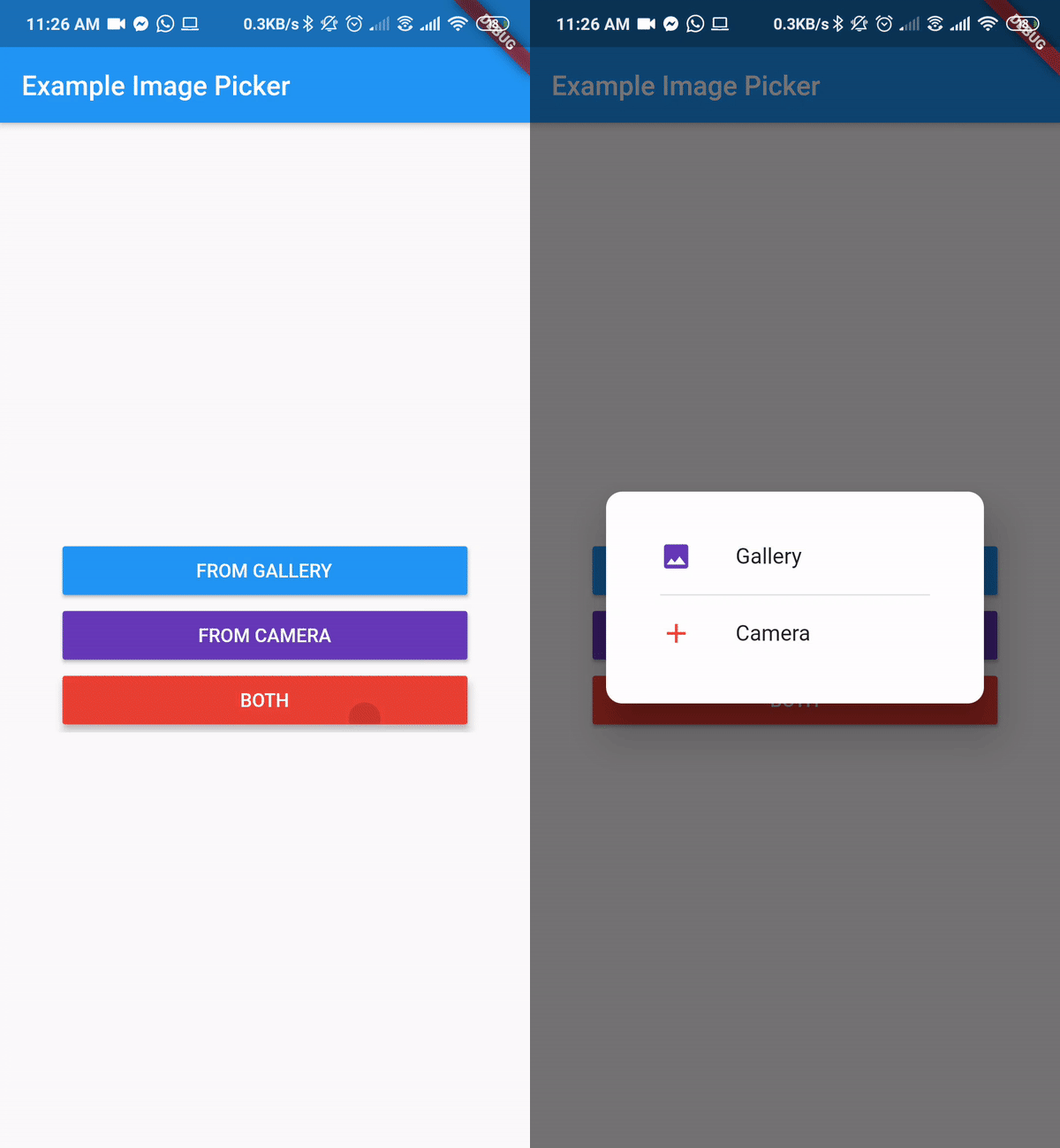
Final Output

Example

import 'dart:io';

import 'package:flutter/material.dart';
import 'package:image_picker_gallery_camera/image_picker_gallery_camera.dart';

void main() => runApp(MyApp());

class MyApp extends StatelessWidget {
  // This widget is the root of your application.
  @override
  Widget build(BuildContext context) {
    return MaterialApp(
      title: 'Example Image Picker',
      theme: ThemeData(
        primarySwatch: Colors.blue,
      ),
      home: MyHomePage(title: 'Example Image Picker'),
    );
  }
}

class MyHomePage extends StatefulWidget {
  MyHomePage({Key key, this.title}) : super(key: key);
  final String title;

  @override
  _MyHomePageState createState() => _MyHomePageState();
}

class _MyHomePageState extends State<MyHomePage> {
  var _image;

  Future getImage(ImgSource source) async {
    var image = await ImagePickerGC.pickImage(
        enableCloseButton: true,
        closeIcon: Icon(
          Icons.close,
          color: Colors.red,
          size: 12,
        ),
        context: context,
        source: source,
        barrierDismissible: true,
        cameraIcon: Icon(
          Icons.camera_alt,
          color: Colors.red,
        ), //cameraIcon and galleryIcon can change. If no icon provided default icon will be present
        cameraText: Text(
          "From Camera",
          style: TextStyle(color: Colors.red),
        ),
        galleryText: Text(
          "From Gallery",
          style: TextStyle(color: Colors.blue),
        ));
    setState(() {
      _image = image;
    });
  }

  @override
  Widget build(BuildContext context) {
    return Scaffold(
      appBar: AppBar(
        title: Text(widget.title),
      ),
      body: Center(
        child: SingleChildScrollView(
          child: Column(
            mainAxisAlignment: MainAxisAlignment.center,
            children: <Widget>[
              Container(
                width: 300,
                child: ElevatedButton(
                  onPressed: () => getImage(ImgSource.Gallery),
                  style: ElevatedButton.styleFrom(
                    primary: Colors.blue,
                  ),
                  child: Text(
                    "From Gallery".toUpperCase(),
                    style: TextStyle(color: Colors.white),
                  ),
                ),
              ),
              Container(
                width: 300,
                child: ElevatedButton(
                  onPressed: () => getImage(ImgSource.Camera),
                  style: ElevatedButton.styleFrom(
                    primary: Colors.deepPurple,
                  ),
                  child: Text(
                    "From Camera".toUpperCase(),
                    style: TextStyle(color: Colors.white),
                  ),
                ),
              ),
              Container(
                width: 300,
                child: ElevatedButton(
                  onPressed: () => getImage(ImgSource.Both),
                  style: ElevatedButton.styleFrom(
                    primary: Colors.red,
                  ),
                  child: Text(
                    "Both".toUpperCase(),
                    style: TextStyle(color: Colors.white),
                  ),
                ),
              ),
              _image != null ? Image.file(File(_image.path)) : Container(),
            ],
          ),
        ),
      ),
    );
  }
}

所屬分類

依賴

依賴清單 1 項

原始碼儲存庫

使用此套件的專案

暫無相關資料。