搜尋套件、儲存庫與 APP 分類

套件詳情v2.0.0

import_lint

Import Lint 套件定義了匯入 Lint 規則,並報告 Dart 程式碼中發現的 Lint 問題。

AndroidiOSmacOSWindowsLinux
近 30 天下載
1萬
喜歡數
28
Pub 分數
150

安裝套件

flutter pub add import_lint

套件介紹

根據套件公開資料產生的選型評估,僅供參考。

Import Lint 套件提供了一組 lint 规則,用於在 Dart 程式碼中強制執行一致且乾淨的匯入實務。它會分析匯入陳述式,並報告未使用的匯入、重複的匯入或不正確的匯入順序等問題。透過與 Dart 分析工具整合,有助於維持專案中的程式碼品質與可讀性。此套件對於希望標準化其匯入模式並減少原始碼檔雜亂的團隊特別有幫助。

適用情境

  • 強制執行一致的匯入樣式
  • 偵測未使用或冗餘的匯入
  • 提升程式碼可讀性
  • 維護團隊範圍內的編碼標準
  • 開發過程中自動清理匯入

主要特色

  • 可自定義的匯入 lint 規則
  • 與 Dart 分析伺服器整合
  • 即時 lint 報告
  • 支援多個平台
  • 開源並由社群維護

適合對象

  • Dart 和 Flutter 開發團隊
  • 需要嚴格代碼質量的項目
  • CI/CD 流水線用於自動化 linting
  • 專注於程式碼潔淨的開發人員

使用建議

  • 需要在 analysis_options.yaml 中進行配置
  • 可能需要為舊代碼庫進行調整
  • 依賴於 Dart SDK 版本相容性
  • 不是獨立的格式化程式,而是補充現有工具

原始 README

以下為關聯原始碼儲存庫的 README 原文快照,最新內容請造訪原始碼儲存庫。

cover

Why import_lint?

The import_lint package defines rules to restrict imports and performs static analysis. It was inspired by eslint/no-restricted-paths.

😻 Usage

  1. Add import_lint as a dev_dependencies in pubspec.yamls.
flutter pub add --dev import_lint

or

dart pub add --dev import_lint
  1. You have lints configured in an analysis_options.yaml file at the root of your project.
  • target: Define the file paths of the targets to be restricted using glob patterns.
  • from: Define the paths that are not allowed to be used in imports using glob patterns.
  • except: Define the exception paths for the 'from' rule using glob patterns.

Example of analysis_options.yaml

plugins:
  import_lint: <version number>

import_lint:
  rules:
    example_rule:
      target: "package:example/target/*.dart"
      from: "package:example/from/*.dart"
      except: ["package:example/from/except.dart"]
    self_rule:
      target: "package:example/self/*.dart"
      from: "package:example/self/*.dart"
      except: []
    only_rule:
      target: "package:example/*[!only]/*.dart"
      from: "package:example/only_from/*.dart"
      except: []
    package_rule:
      target: "package:example/**/*.dart"
      from: "package:import_lint/*.dart"
      except: []
    # add custom rules...

Note: import_lint requires Dart 3.10 or later (analyzer plugin support was added in Dart 3.10 / Flutter 3.38). The top-level plugins: section is the new analyzer plugin system. After any change to the plugins: section, the Dart Analysis Server must be restarted to see the effects (VS Code: Dart: Restart Analysis Server).

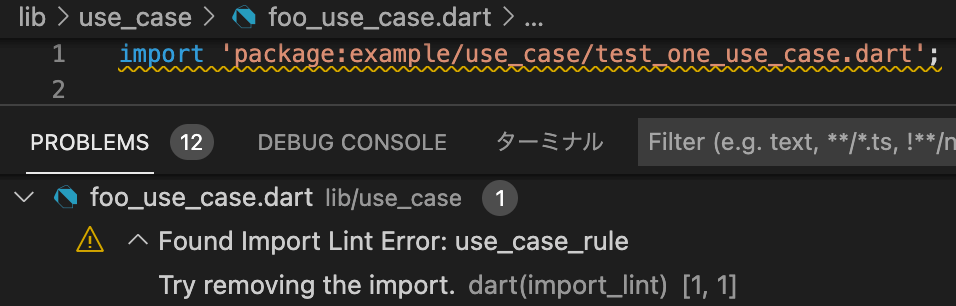
By adding import_lint plugin to get the warnings directly in your IDE by configuring.

vscode

  1. run import_lint(CLI Support)
flutter run import_lint

or

dart run import_lint

Example

example/analysis_options.yaml

plugins:
  import_lint:
    path: ..

import_lint:
  rules:
    example_rule:
      target: "package:example/target/*.dart"
      from: "package:example/from/*.dart"
      except: ["package:example/from/except.dart"]
    self_rule:
      target: "package:example/self/*.dart"
      from: "package:example/self/*.dart"
      except: []
    only_rule:
      target: "package:example/*[!only]/*.dart"
      from: "package:example/only_from/*.dart"
      except: []
    package_rule:
      target: "package:example/**/*.dart"
      from: "package:import_lint/*.dart"
      except: []

files

example/lib

output

$ dart run import_lint

Analyzing...
   warning • /example/lib/not/1.dart:1:8 • package:example/only_from/1.dart • only_rule
   warning • /example/lib/target/1.dart:2:8 • package:example/from/test.dart • example_rule
   warning • /example/lib/self/1.dart:1:8 • package:example/self/2.dart • self_rule
   warning • /example/lib/package/1.dart:1:8 • package:import_lint/import_lint.dart • package_rule

4 issues found.

Option

Rule Severities

To change the severity of a rule, add a severity key to the rule configuration.

  • warning (default)
  • error (exit code 1 when lint is found)
import_lint:
  severity: "error"
  rules: ...

Note on IDE severity: The severity: "error" setting is honored by dart run import_lint (exit code 1). In the IDE, analysis_server_plugin registers a fixed warning severity. To see import_lint errors as errors in the IDE, add this to analysis_options.yaml:

analyzer:
  errors:
    import_lint: error

Contribution

Welcome PRs!

To develop locally, clone the repo and enable the plugin from a local path in your host project's analysis_options.yaml:

plugins:
  import_lint:
    path: /path/to/your/import-lint
    diagnostics:
      import_lint: true

For CLI use (dart run import_lint), also add it under dev_dependencies:

dev_dependencies:
  import_lint:
    path: /path/to/your/import-lint

Then run dart pub get in the host project and restart the Dart Analysis Server. No separate tools/analyzer_plugin directory is needed — the plugin entry point is lib/main.dart in this package.

所屬分類

依賴

依賴清單 8 項

原始碼儲存庫

使用此套件的專案

暫無相關資料。