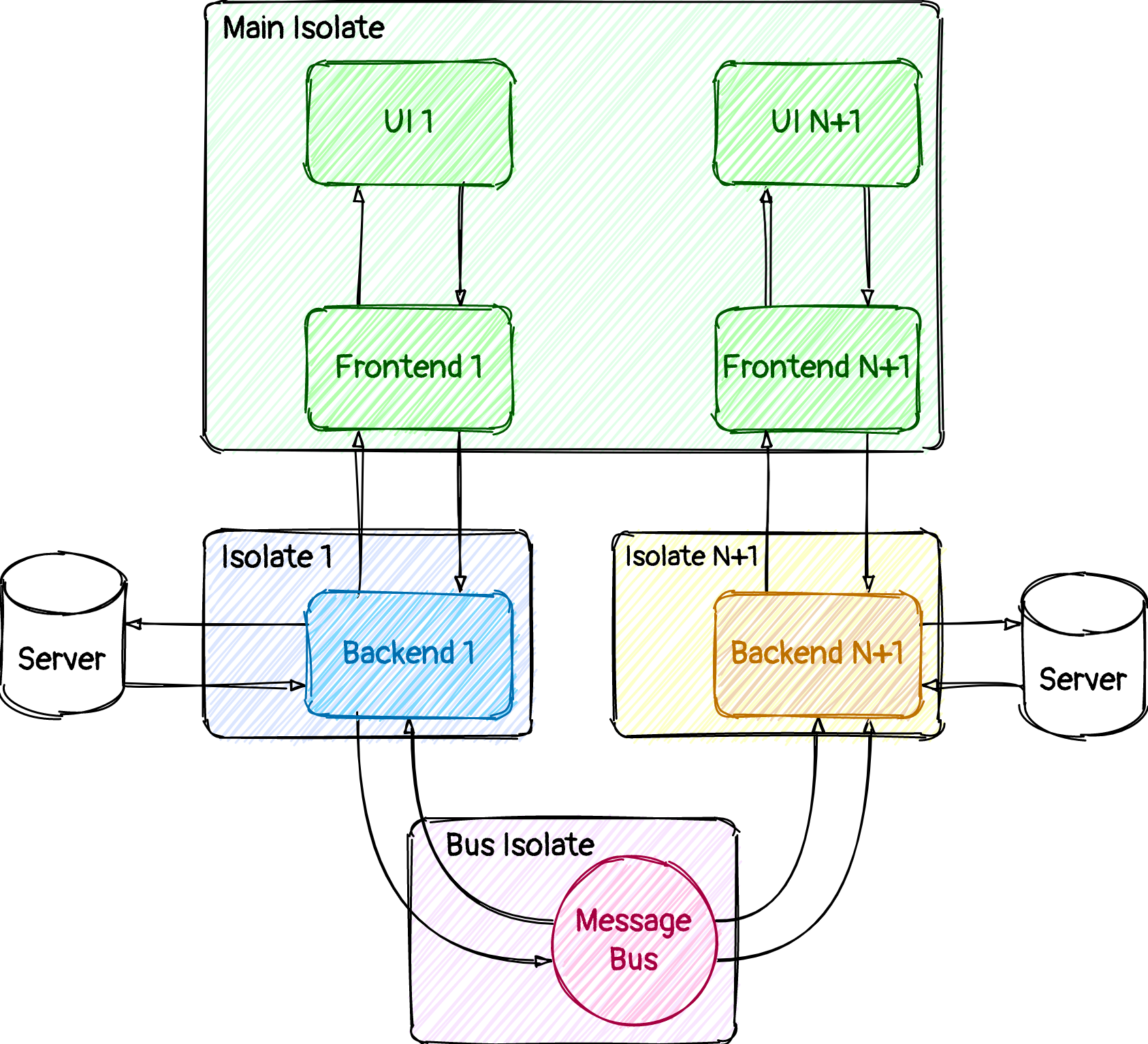
Do you ever want to use isolates in your app, but think, that it is very complex? Or, maybe, you feel that your app has some lugs when you open some screen, which needs data from a backend? With the Isolator, all these problems go out. Have an always stable frame rate at 60 / 120 per second. Don't have any problems with UI-thread junks. And feel happy.
Isolator is a package, which offer to you a simple way for creating two-component states with isolated part, named Backend and Frontend part in UI-isolate of any kind (BLoC, MobX, ChangeNotifier, and many others).
With Isolator you can use all benefits of isolate API without boilerplate code.
Also, Isolator works with Flutter Web, but without multi-threading (because Dart itself has no Web support for isolate API).
Main concepts
Frontend
Frontend - this is the first part of your two-classes logic component. It can use any state management as a base to update your UI: ChangeNotifier, Mobx, Bloc, and any another.
Frontend's mission is in calling Backend's methods, which must be registered through whenEventCome(SomeEvent).run(_someBackendMethod) method in Backend.
Also, Frontend can register its own message handlers in the same manner: whenEventCome(SomeEvent).run(someFrontendMethod) to react on Backend's messages.
And also you can subscribe on your Frontend to get notifications about new messages from the corresponding Backend.
Backend
Backend - this is the second part of the two-classes logic component. All Backend's will run in separated isolate and doesn't affect to UI-isolate. That means, that if you have CPU-heavy logic, big-data parsing or manipulating - you can do this in your Backend and your interface will not drop any frame at all!
Interactor
Interactor - it is an additional part of Backend, which is used to communicate between any Backends without affecting UI-isolate.
Other
You can run each Backend in its separate isolate, or you can run part of Backends in one isolate and another part in another isolate (with pool param).
If you want to know all possibilities of this package, please - investigate this project, which I made to show how Isolator can be used. Also, you can research the tests for the Isolator itself, which have examples for almost all API.
Articles about Isolator
And finally - at the moment I am writing several articles about using my Open Source packages in real projects and when they will be ready - I will attach links to this readme in order to explain in as much detail as possible how to get the most advantages out of this library and from others too.