linkcheck 是一個高效率的工具,用於驗證 HTML 和 CSS 檔案中連結的完整性。它能有效爬取網站,識別損壞或無法存取的連結,以確保內容的可靠性。專為開發人員和網站維護人員設計,支援 Android、iOS、macOS、Windows 和 Linux 等多個平台。該套件可透過 Flutter 的 pub 系統無縫整合至開發工作流程中。其快速掃描功能使其非常適合定期網站審核與品質保證流程。
適用情境
網站維護
自動連結驗證
預部署檢查
內容完整性驗證
CI/CD 流水線整合
主要特色
快速爬取效能
支援 HTML 與 CSS 連結檢測
跨平台相容性
命令列介面
與 Flutter 項目整合
適合對象
前端開發人員
網站管理員
DevOps 工程師
品質保證團隊
內容管理員
使用建議
需要互聯網訪問以檢查外部連結
可能會與動態內容產生誤報
不適用於即時監控
僅限連結的靜態分析
外部網站可能應用速率限制
原始 README
以下為關聯原始碼儲存庫的 README 原文快照,最新內容請造訪原始碼儲存庫。
linkcheck
Very fast link-checking.
Philosophy:
A good utility is custom-made for a job. There are many link checkers out there,
but none of them seems to be striving for the following set of goals.
Crawls fast
You want to run the link-checker at least before every deploy (on CI
or manually). When it takes ages, you're less likely to do so.
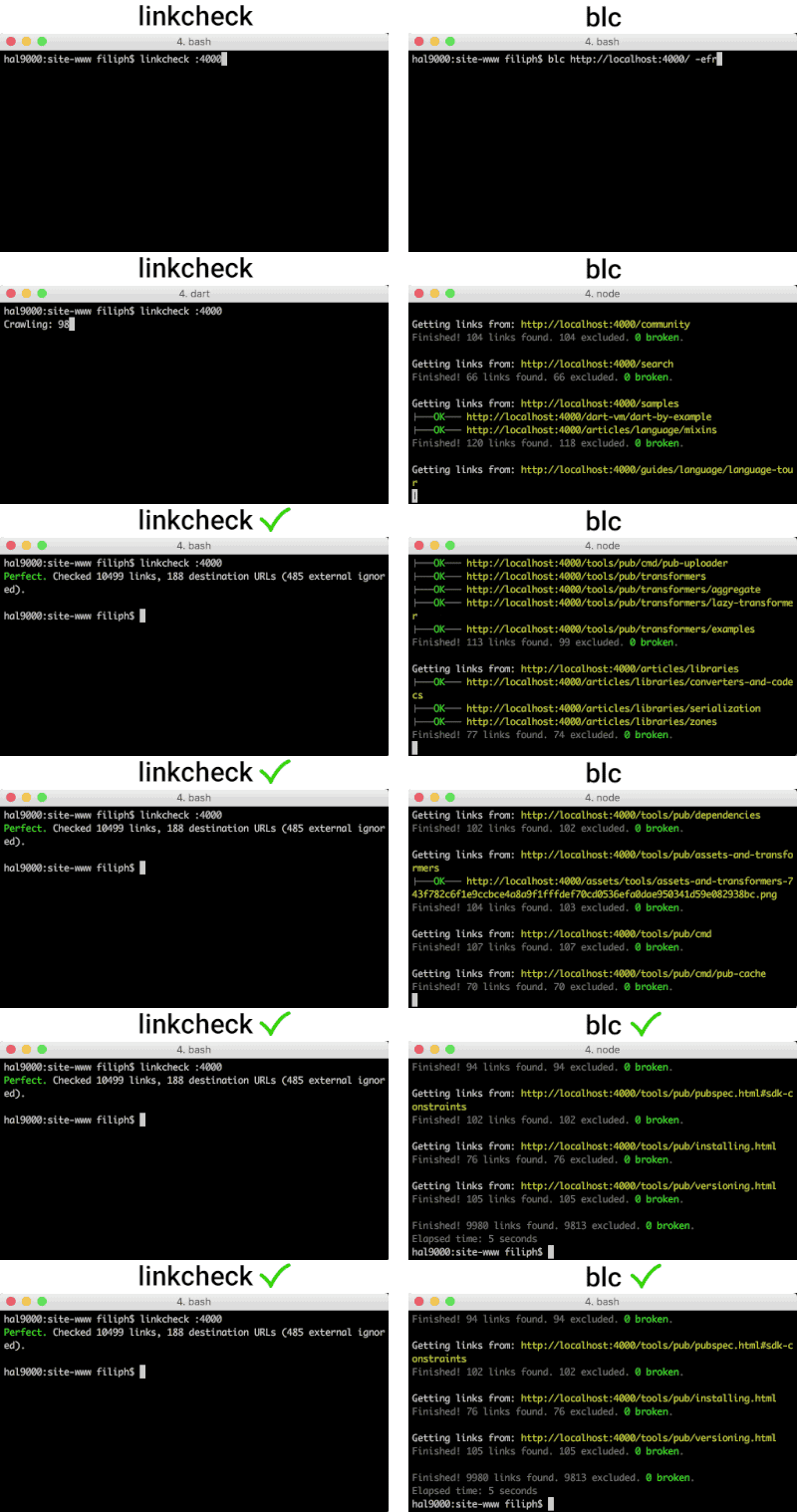
linkcheck is currently several times faster than
blc and all other link
checkers that go to at least comparable depth. It is 40 times faster than the
only tool that goes to the same depth
(linkchecker).
Finds all relevant problems
No link-checker can guarantee correct results: the web is too flaky
for that. But at least the tool should correctly parse the HTML (not just
try to guess what's a URL and what isn't) and
the CSS (for url(...) links).
PENDING: srcset support
linkcheck finds more than linklint and
blc. It finds the
same amount or more problems than the best alternative,
linkchecker.
Leaves out irrelevant problems
linkcheck doesn't attempt to render JavaScript. It would make
it at least an order of magnitude slower and way more complex. (For example,
what links and buttons should the tool attempt to click, and how many
times? Should we only click visible links? How exactly do we detect broken
links?) Validating SPAs is a very different problem than checking static
links, and should be approached by dedicated tools.
linkcheck only supports http: and https:. It won't try to check
FTP or telnet or nntp links.
Note: linkcheck will currently completely ignore unsupported schemes
like ftp: or mailto: or data:. This may change in the future to
at least show info-level warning.
linkcheck doesn't validate file system directories. Servers often behave
very differently than file systems, so validating links on the file system
often leads to both false positives and false negatives. Links should be
checked in their natural habitat, and as close to the production environment
as possible. You can (and should) run linkcheck on your localhost server,
of course.
Good UX
Yes, a command line utility can have good or bad UX. It has mostly to do with
giving sane defaults, not forcing users to learn new constructs, not making
them type more than needed, and showing concise output.
The most frequent use cases should be only a few arguments.
For example, unleashing linkcheck on http://localhost:4001/ can be done
via linkcheck :4001.
linkcheck doesn't throttle itself on localhost.
linkcheck follows POSIX CLI standards (no @input and similar constructs
like in linklint).
Brief and meaningful output
When everything works, you don't want to see a huge list of links.
In this scenario, linkcheck just outputs 'Perfect' and some stats on
a single line.
When things are broken, you want to see where exactly is the problem
and you want to have it sorted in a sane way.
linkcheck lists broken links by their source URL first so that you can
fix many links at once. It also sorts the URLs alphabetically, and shows
both the exact location of the link (line:column) and the anchor
text (or the tag if it wasn't an anchor).
For CI builds, you want non-zero
exit code whenever there is a problem.
linkcheck returns status code 1 if there are warnings, and
status code 2 if there are errors.
It goes without saying that linkcheck fully respects definitions
in robots.txt and throttles itself when accessing websites.
Installation
Direct download
Download the latest executable from the
Releases page on GitHub.
Pick the executable for your system (for example, linkcheck-win-x64.exe for
a 64-bit machine running Microsoft Windows).
You should be able to immediately run this executable -- it has no external
dependencies. For example, assuming you are on macOS and downloaded the file
to the default downloads directory, you can go to your Terminal
(or iTerm, or SSH) and run ./Downloads/linkcheck-mac-x64.
You can rename the file and move it to any directory. For example,
on a Linux box, you might want to rename the executable to simply
linkcheck, and move it to /usr/local/bin, $HOME/bin or another
directory in your $PATH.
Follow the installation instructions for your platform
from the Get the Dart SDK documentation.
For example, on a Mac, assuming you have homebrew,
you just run:
$ brew tap dart-lang/dart
$ brew install dart
Step 2. Install linkcheck
Once Dart is installed, run:
$ dart pub global activate linkcheck
Pub installs executables into ~/.pub-cache/bin, which may not be on your path.
You can fix that by adding the following to your shell's config file (.bashrc,
.bash_profile, etc.):
export PATH="$PATH":"~/.pub-cache/bin"
Then either restart the terminal or run source ~/.bash_profile (assuming
~/.bash_profile is where you put the PATH export above).
Docker
If you have Docker installed, you can build the image and use the container
avoiding local Dart installation.
Build
In the project directory, for x86 and x64 architectures, run
You probably want to make sure you never break your inbound links. For example,
if a page changes URL, the previous URL should still work (redirecting to the
new page when appropriate).
Where do you get a list of inbound links? Try your site's sitemap.xml as
a starting point, and — additionally — try something like the Google Webmaster
Tools’ crawl error page.
Skipping URLs
Sometimes, it is legitimate to ignore some failing URLs. This is done via
the --skip-file option.
Let's say you're working on a site and a significant portion of it is currently
under construction. You can create a file called my_skip_file.txt, for
example, and fill it with regular expressions like so:
# Lines starting with a hash are comments.

admin/
\.s?css$
\#info
The file above includes a comment on line 1 which will be ignored. Line 2 is
blank and will be ignored as well. Line 3 contains a broad regular expression
that will make linkcheck ignore any link to a URL containing admin/
anywhere in it. Line 4 shows that there is full support for
regular expressions – it will ignore URLs ending with .css and
.scss. Line 5 shows the only special escape sequence.
If you need to start your regular expression with a #
(which linkcheck would normally parse as a comment) you can
precede the # with a backslash (\). This will force linkcheck
not to ignore the line. In this case, the regular expression on line 4
will match #info anywhere in the URL.
Regular expressions are hard. If unsure, use the -d option to see what URLs
your skip file is ignoring, exactly.
To use a skipfile while running linkchecker through docker create a directory
to use as a volume in docker and put your skip file in it. Then use a command
similar to the following (assuming the folder was named skipfiles):
docker run -v "$(pwd)/skipfiles/:/skipfiles/" filiph/linkcheck http://example.com/ --skip-file /skipfiles/skipfile.txt
User agent
The tool identifies itself to servers with the following user agent string:
Commit all your changes, including updates to CHANGELOG,
and including updating the version number in pubspec.yaml
and lib/linkcheck.dart. Let's say your new version number is 3.4.56.
That number should be reflected in all three files.
Tag the last commit with the same version number.
In our case, it would be 3.4.56.
Push to master.
This will run the GitHub Actions script in .github/workflows/release.yml,
building binaries and placing a new release into
github.com/filiph/linkcheck/releases.
In order to populate it to the GitHub Actions Marketplace
as well, it's currently required to manually Edit and hit
Update release on the release page once. No changes needed.
(Source: GitHub Community)