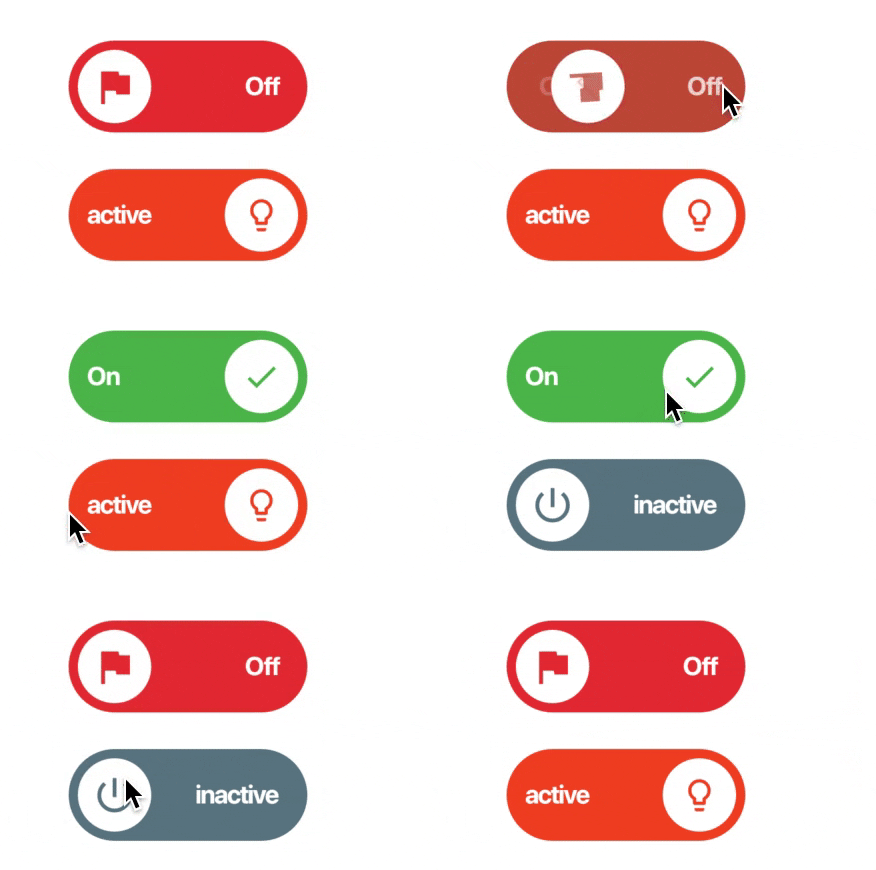
Lite Rolling Switch 是一個可自訂的 Flutter 切換元件,具備流暢且視覺上吸引人的動畫。它讓開發者能根據應用程式設計調整顏色、圖示及其他視覺元素。完全相容空值安全性,支援多個平台,包括 Android、iOS、Web、macOS、Windows 和 Linux。此套件輕巧且易於整合,非常適合需要吸引人切換介面卻不希望帶來沉重負擔的應用。
適用情境
表單中的自定義切換開關
互動式設定面板
儀表板中的動畫UI元素
使用者偏好切換
移動和網頁應用中的視覺反饋
主要特色
平滑滾動動畫
可自定義的顏色和圖示
空值安全支援
跨平台相容性
輕量且高效
與 Flutter 的輕鬆整合
適合對象
尋求動畫開關的開發者
注重設計的應用程式
需要互動式切換的 App
Flutter 初學者探索組件
針對多個平台的專案
使用建議
僅限外觀自訂
無內建狀態管理
不適合複雜的表單邏輯
需要手動處理 onToggle 事件
僅適用於簡單的切換功能
原始 README
以下為關聯原始碼儲存庫的 README 原文快照,最新內容請造訪原始碼儲存庫。
lite_rolling_switch
Full customable rolling switch widget for flutter apps based on Pedro Massango's 'crazy-switch' widget https://github.com/pedromassango/crazy-switch
About
Custom Switch button with attractive animation,
made to allow you to customize colors, icons and other cosmetic content. Manage the widget states in the same way you do with the classical material's switch widget.
NOTE: Currently, you cannot directly change the widget height properties. This feature will be available soon.
Previews
Basic Implementation
import'package:lite_rolling_switch/lite_rolling_switch.dart';
LiteRollingSwitch(
//initial value
value: true,
textOn: 'disponible',
textOff: 'ocupado',
colorOn: Colors.greenAccent[700],
colorOff: Colors.redAccent[700],
iconOn: Icons.done,
iconOff: Icons.remove_circle_outline,
textSize: 16.0,
onChanged: (bool state) {
//Use it to manage the different statesprint('Current State of SWITCH IS: $state');
},
),
Tests
To executed included unit tests run flutter test. Feel free to Pull Request your own Unit Test to improve this package!