搜尋套件、儲存庫與 APP 分類

套件詳情v1.4.0

localstore

基於 JSON 檔案的儲存套件為簡單的 NoSQL 資料庫提供持久性儲存庫。

AndroidiOSWebmacOSWindowsLinux
近 30 天下載
4020
喜歡數
194
Pub 分數
140

安裝套件

flutter pub add localstore

套件介紹

根據套件公開資料產生的選型評估,僅供參考。

LocalStore 是一個 Flutter/Dart 套件,提供基於檔案的持續性 JSON 儲存,可作為簡單的 NoSQL 資料庫使用。它讓應用程式能在多個平台(包含 Android、iOS、Web、macOS、Windows 和 Linux)上本地儲存與取得結構化資料。專為輕量級使用案例設計,將資料儲存在單一 JSON 檔案中,無需複雜設定即可輕鬆管理與存取。非常適合儲存使用者偏好設定、快取資料或需要在應用程式會話之間持續存在的小型資料集。

適用情境

  • 儲存使用者偏好
  • 快取 API 回應
  • 保存應用狀態
  • 管理本地設定
  • 持久化小數據集

主要特色

  • 基於檔案的 JSON 儲存
  • 跨平台支援
  • 簡單的鍵值介面
  • 自動序列化/反序列化
  • 輕巧且快速

適合對象

  • 簡單資料持久化
  • 離線優先的應用程式
  • Prototyping
  • 小型應用
  • 開發者便利

使用建議

  • 不適用於大型資料集
  • 無內建查詢功能
  • 限制為 JSON 格式
  • 需要手動備份
  • 大型檔案可能導致效能下降

原始 README

以下為關聯原始碼儲存庫的 README 原文快照,最新內容請造訪原始碼儲存庫。

Localstore

pub package

Between SQL or NoSQL, there's no one best database, there's the right database for your specific project. Localstore is a JSON file-based storage package (localstorage) provides a persistent repository for simple NoSQL database.

Localstore (NoSQL) SQLite (SQL)
Data format File path (collection) Table
Data item JSON Document (doc) Record / Row
Scalability Horizontal Limited vertical
Organization Schema-less Fixed schema

Demo Screenshot

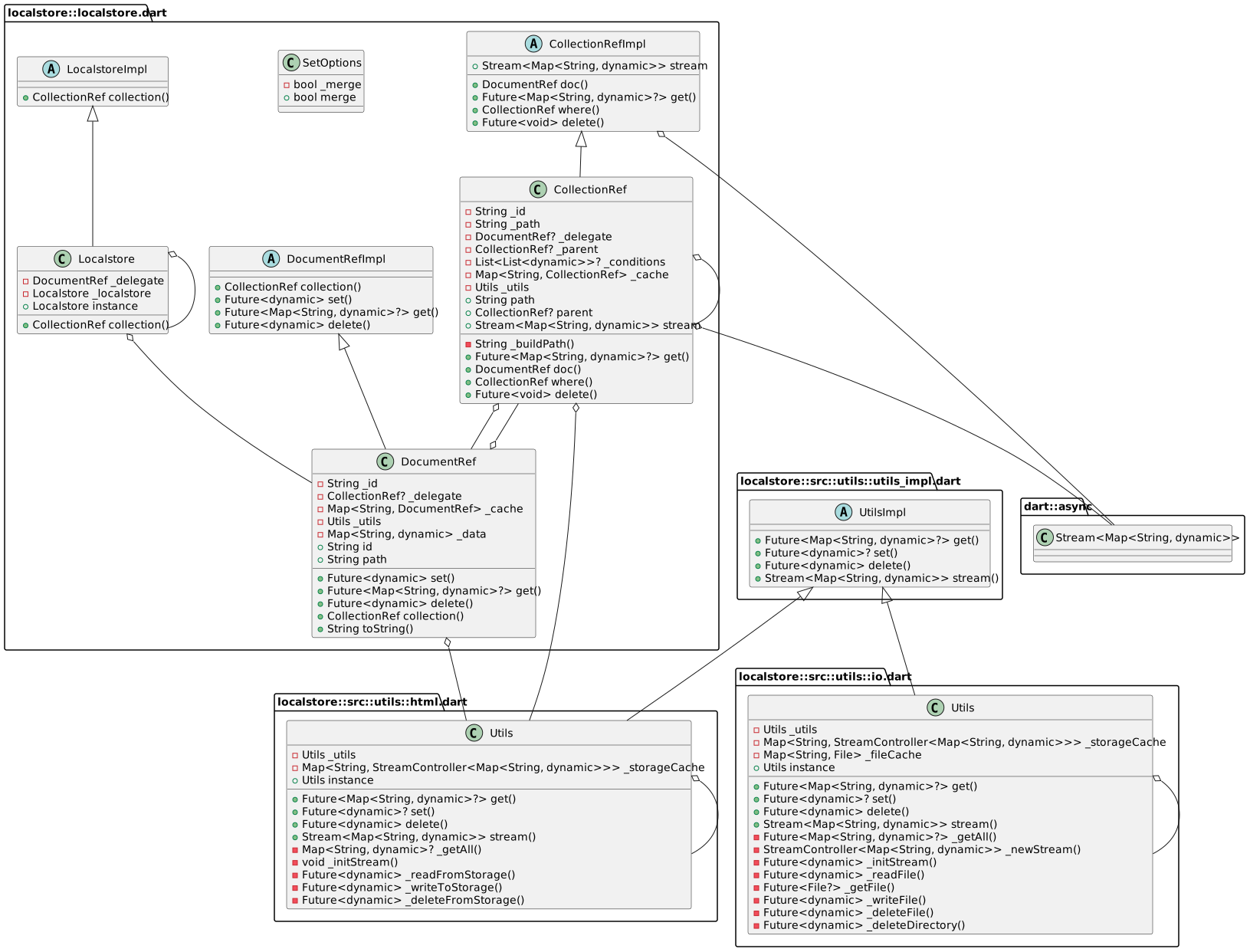
UML diagram

Localstore UML diagram

Getting Started

  1. Calling WidgetsFlutterBinding.ensureInitialized(); in main() before calling runApp():
void main() {
  WidgetsFlutterBinding.ensureInitialized();
  runApp(MyApp());
}
  1. Import import 'package:localstore/localstore.dart';
import 'package:flutter/material.dart';
import 'package:localstore/localstore.dart';

void main() {
  WidgetsFlutterBinding.ensureInitialized();
  runApp(MyApp());
}
  1. Creates an instance using the default Localstore
final db = Localstore.instance;

or using anywhere in your project.

  1. Creates new item
// gets new id
final id = db.collection('todos').doc().id;

// save the item
db.collection('todos').doc(id).set({
  'title': 'Todo title',
  'done': false
});
  1. Gets item by id
final data = await db.collection('todos').doc(id).get();
  1. Delete item by id
db.collection('todos').doc(id).delete();
  1. Fetch the documents for the collection
final items = await db.collection('todos').get();
  1. Using stream
final stream = db.collection('todos').stream;

Features and bugs

Please file feature requests and bugs at the issue tracker.

所屬分類

依賴

依賴清單 2 項

原始碼儲存庫

使用此套件的專案

暫無相關資料。