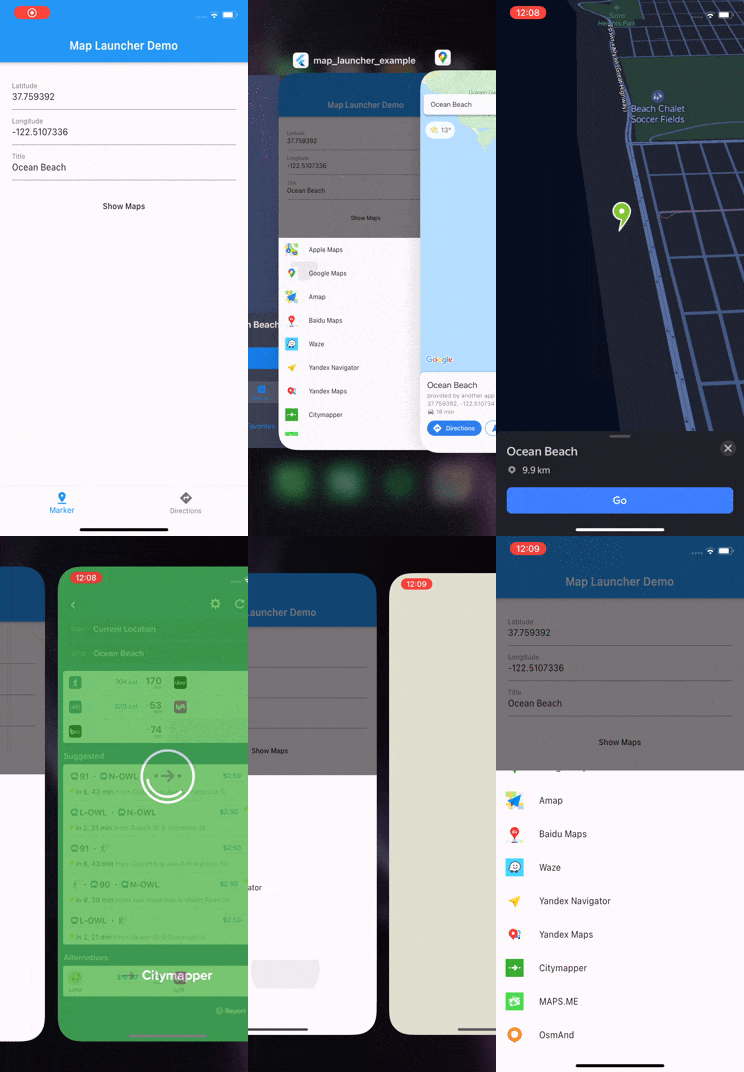
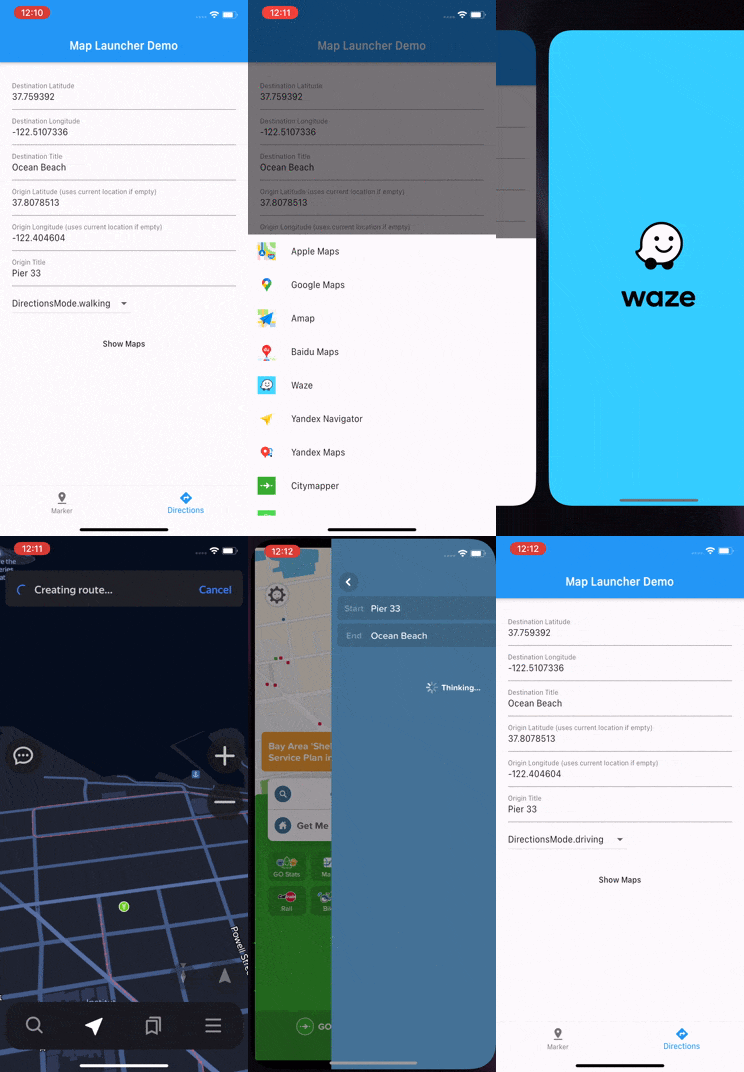
Map Launcher 是一個 Flutter 插件,可偵測 Android 和 iOS 裝置上的可用地圖應用程式,並以指定位置或路線啟動它們。它讓使用者能使用其偏好的地圖應用程式(例如 Google 地圖或 Apple 地圖)查看標記或取得導航指引。此插件簡化了與原生地圖功能的整合,無需為每個平台進行自訂實作。它支援靜態位置以及點之間的動態路徑規劃。
適用情境
在地圖應用中打開特定位置
啟動逐向導航
在給定座標處顯示標記
與基於位置的服務整合
啟用使用者選擇地圖提供者
主要特色
自動檢測已安裝的地圖應用
同時支援 Android 和 iOS
用於啟動地圖的簡單API
處理路由和標記
跨平台相容性
適合對象
需要地圖整合的應用程式
旅行或配送應用
位置共享功能
導航工具
使用者驅動的地圖選擇
使用建議
需要正確的權限才能訪問位置
若未安裝地圖應用程式,可能無法使用
行為在不同平台之間略有差異
不包含應用內的地圖渲染
依賴外部地圖應用來實現功能
原始 README
以下為關聯原始碼儲存庫的 README 原文快照,最新內容請造訪原始碼儲存庫。
Map Launcher
Map Launcher is a Flutter plugin to open maps on all platforms: iOS, Android, web, and desktop. Show markers, get directions, or search across 30 supported maps.
Uses universal links (HTTPS URLs), with native app detection on mobile.
Maps are tree-shakeable: only the maps you reference are compiled into your app. No URL schemes, package names, store ids, or icons of unused maps ever ship in your binary. See Binary Size & App Store Compliance.
import'package:map_launcher/map_launcher.dart';
// Show a marker (opens the best available map)awaitMapLauncher.marker(.coords(59.33, 18.07, title: 'Gamla Stan')).show();
// Show directionsawaitMapLauncher.directions(.coords(59.33, 18.07), mode: .walking).show();
// SearchawaitMapLauncher.marker(.search('Fika near Södermalm')).show();
// Specific mapawaitMapLauncher.marker(.coords(59.33, 18.07)).show(map: .google);
// Discover available maps (pass the maps your app supports)final maps = awaitMapLauncher.marker(.coords(59.33, 18.07))
.getSupportedMaps([.apple, .google, .waze]);
await maps.first.show();
Setup
iOS: Add URL schemes to Info.plist
Required for detecting installed native apps. Add only the schemes for the
maps your app uses. Each entry is visible to App Store review, so keep the
list as short as your map list:
<key>LSApplicationQueriesSchemes</key><array><string>comgooglemaps</string><!-- Google Maps --><!-- Add more only if you use them:
<string>waze</string> Waze
<string>iosamap</string> Amap
<string>baidumap</string> Baidu Maps
<string>yandexmaps</string> Yandex Maps
<string>yandexnavi</string> Yandex Navigator
<string>citymapper</string> Citymapper
<string>mapswithme</string> MAPS.ME
<string>osmandmaps</string> OsmAnd
<string>dgis</string> 2GIS
<string>qqmap</string> Tencent (QQ Maps)
<string>here-location</string> HERE WeGo
<string>tomtomgo</string> TomTom Go
<string>copilot</string> CoPilot
<string>com.sygic.aura</string> Sygic Truck
<string>nmap</string> Naver Map
<string>kakaomap</string> Kakao Maps
<string>tmap</string> TMap
<string>szn-mapy</string> Mapy.cz
<string>mappls</string> Mappls
<string>moovit</string> Moovit
<string>neshan</string> Neshan
<string>airnavpro</string> Air Navigation Pro
<string>magicearth</string> Magic Earth
--></array>
Apple Maps needs no entry. Each map's scheme is also available in code as
MapApp.<name>.iosScheme.
If you pass a map to discovery but forget its plist entry, debug builds print
a warning naming the exact scheme to add. Without the entry the map can
never be detected, which is otherwise indistinguishable from "not installed".
Android: No setup needed
The plugin ships a <queries> manifest block so installed map apps are
visible to detection. If you want your merged manifest to list only the maps
you use, remove entries in your app's AndroidManifest.xml:
// By coordinatesawaitMapLauncher.marker(.coords(59.33, 18.07, title: 'Gamla Stan')).show();
// With zoom levelawaitMapLauncher.marker(.coords(59.33, 18.07), zoom: 14).show();
// By search query (Google & Apple Maps)awaitMapLauncher.marker(.search('Vasa Museum Stockholm')).show();
Error Handling
show() throws MapLaunchException if the map cannot be opened:
try {
awaitMapLauncher.marker(.coords(59.33, 18.07)).show(map: .google);
} onMapLaunchExceptioncatch (e) {
print('Failed to open map: $e');
}
// Specific mapawaitMapLauncher.marker(.coords(59.33, 18.07)).show(map: .google);
// If map is omitted, the best available map is used automatically:// • iOS/macOS → Apple Maps// • Other platforms → Google Maps// • Falls back to web if native app unavailable
Discovering Maps
Discovery takes the list of maps your app supports. Only the maps you
reference are compiled into your binary. Declare the list once as a
constant and reuse it:
const myMaps = <MapApp>[.apple, .google, .waze, .citymapper];
// Maps that support a specific marker requestfinal marker = MapLauncher.marker(.coords(59.33, 18.07));
final maps = await marker.getSupportedMaps(myMaps);
for (final map in maps) {
print('${map.name} (installed: ${map.isInstalled})');
}
await maps.first.show(); // launches the marker request with that map// Maps that support a specific directions requestfinal directions = MapLauncher.directions(.coords(59.33, 18.07), mode: .walking);
final navMaps = await directions.getSupportedMaps(myMaps);
// All maps available on this platform (installed + universal link)final allAvailable = awaitMapLauncher.getAvailableMaps(myMaps);
// Every supported map (opts out of tree shaking, see// "Binary Size & App Store Compliance" below)final everything = awaitMapLauncher.getAvailableMaps(MapApp.all);
URL Inspection
final marker = MapLauncher.marker(.coords(59.33, 18.07, title: 'Gamla Stan'));
// Best URL for this platform (scheme on mobile, universal on web)final url = marker.getUrl(map: .google);
// Universal (HTTPS) URL, always works in browserfinal universal = marker.getUniversalUrl(map: .google);
// → https://www.google.com/maps/search/?api=1&query=59.33%2C18.07// Native scheme URL, only works with installed appfinal scheme = marker.getSchemeUrl(map: .google);
// → comgooglemaps://?q=59.33,18.07// Preview scheme URL for a different platformfinal iosScheme = marker.getSchemeUrl(map: .google, platform: .ios);
final androidScheme = marker.getSchemeUrl(map: .google, platform: .android);
Map Info & Store Links
MapApp properties are synchronous:
MapApp.waze.name // "Waze"MapApp.waze.id // "waze", stable and safe to persist in preferencesMapApp.waze.iconBytes // PNG bytes, use with Image.memory()MapApp.waze.appStoreUrl // "https://apps.apple.com/app/id323229106"MapApp.waze.playStoreUrl // "https://play.google.com/store/apps/details?id=com.waze"MapApp.waze.hasUniversalLink // true
Each map is a const object, and only the maps your code references are
compiled into your app: their URL strings, package names, store ids, and
icons. Everything else is removed by Dart's tree shaking in release builds.
This matters beyond binary size: App Store review scans binaries for
references to embargoed services, and there is precedent for apps being
rejected over identifiers they never actually used. With 6.0, if you don't
reference a map, nothing about it exists in your build.
Things to know:
MapApp.all references every map, so using it opts out of tree shaking.
All 30 maps' identifiers will ship in your binary. Prefer an explicit list.
Your LSApplicationQueriesSchemes is part of your app, not the plugin.
Declare only the schemes you use and prune stale ones (see Setup).
The plugin's Android <queries> entries can be removed per map with
tools:node="remove" if you want a minimal manifest (see Setup).
Custom Maps
Subclass MapApp to add a map the plugin doesn't ship. No fork needed:
classAcmeMapsextendsMapApp{
constAcmeMaps();
@overrideStringget id => 'acmeMaps';
@overrideStringget name => 'Acme Maps';
@overrideString? get playStoreId => 'com.acme.maps';
@overrideString? get iosScheme => 'acmemaps://';
@overrideUint8Listget iconBytes => myIconPngBytes;
@overrideString? markerUrl(LocationCoords coords, {int? zoom}) =>
'https://maps.acme.com/?ll=${coords.latlng}';
@overrideString? directionsUrl({
requiredLocationCoords destination,
LocationCoords? origin,
List<LocationCoords>? waypoints,
TravelMode? travelMode,
}) => 'https://maps.acme.com/directions?to=${destination.latlng}';
}
// Works everywhere a built-in map does:awaitMapLauncher.marker(.coords(59.33, 18.07)).show(map: constAcmeMaps());
final maps = await request.getSupportedMaps([.google, constAcmeMaps()]);
Override the scheme-URL methods and capability flags (supportsWaypoints,
supportsMarkerSearch, ...) as needed. See any map in
lib/src/maps/ for a template.
For a custom map to be detected as installed, add its identifiers to your
own app config. The plugin's bundled entries only cover built-in maps:
iOS: add its scheme to LSApplicationQueriesSchemes (debug builds warn
if you forget).
Android: add a <queries> entry to your AndroidManifest.xml:
Note there is no warning for this on Android. The OS gives apps no way to
check their own <queries>, so a missing entry looks exactly like "app
not installed". Launching (show(map: const AcmeMaps())) works either way;
only detection needs these entries.
Migrating from 5.x
Call sites like show(map: .google) compile unchanged. The full guide is in
MIGRATION.md. The short version:
5.x
6.0
MapType.google
MapApp.google
getSupportedMaps()
getSupportedMaps([.apple, .google, .waze])
MapLauncher.getAvailableMaps()
MapLauncher.getAvailableMaps(myMaps)
map.mapType
map.map
map.displayName
map.name
SvgPicture.asset(map.icon)
Image.memory(map.iconBytes)
MapType.values.byName(saved)
myMaps.firstWhere((m) => m.id == saved)
Known Issues
On iOS it's possible to "delete" Apple Maps which actually just removes it from the home screen and does not actually delete it. Because of that Apple Maps will always show up as available on iOS. More info
Contributing
Pull requests are welcome. See CONTRIBUTING.md for setup instructions and guidelines.






 Google Maps
 Apple Maps
 Waze
 Yandex Maps
 2GIS
 HERE WeGo
 Mapy.cz
 Mappls
 Baidu Maps
 Amap
 Tencent (QQ)
 Yandex Navi
 Google Maps Go
 Naver Map
 Kakao Maps
 TMap
 OsmAnd
 OsmAnd+
 Petal Maps
 MAPS.ME
 Neshan
 CoPilot
 Moovit
 Citymapper
 TomTom Go
 TomTom Go Fleet
 Sygic Truck
 Flitsmeister
 Air Nav Pro
 Magic Earth